Unlocking Partnerships as Tiny Teams: Templates, Tools, & Tactics To Scale
Expert advice from Rachel Collie and Danny.
Snapshot
Are you running a partner program with too many spinning plates and too few hands? You’re not alone! We all do this because the strategy is obvious: tech partnerships are a growth engine, create product stickiness, and act as a strategic lever for M&A, vertical expansion, and new feature adoption.
We see the upside — faster sales cycles, broader product coverage, and more defensible customer relationships!
But the risk is also painfully clear: managing partnerships via spreadsheets, in disconnected silos, the opportunity stops feeling catalytic and starts to become a drain.
These problems show up as real operational symptoms: duplicate work, missed handoffs, un-utilized integrations, and partners that “go dark” because there isn’t a clear onboarding or activation path.
For tiny teams — a single partner manager supporting dozens of integrations — the result is predictable: exhaustion, slow time-to-value, and missed revenue or strategic opportunities because you can’t demonstrate impact to execs.
The good news: this is fixable without doubling headcount and this article will talk you through how one product partnership manager, running a tiny team has done it!
Tiny teams don’t win by adding headcount — they win by using templates, tools, and ruthless focus to get time back. – Rachel Collie
Table of Contents
- How to say no and why exclusion is powerful
- Practical partner buckets: Expand offerings, Joint customer need, AI-forward
- Tech stack essentials: replace spreadsheets and retrofit tools
- How templates and workflows free your time
- Measuring and demonstrating partner value
- Recruiting and retaining the right partners
- Handling dormant partnerships and prioritization
- Aligning partnerships to M&A and exit goals
- Real-world example: How Unanet made it work
- Step-by-step checklist for immediate improvement
- Common pitfalls to avoid
- FAQs
- Conclusion
Step 1: How to say no and why exclusion is powerful
Saying no is not rejection. Saying no is prioritization. If you accept every partner request, you will dilute your team and lose track of what’s working. Rachel points out that it is okay to say no. You need criteria and a repeatable evaluation that lets you decline quickly and graciously.
Use a simple intake rubric that answers three questions:
- Does the partner expand capabilities we cannot or should not build in-house?
- Does the partner address a measurable joint customer need or bring high-value named customers?
- Is the partner aligned with our strategic bets, like AI or other future-facing investments?
If the intake returns a single yes, consider a lightweight pilot; two yeses is a strong candidate for a formal integration; three yeses is a strategic priority. If none of the boxes check, close the conversation politely and save the bandwidth.
Step 2: Practical partner buckets
Rachel’s three buckets are pragmatic and actionable.
- Expand offerings: Partner with best-of-breed systems for capabilities you will never build. Payroll is the canonical example—no ERP wants to be a payroll vendor. Partner with specialists and expose integrations that are table stakes for customers.
- Joint customer need: Look not just at raw customer counts but at percentages and named accounts. A partner that brings two highly strategic customers can be more valuable than one with hundreds of low-fit customers.
- AI-forward: As AI becomes mainstream, your customers will demand AI solutions that fit their compliance and finance environments. Prioritize partners who can deliver regulated, audit-friendly AI features, like proposal automation for government contracting or proposal AI for AEC firms.
These buckets force legibility: when a prospect partner approaches, you can score them quickly and move the right ones forward without draining time on low-impact conversations.
I’m a solo mom and I need time back. Coport has allowed me to stop working at night and focus on my daughter. – Rachel Collie
Step 3: Build the right tech stack
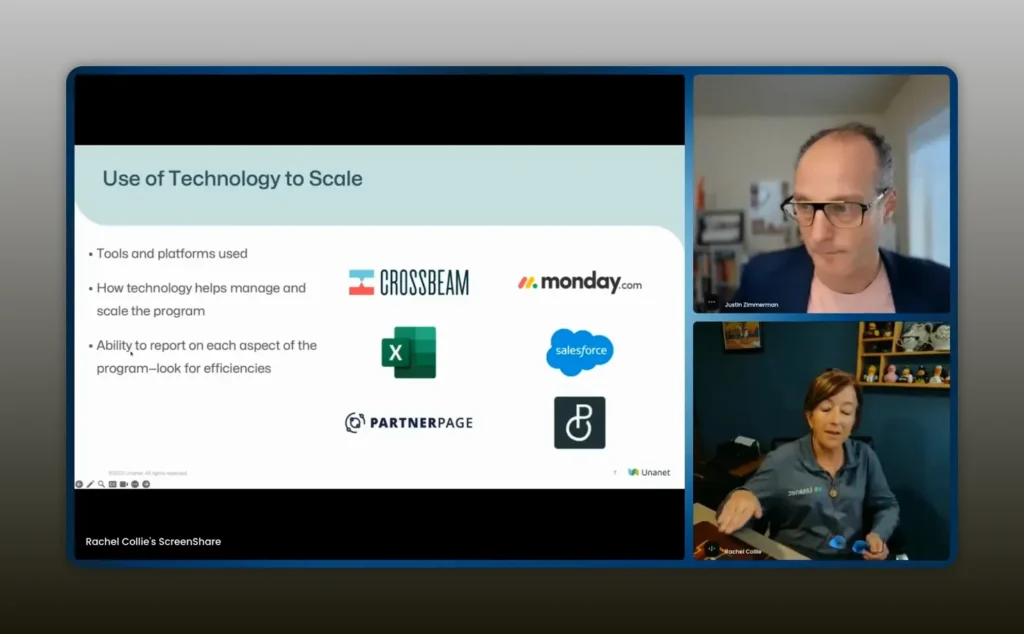
Most partner managers try to bend a generic project tool into a partner system and end up with a fragile mess. Rachel lists a practical stack that removes spreadsheets and frees up time:
- Crossbeam for secure account mapping and visibility into mutual customers. It replaces insecure, outdated spreadsheets and provides clean, auditable mapping between your accounts and a partner’s book of business.
- Partner Page to manage your partner portal and public integration information. As a team of one, Rachel found that building and maintaining partner pages was a time sink until they adopted a tool that fits partners’ needs and reduces web maintenance overhead.
- Coport (pronounced cohort in the transcript) to replace project tools like Monday.com when you need partner-specific workflows and parallel tracking of integrations plus go-to-market activities. Coport is presented as a hybrid between spreadsheets and smart workflows, allowing you to store partners, track tasks, and report across business lines without a hundred separate boards.
Rachel removed two things from her toolkit: spreadsheets and Monday.com.
Spreadsheets are insecure and brittle. Generic project tools force you to retrofit partner workflows into boards and automations not built for partner programs. The right tools reduce manual work and allow you to report on non-revenue metrics that matter to product, support, and sales leadership.
I’m a solo mom and I need time back. Coport has allowed me to stop working at night and focus on my daughter. – Rachel Collie
Step 4: Leverage templates and workflows free your time
Templates are the multiplier for tiny teams. Rachel came to Danny complaining about “Monday.com hell” where she had dozens of separate boards and hundreds of tasks. Danny helped design templates that encapsulate the partner lifecycle: intake, technical integration, joint go-to-market, enablement, and measurement.
Templates should include:
- Standard intake checklist with the three-bucket score
- Integration playbook with stakeholders, timelines, and test criteria
- Go-to-market checklist with enablement, sales collateral, and joint marketing
- Quarterly health check template to evaluate engagement, pipeline, and product usage
Automate the repetitive steps and create default assignees and timelines. When a partner enters the system, a template generates tasks for engineering, product, support, and sales automatically. That reduces friction, stops context switching, and gives you time back to focus on strategy and relationship-building.
Step 5: Measure and demonstrate partner value
Revenue is important, but it is not the only metric your executives care about. Rachel points out the need to track what matters beyond Salesforce revenue: partner activation, integration completeness, joint customer percentages, enablement adoption, and the number of go-to-market motions executed.
Build dashboards that answer three executive-level questions:
- How many partners are active vs dormant?
- Which partners drive the most strategic outcomes (named accounts, margin, or product stickiness)?
- Which go-to-market motions are converting into pipeline?
Use Coport or an equivalent partner operations tool to track these non-revenue metrics and export succinct reports for your general managers. The ease of reporting increases your visibility and gives you political capital to expand resources when you need them.
Step 6: Continue to recruiting and retain the right partners
Recruiting is not a one-time event. Once a partner is onboarded they still need enablement, joint sales plays, and regular health checks. For a team of one, you must prioritize partners that will help you reach well-defined business goals.
Recruit with intention:
- Target partners in the three buckets you defined
- Ask for names of mutual customers during intake and validate the match
- Define a minimal viable integration and sell it internally as a pilot
Retain with cadence:
- Set quarterly business reviews with clear KPIs
- Keep an enablement calendar and track attendance
- Automate routine communications so you only intervene for strategic opportunities
Step 7: Remove dormant partnerships
Not every partnership will thrive. Some go dormant because the partner lacks execution capacity. Rachel accepts this reality and recommends two approaches:
- Maintain a dormant roster. Keep them in your partner database with a dormancy tag and a light-touch nurturing sequence in case they become active again.
- Set objective reactivation triggers. Define events that move a dormant partner back to active: a named account request, a product release, or a joint pipeline opportunity.
Defining those triggers prevents emotional or political decisions about who to resurrect, and it preserves your time for partners who are engaged and delivering value.
Step 8: Keep aligning partners to M&A and exit goals
Rachel is explicit about using the partner program to support M&A and exit strategies. That means choosing partners that increase product defensibility, enterprise credibility, and recurring revenue stickiness.
When evaluating partners through an M&A lens, ask:
- Does this partner increase the breadth or depth of our addressable market?
- Does the integration raise switching costs for customers?
- Do their customers or technology make us more attractive to potential acquirers?
These alignment questions should be part of your intake and prioritization, and should be visible to executives who will evaluate the company at exit time.
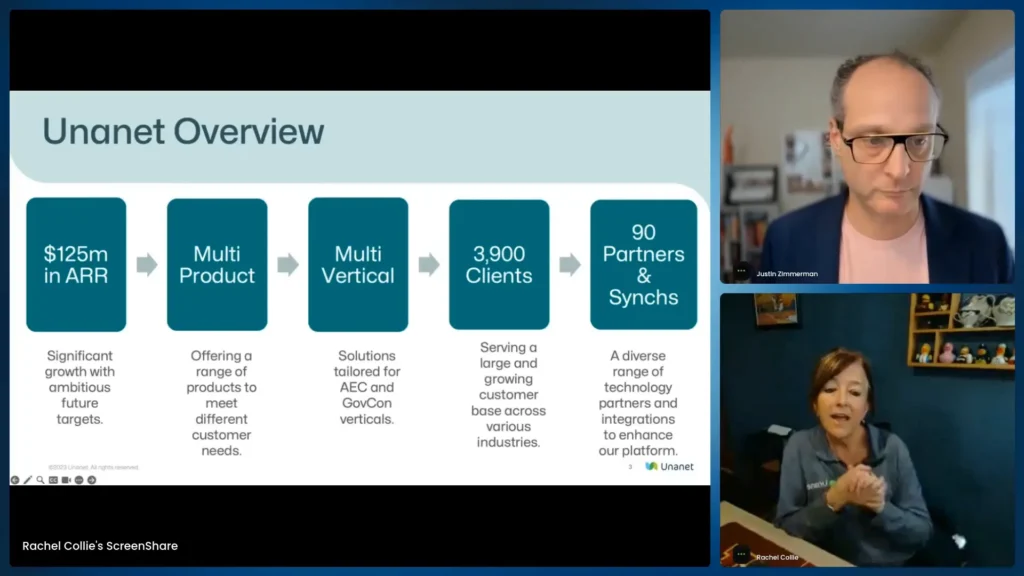
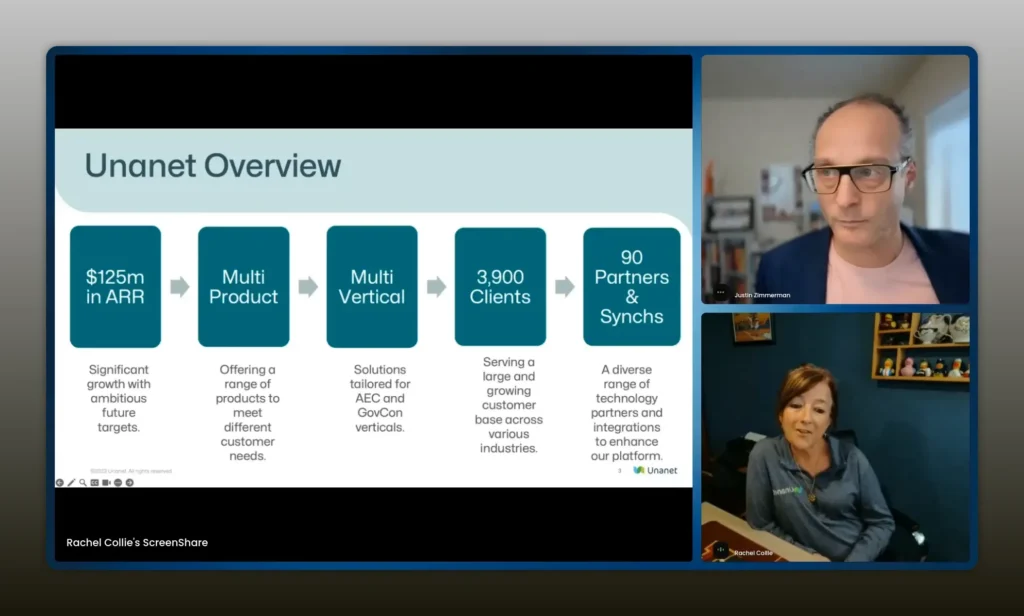
Unanet is a $125M ARR, multi‑product company serving GovCon & AEC — I’m a team of one managing 90 integrations across 4,000 customers. – Rachel Collie
Real-world example: How Unanet made it work
Unanet provides an instructive example of a tiny team operating at scale. Rachel manages 90 active integrations and more than 4,000 customers, across two distinct verticals: government contractors and architecture/engineering/construction. She supports two general managers with different priorities: one wants breadth and openness; the other wants a focused up-market strategy.
Rachel took concrete steps:
- Defined three partner buckets to clear intake decisions
- Removed spreadsheets and generic project boards from core workflows
- Adopted Crossbeam for account mapping and secure data sharing
- Used Partner Page to manage partner-facing content and reduce web maintenance
- Implemented Coport to consolidate partner tasks, templates, and reporting
Those changes converted fragmented, manual work into repeatable processes that saved time and allowed Rachel to support product, M&A, and go-to-market strategy while still being present for her family.
I’m a solo mom and I need time back. Coport has allowed me to stop working at night and focus on my daughter. – Rachel Collie
Step-by-step checklist for immediate improvement
Use this checklist to move from chaos to control within 90 days.
- Draft your partner buckets and publish them to sales and product stakeholders.
- Create an intake form that scores prospects against your buckets.
- Remove spreadsheets from account mapping. Move to CrossBeam or an equivalent secure solution.
- Standardize a minimal viable integration playbook and a go-to-market checklist.
- Choose a partner-specific operations tool (Coport or similar) to centralize tasks and templates.
- Set up a reporting dashboard for active vs dormant, joint customer percentages, and enablement adoption.
- Automate routine communications to partners and set a cadence for quarterly business reviews.
- Tag dormant partners and define reactivation triggers.
- Align partner selection criteria with M&A and product strategy.
- Run an executive briefing showing how partnerships drive stickiness, pipeline, or strategic value.
Common pitfalls to avoid
- Accepting every partnership request without criteria. This creates a maintenance burden and dilutes impact.
- Relying on spreadsheets for account mapping or task management. They are insecure and quickly out of date.
- Using a generic PM tool without templates built for partner workflows. This leads to a hundred isolated boards and no consolidated reporting.
- Measuring only revenue. Executives want to see activation, joint customer coverage, and how partners make the product stickier.
- Failing to define reactivation triggers for dormant partners. That leaves valuable opportunities buried in noise.
FAQs
How do I decide which partner requests to accept when I’m a team of one?
Adopt a simple intake rubric that asks whether the partner expands capabilities you will never build, whether they address joint customer needs (percentage or named accounts), and whether they align with strategic initiatives like AI. If none of those apply, politely decline and keep them in a cold nurture list.
What tools should I replace spreadsheets with first?
Start with account mapping. Crossbeam or similar secure account-mapping tools remove the security and versioning problems of spreadsheets. Then replace partner web maintenance with a partner portal tool like Partner Page. Finally, adopt a partner operations tool like Coport to centralize workflows and reporting.
How do I measure partner value beyond revenue?
Track activation rates, integration completeness, joint customer percentages, enablement attendance, and the number of joint go-to-market motions executed. These non-revenue metrics show engagement and strategic value and are easier to influence in the short term.
What do I do with dormant partners?
Tag them as dormant and keep a minimal record with a reactivation trigger list. Define events that move a partner back to active, such as a named account request or a new product release. This avoids wasting time on partners that are not ready to execute.
How can templates save me time immediately?
Create templates for intake, integration, go-to-market, and quarterly health checks. Automate task creation and default assignments so a partner entering the system generates the necessary tasks for engineering, product, support, and sales without manual overhead.
How do I align partnerships to M&A and exit goals?
Evaluate partners by whether they increase addressable market, raise customer switching costs, or bring strategic customers or technologies that make your company more attractive to acquirers. Include these questions in your intake rubric and make alignment visible to executive stakeholders.
Conclusion
You can build a high-leverage partner program even if you are a team of one. The critical moves are deliberate filtering, replacing spreadsheets with the right tools, and codifying workflows into templates. Those changes stop firefighting and start scaling. Use account mapping tools to secure shared customer data, a partner portal to offload website maintenance, and a partner operations platform to centralize tasks and reporting. Track non-revenue metrics that matter to product and sales leadership, and always align partner selection to your long-term business strategy.
Small teams that commit to clarity, automation, and sensible exclusion not only survive—they create disproportionate impact. Follow the checklist, adopt templates, and choose tools that return time to you. That time is what lets you do the creative, strategic work that makes partnerships a source of sustained growth.