How to Automate Partner Engagement Without Losing the Human Touch
Expert advice from Rob Rebholz and Justin Zimmerman.
Table of Contents
- Why automation is not a headcount cut
- The relationship funnel every partner program needs
- The three stages of partner automation maturity
- Designing a living process: mapping touch points and triggers
- Content and communication: short, human, single-message emails
- Tools and data sources to power partner automation
- Co-selling done right: beyond referrals
- Practical automation examples you can implement now
- Case study: systematic follow-up and education
- Common mistakes that kill partner engagement
- Getting started checklist
- Visual guide: where to capture screenshots
- FAQs
- Conclusion
Snapshot
Channel Partnerships: The opportunity is simple but profound: when partnerships are treated as a systematic motion—driven by repeatable processes, clearly defined touch points, and the right automations—they stop being a handful of ad-hoc favors and become a predictable source of pipeline and closed business.
Done well, thoughtful automation reduces low-value, manual work (reminders, status checks, routing signups) so partner teams can spend more time on high-leverage activities like strategic co-selling, executive alignment, and custom enablement.
The risk is equally clear: automation that replaces relationships or automates the wrong signals creates noise, damages trust and wastes effort. That’s why every automation should map to a measurable outcome (course completion, referral volume, partner-influenced opportunities, win rate) and be designed to hand the conversation back to a human at the moment their judgment matters most.
In practice this means mapping the partner lifecycle (onboard → activate → co-sell → close → nurture), prioritizing a small set of revenue-driving touch points, integrating CRM/PRM/overlap data so messages are timely and relevant, and sending outreach from real people rather than a generic inbox.
With that approach and this article, you will see how to leverage automation as an amplifier for relationships—not a replacement—and you get more predictable growth without losing the human touch that actually closes deals.
If it doesn’t impact revenue, you have the wrong automation setup. – Rob Rebholz
Why automation is not a headcount cut
When people hear “automation,” their first thought is often cost reduction. Many partnership leaders fear that automating partner touch points will mean fewer roles or an outsourced partner function. That is not what effective partner automation does.
Automation multiplies capacity: it handles repeatable, predictable tasks so your people can focus on the highest-value work—strategic deals, relationship-building with senior stakeholders and creative co-selling motions. Rather than replacing partner managers, automation lets them be more proactive and present on the things that actually move the needle.
Rob frames this plainly: automation should be judged by whether it increases revenue. If it doesn’t, you have the wrong setup. That means you need to design automations with a revenue objective in mind, not with a vanity metric or a desire to “get tech in place.”
The relationship funnel every partner program needs
Think of partnerships like a funnel that’s just as much about people as it is about opportunities. Most teams focus on onboarding—but stop there. The work that wins deals happens before, during and after an opportunity is created.
At a high level, build a funnel that includes:
- Awareness and onboarding: get the right people introduced and trained.
- Activation and enablement: provide the assets and micro-moments that allow partners to act.
- Referral generation: make it simple for AEs, CSMs and product teams to bring you into deals.
- Deal involvement and close: keep partner contributors informed and engaged while the deal moves through pipeline stages.
- Post-close nurturing: thank the contributors, share outcomes, and keep the relationship warm for the next deal.
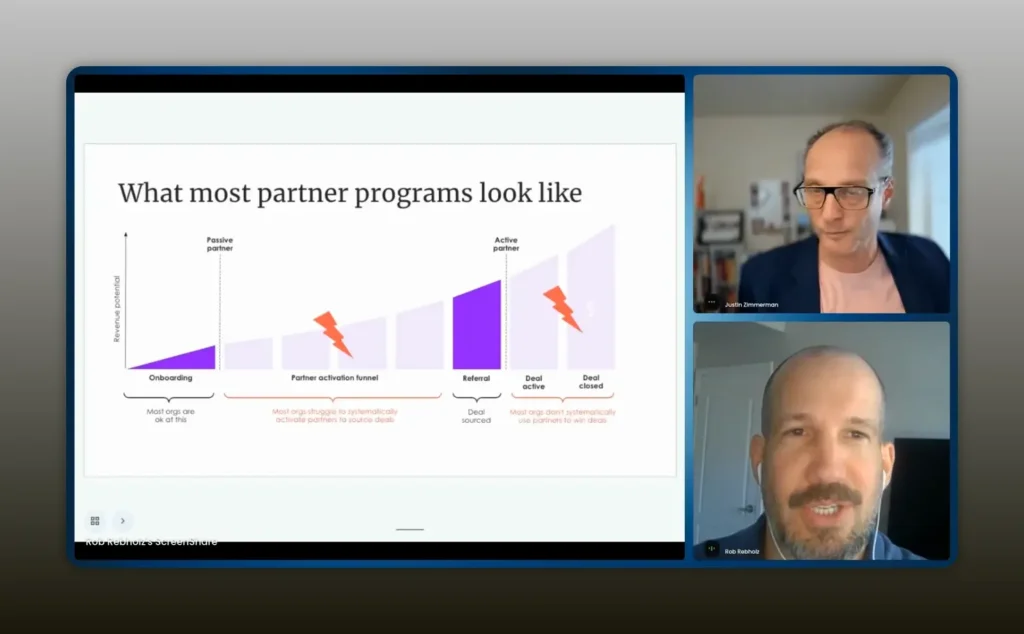
You’re not going to win somebody over because you had an amazing presentation and you have a great partner agreement. – Rob Rebholz
That quote highlights the difference between an initial kickoff and continuous engagement. A two-weekly check-in with another partner manager won’t make your product part of that partner’s sales behavior. Continuous, relevant touch points with the people who influence deals—AEs, CSMs, product owners—are what create predictable outcomes.
The three stages of partner automation maturity
Rob outlines a straightforward maturity model you can use to evaluate where your program sits and what to focus on next.
- Discovery and mapping Most organizations are stuck here. The mission is to figure out who lives in your ecosystem. Identify partner types, tiers and the personas inside partner organizations. Work out what each persona cares about and what a successful “engagement” looks like for them.
- Process design and operationalization This is where most teams fail to go deep. Having a “process” in a document is not the same as running a living process. A true process requires defined triggers, segments, metrics and an operational cadence so partner managers actually follow the plan.
- Programmatic automation Once process and KPIs are defined, translating those into automations becomes straightforward. Automation should be purposeful: prioritize touch points that drive the outcomes you defined in stage two.
Designing a living process: mapping touch points and triggers
The biggest single mistake is thinking process means a static Word doc. A robust partnership process is dynamic, measurable and adopted across the team.
Start by mapping the lifecycle from the moment a contact enters your CRM to the moment they deliver—or fail to deliver—referrals and influence. For each step in that lifecycle define:
- Who the persona is
- What success looks like
- Which touch points should happen and when (X days after contact creation, Y days after academy signup, etc.)
- What channel to use (email from a partner manager, task in CRM, three-way Slack or email thread)
- How to measure the outcome and what to do if the action does not happen
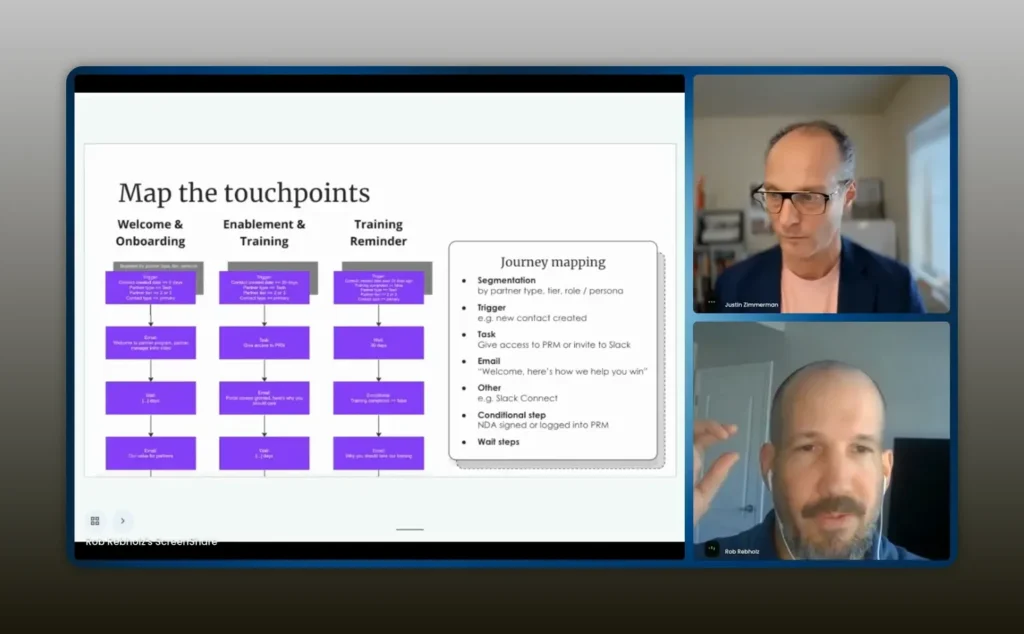
Detail the touch points like, hey, X days after we’ve created a contact in Salesforce, this needs to happen. – Rob Rebholz
Be explicit. For example:
- 10 days after someone signs up for the partner academy: they should take their first training. If not, notify the assigned partner manager.
- When a partner-sourced deal stalls for 14 days in a negotiation stage: trigger a check-in to the AE and suggest partner assistance.
- If a partner hasn’t engaged in 90 days: trigger a reactivation sequence with short, relevant asks.
Mapping like this makes the automations obvious. The hard part is deciding which touch points matter most and codifying them so the whole team follows the playbook.
Content and communication: short, human, single-message emails
One of the most practical takeaways is how simple your messaging should be. Rob emphasized that partner engagement wins on authenticity, not polish.
Rules for partner messaging:
- Send emails from individuals’ inboxes, not a generic partner@ address.
- Keep messages short and conversational.
- One ask per message. If you need five things, send five messages over time.
- Use video or a personalized sentence to increase relevance.
- Don’t agonize over perfect templates. A simple human note outperforms branded HTML every time.
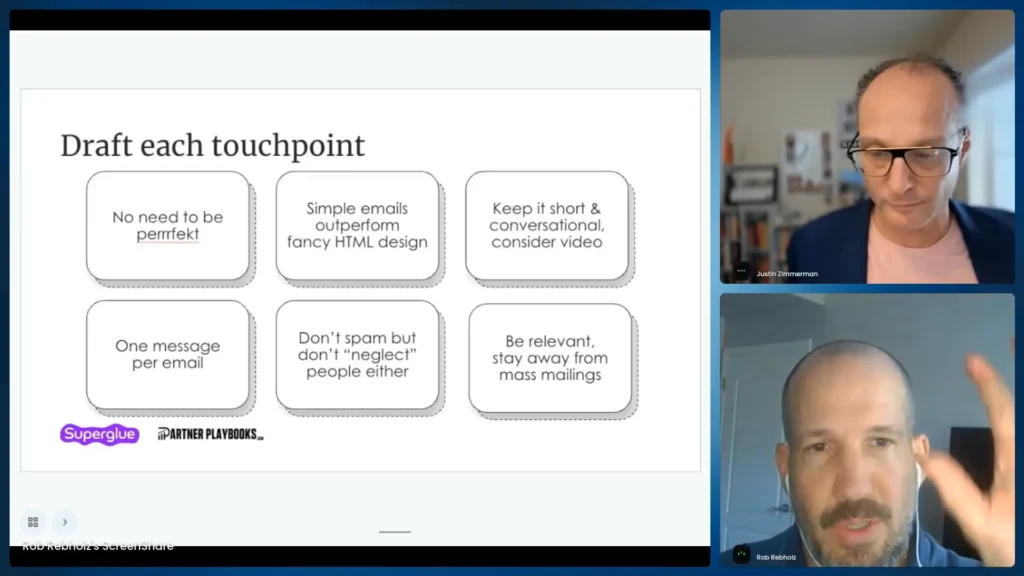
Draft each touchpoint: be explicit about who, when and how so automations trigger the right action. – Rob Rebholz
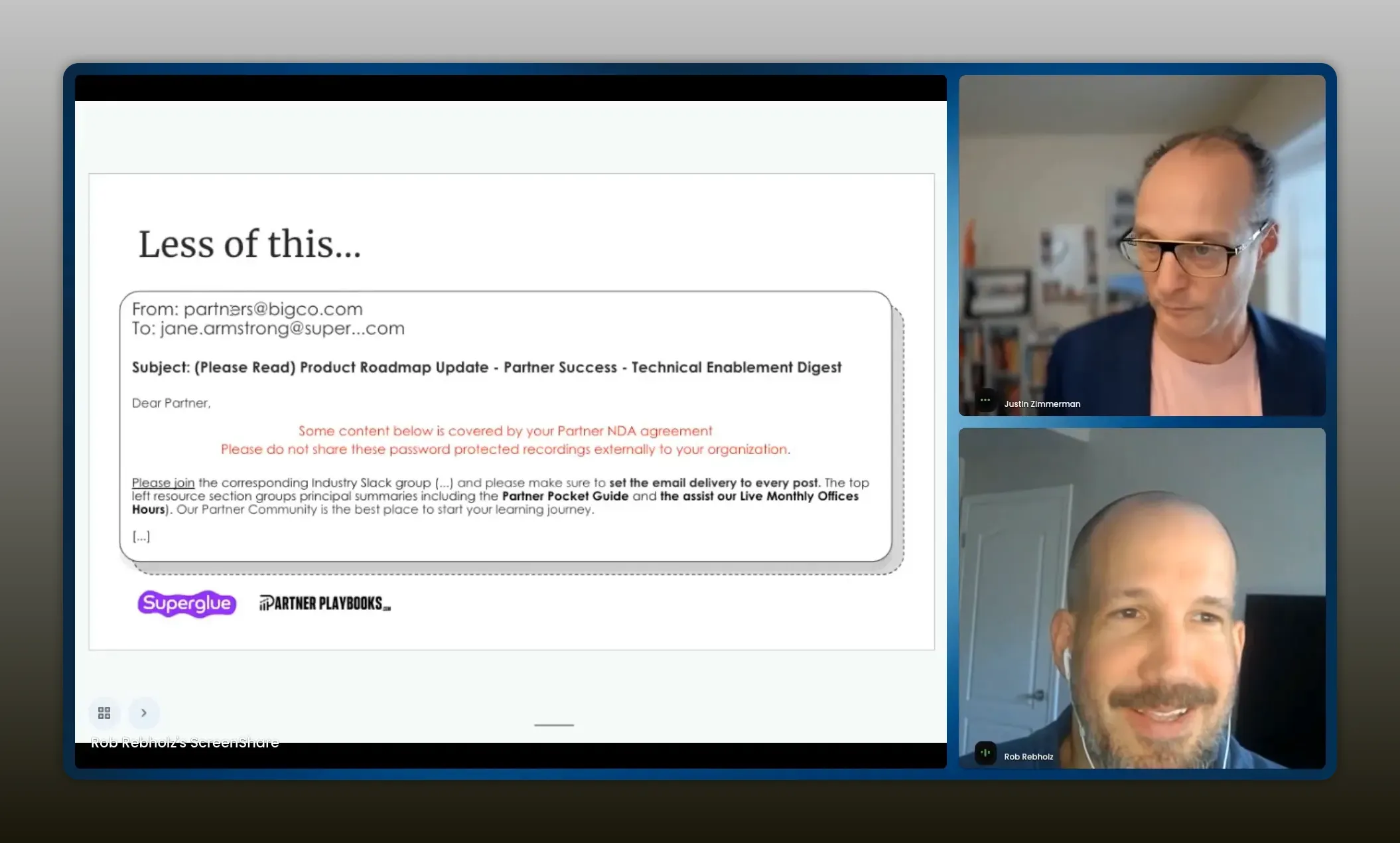
Less of this: generic partners@ blasts—more short, human, single‑ask emails. – Rob Rebholz
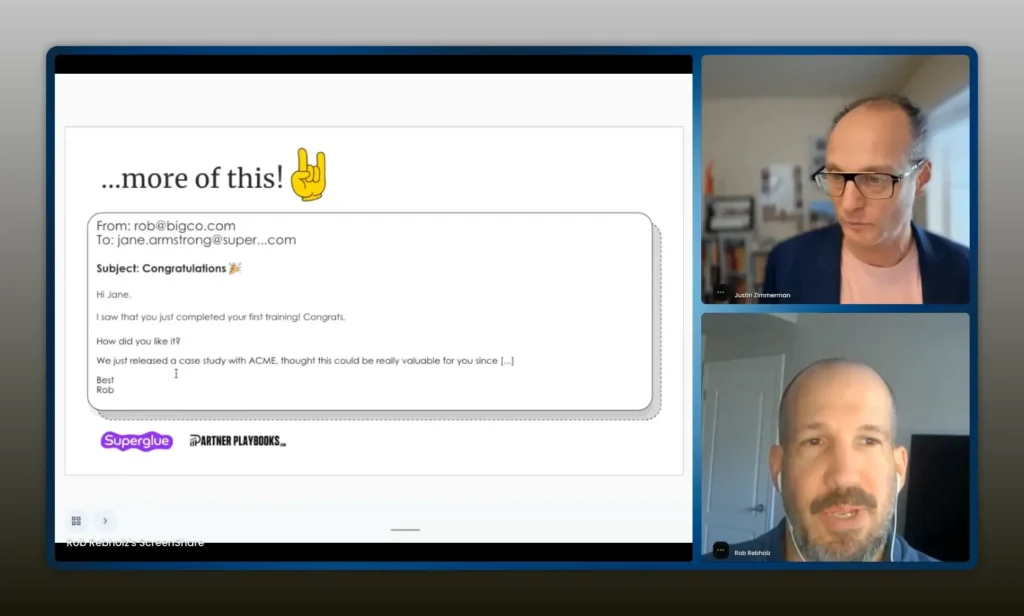
Simple emails outperform HTML. Individual messages will always outperform official news sent from partners@. – Rob Rebholz
Why does this work? People trust other people. An email from a named partner manager feels like a real ask from a real human. Automated, branded emails are easy to ignore.
Tools and data sources to power partner automation
Choosing the right tool is about data and execution. Your automation platform needs to play well with the systems where partner activity lives.
Key data sources:
- CRM data (opportunity stage, owner, activity history)
- PRM data (registrations, certifications, program tier)
- Third-party overlap data (Crossbeam or other partner overlap tools)
- Email systems (Gmail, Outlook integration so messages can be sent from real inboxes)
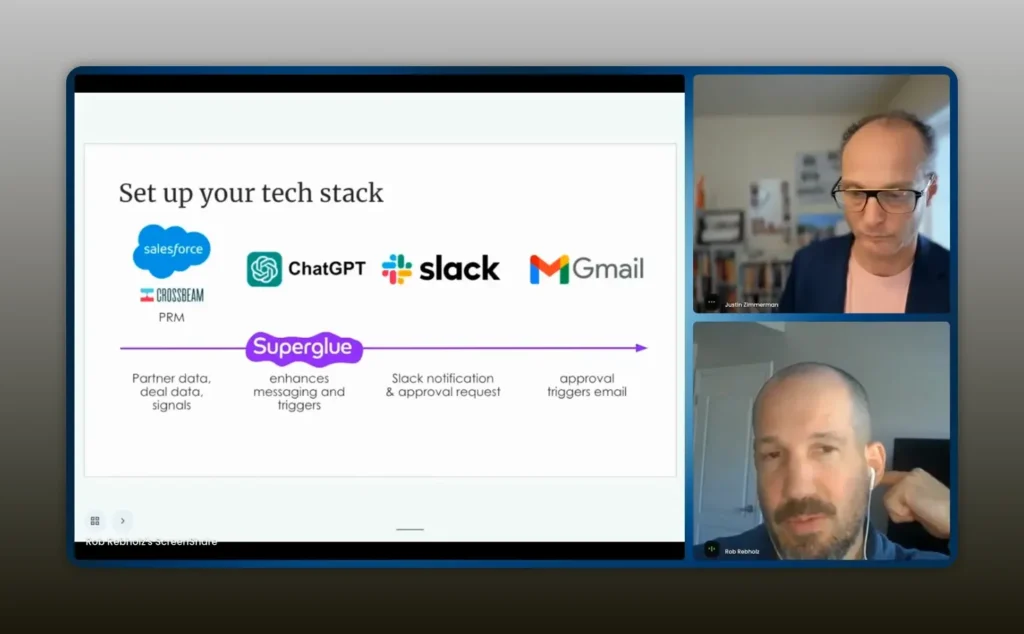
A tool should be able to work with all the data sources: CRM, Crossbeam, PRM. Then it needs to prioritize and engage. – Rob Rebholz
When evaluating a tool, ask:
- Can it read the opportunity stage and trigger messages when deals stall?
- Does it identify high-priority touch points and alert partner managers?
- Can messages be sent from the partner manager’s inbox so replies come back to a human?
- Does it support segmentation so different personas receive different sequences?
Remember Rob’s point: automation is only as valuable as the outcomes it drives. Integrations and prioritization matter more than flashy dashboards.
Co-selling done right: beyond referrals
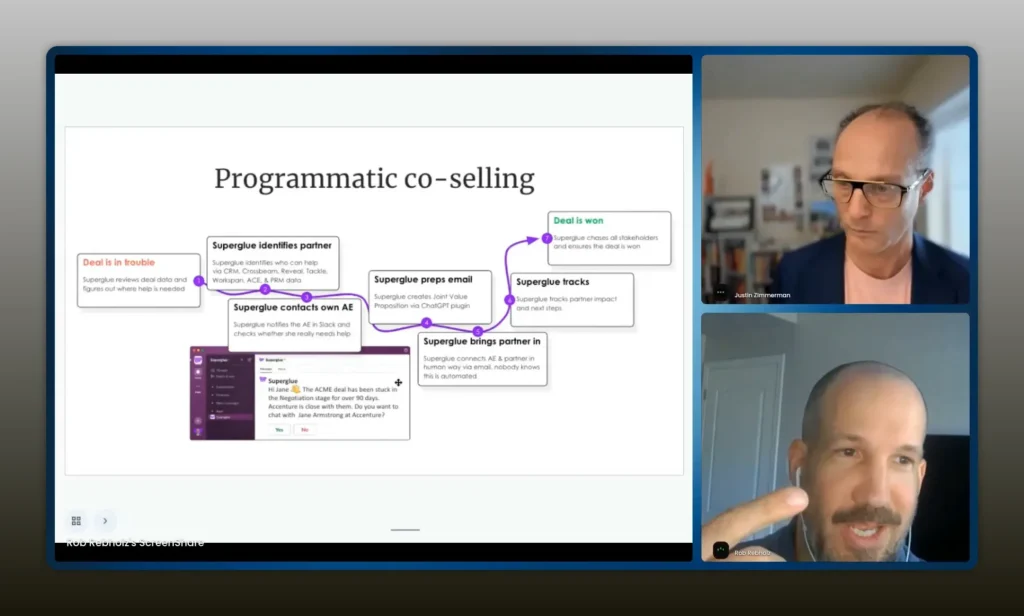
Co-selling is often treated as a two-step play: get a referral, wait for revenue. That is a narrow view. The more valuable motion is bringing partners into deals and keeping them engaged through close.
Think about two distinct opportunities for automation within co-selling:
- Deal assistance triggers: If a partner-sourced opportunity stalls, automatically suggest relevant partners (either the original source or overlaps identified via Crossbeam) to the AE. Prompt the AE to accept partner help with a simple yes/no response.
- Three-way warm introductions: If the AE accepts help, automatically draft a three-way email that introduces the partner, sets expectations and proposes a next step. The message should be short and sent from the AE or partner manager, not from a generic address.
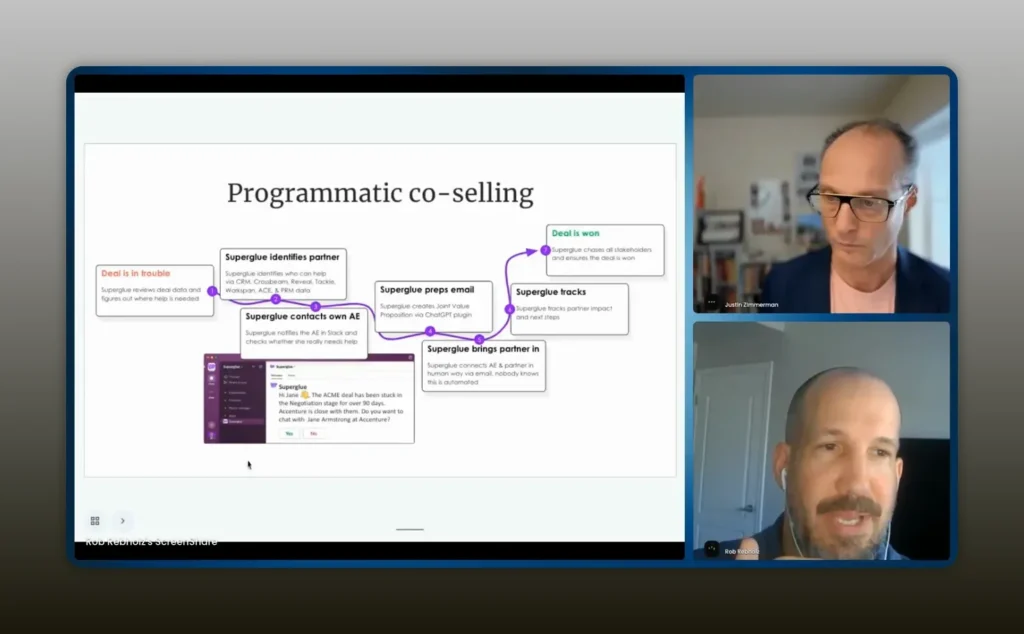
It would send a message to your AE working that deal and tell the AE, hey, it looks like you need help on this deal. Do you want help from this partner? – Rob Rebholz
These automations make partner involvement seamless and relevant. They remove the manual detective work: identifying who to pull in, drafting the intro, and tracking whether the partner followed up.
Practical automation examples you can implement now
Here are automations that deliver value fast and are easy to justify to leadership.
- Academy follow-up trigger When a partner registers for training but does not complete the first course within 10 days, notify the assigned partner manager with a one-click template they can send from their inbox.
- New partner signup routing When a new partner registers, create an assignment rule to route to the right partner manager and send an action-oriented, short intro email template.
- Deal-stall partner assist When a partner-sourced opportunity sits in a stage for X days, alert the AE and offer partner help. If accepted, prep the intro and copy the partner manager.
- Activity-based re-engagement If a partner account has no recorded activity in 90 days, launch a reactivation sequence: short check-in first, then a value reminder (recent wins, co-sell playbook) two days later if no reply.
- Post-close thank you + next-step After a closed-won deal that involved a partner, automatically send a personalized note from the partner manager to thank the partner and propose the next co-selling action.
Case study: systematic follow-up and education
One company Rob worked with had a simple but impactful problem: partners were signing up for their academy but not completing courses. The partner managers rarely knew which partners were dropping off because the data lived in a report nobody checked weekly.
The solution:
- Build a trigger that alerts the partner team when a partner signs up and doesn’t take the first course within a defined window.
- Notify the specific partner manager and provide a short template they can send from their inbox.
- Measure course completion rates and referral rates before and after the automation.
The result was straightforward: higher course completion, more partner-initiated outreach and an increase in referrals. Rob highlights this as an example of low-hanging fruit: when the process is clear, automation delivers measurable lift.
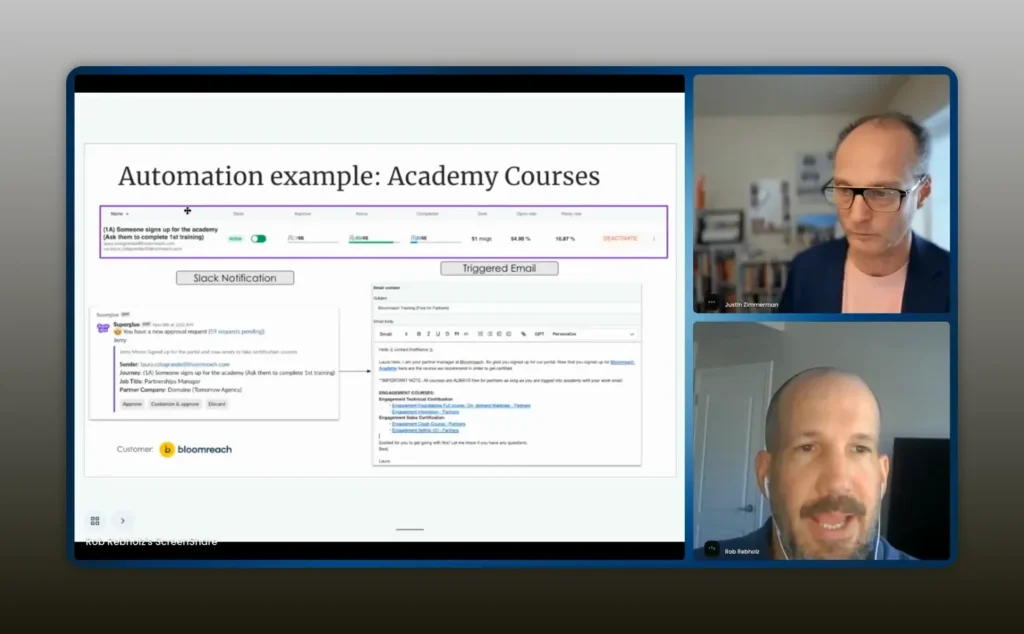
They were very systematic about detailing what they expect from partners. – Rob Rebholz
Common mistakes that kill partner engagement
Avoid these pitfalls when building your partner automations.
- Not having a real process — a stale Word document is not a living process. If partner managers are not following it, it does not exist.
- Automating the wrong things — automation for automation’s sake creates noise. Prioritize the touch points that drive revenue.
- Relying on marketing-style blasts — branded, HTML-heavy communications from a generic inbox are easy to ignore.
- Ignoring measurement — if you can’t track whether an automation leads to more referrals, more opportunities, or higher close rates, you can’t prove its value.
- Waiting for perfect content — “we don’t have the content” is the most common excuse. Start with short, personal templates and iterate.
Getting started checklist
Follow this step-by-step to move from reactive to programmatic partner engagement.
- Map the people in your ecosystem: partner types, tiers and internal personas you need to influence.
- Define outcomes for each persona: what behavior do you want from them and how will you measure it?
- Draft a living process with explicit touch points and triggers (include time windows and channels).
- Choose the first three automations you will implement (academy follow-up, new signup routing, deal-stall assist are good starters).
- Pick tools that integrate with CRM, PRM and overlap data sources and can send messages from real inboxes.
- Create simple, human templates and test them. Prefer short personal emails over long branded collateral.
- Monitor outcomes and iterate. If automations aren’t moving revenue, change them.
FAQs
What should be the first automation I build for my partner program?
Start with something measurable and high-impact like an academy follow-up. If partners register for training and don’t complete it within a set time frame, notify the assigned partner manager with a one-click template. This increases activation and is easy to measure.
Will automation replace partner managers?
No. When implemented well, automation frees partner managers to focus on strategic activities. Automation should handle repetitive tasks and prompt humans at the precise moment their intervention is most valuable.
How do I measure the ROI of partner automation?
Tie automations to revenue-linked KPIs: referrals, partner-influenced opportunities, win rate for partner-sourced deals, time-to-first-referral after onboarding, and course completion rates. Track baseline numbers before automation and compare after implementation.
What data sources do I need for intelligent partner automations?
At minimum you need CRM data and PRM data. Add overlap data (Crossbeam) for co-selling intelligence and email integrations (Gmail/Outlook) to ensure messages come from real inboxes. The richer the data, the smarter the triggers.
How personal should automated messages be?
Highly personal. Use short, conversational templates sent from the partner manager’s inbox. One ask per message. Personalization and relevance will drive response rates far more than branded, marketing-style blasts.
What common mistakes should I avoid during implementation?
Avoid building automations without a living process, automating low-value tasks, relying on generic emails, and failing to measure outcomes. Also don’t wait for perfect content—start simple and iterate based on data.
Conclusion
Partnerships scale when you treat them like a lifecycle, not a single event. Build a living process, map the touch points that drive behavior, and automate the moments that most directly increase partner-led revenue. Keep messages human, short and sent from real people. Choose tools that integrate with CRM, PRM and partner overlap data. Above all, measure outcomes and iterate: if your automation does not move revenue, it needs to be redesigned.
Rob emphasized the same outcome: automation is an amplifier, not a replacement. Use it to make your partner managers more effective so they can focus on the strategic, high-touch work that actually closes deals.