How Claude Can Help You Track Every Partnership at Scale
Expert advice from Corey Snyder (Principle Partner Manager, Synthesia), Tyler Calder (CMO, PartnerStack), and Justin Zimmerman (Founder, Partnerplaybooks).
Snapshot
Partnerships has always been a function full of scattered conversations, buried follow-ups, hand-built recaps, deal context living across inboxes, Slack threads, call notes, calendars, and half-finished docs. AI changes that, but only if you apply it to the messy, real workflows that actually drive partner revenue.
The opportunity is not just faster writing. It is building a system that remembers what matters, updates itself, surfaces the next move, and helps you know when to stay lean versus when to invest in a PRM. If you get this right, you can create more partner momentum, miss fewer opportunities, and spend more time on revenue-producing work instead of stitching together context by hand.
If you want to solve scattered partner data, dropped follow-ups, and manual partner tracking, keep reading to see how Justin Zimmerman, Corey Snyder, and Tyler Calder can help you do it.
“The real win is getting AI close enough to your daily workflow that it starts carrying the administrative load for you.” -Justin Zimmerman
Table of Contents
- Snapshot
- Why this matters now
- How Corey built his AI operating system
- The power of a memory layer
- Why Notion became the action layer
- Turning partner data into usable assets
- How the weekly review workflow works
- How connectors make this practical
- When a PRM does and does not make sense
- What Tyler sees coming next
- Recommended tools
- FAQs
- Conclusion
Why this matters now
Justin framed the whole conversation around a problem most partner leaders already feel every day: There is no shortage of AI content on the internet, but there is a shortage of role-specific guidance that maps to actual partner workflows.
If you work in partnerships, co-sell, affiliate, ecosystem, or tech partnerships, the challenge is rarely a lack of ideas. The challenge is operational drag. You are juggling dozens of conversations, different systems, partner introductions, follow-up emails, leadership updates, enablement docs, account coordination, and internal visibility. Before AI, most of that glue work depended on your memory, your manual notes, or a system that was never fully up to date.
Justin made a bold prediction earlier in the year that a small group of hands-on operators would become dramatically more productive by learning how to apply AI directly inside their role. Not in theory. In practice. Corey is exactly the kind of operator he was talking about.
The key idea running through the whole session is simple: AI is most valuable when it removes work you should no longer be doing and makes possible work you never had time to do before.
“There are things you no longer need to do, and there are things you finally can do because AI changed the effort required.” -Justin Zimmerman
That is the lens you should use for every workflow in your partner program.
- What repetitive admin work still eats your week?
- What revenue-producing actions get delayed because you are busy organizing context?
- What high-value partner motions never happen because they are too manual to scale?
If you answer those honestly, you start to see where AI belongs.
That broader shift is also showing up across the ecosystem world. If you want another perspective on how AI is reshaping partner strategy and execution, this breakdown of AI in partnerships pairs well with what Corey and Tyler shared here.
How Corey built his AI operating system
Corey did not approach AI as a novelty. He approached it like a builder. His job was to stand up LMS partnerships from the ground up, and that meant moving fast while keeping an enormous amount of context organized.
His starting point was not fancy. It was practical.
He connected Claude to the systems where his actual work lived:
- Gmail
- Slack
- Calendar
- Drive
- Notion
From there, he trained Claude to sound like him. He had it study his email style, pay attention to the way he communicates, and then used those outputs as instruction settings so responses felt natural instead of robotic.
This part is easy to underestimate. Most people stop at prompting. Corey went one level deeper. He created a persistent communication pattern so Claude could generate emails and recaps in a voice that already fit how he works.
That matters because when AI outputs feel close to ready, you use them more. When every output needs a rewrite, adoption drops fast.
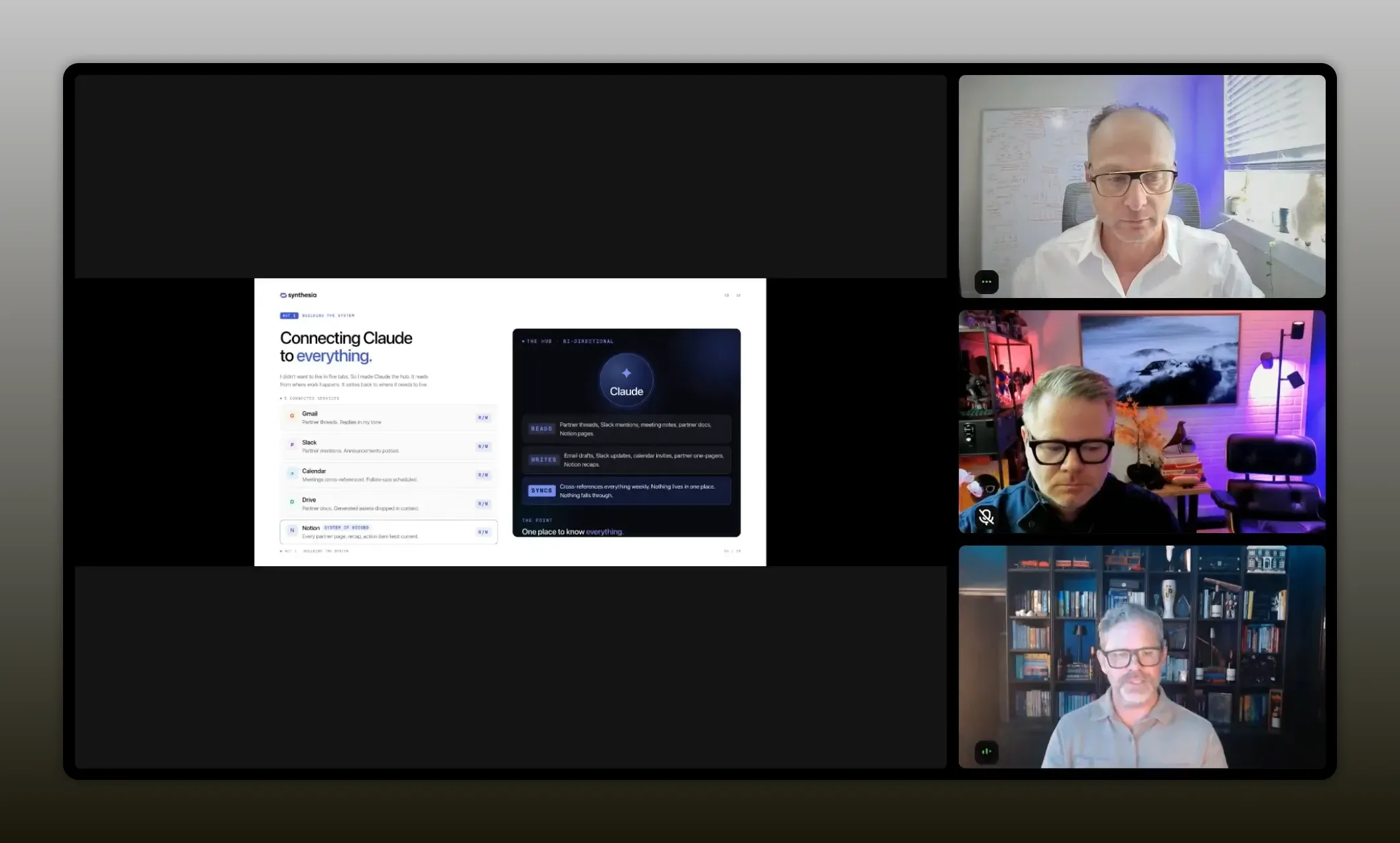
“I connected the systems first because I needed a better way to consolidate what was actually happening in my day.” -Corey Snyder
Once the connectors were in place, Corey started noticing the same questions coming up again and again for partner research:
- What does this company do?
- Who leads it?
- How many employees do they have?
- What industries do they serve?
- What are their core use cases?
- What is their ideal customer profile?
Instead of repeating that research process manually for every new prospect, he asked Claude to generate a reusable partner review prompt based on the questions he kept asking.
Then he simplified execution even further with keyboard shortcuts on his Mac. A quick command dropped in the full prompt automatically. That meant he could start partner analysis in seconds instead of rebuilding the prompt each time.
The result was dramatic. What used to take hours could now produce a detailed company profile in about ten minutes.
The power of a memory layer
The most useful phrase Corey used was memory layer.
That is really the heart of his system.
Instead of treating each prompt like a one-off interaction, he used Claude as a place to accumulate partner context over time. Research, call notes, email threads, Slack details, account mentions, internal discussions, and meeting recaps all fed the same growing source of memory.
This changed the nature of the work.
Once Claude had ongoing context for a specific partner, Corey no longer had to restate everything from scratch. After a partner call, he could simply say that he had just spoken with a specific contact and ask Claude to draft a recap email. Since the context was already there, the model could create something grounded in prior discussions and recent notes.
That is very different from generic prompting. It is more like building a working system of record that sits alongside your existing tools.
To support that memory, Corey used Notion as his structured knowledge base. Claude became the thinking layer. Notion became the visible layer where information could be organized, updated, and shared internally.
That combination is powerful because each tool plays a different role:
- Claude handles retrieval, synthesis, drafting, and task generation
- Notion stores organized records, pages, trackers, and team-facing documentation
If you are trying to build a similar stack for partner work, that separation is worth copying.
And if you are still getting comfortable with Claude specifically, this Claude for beginners guide is a useful companion for thinking through partnership-specific use cases.
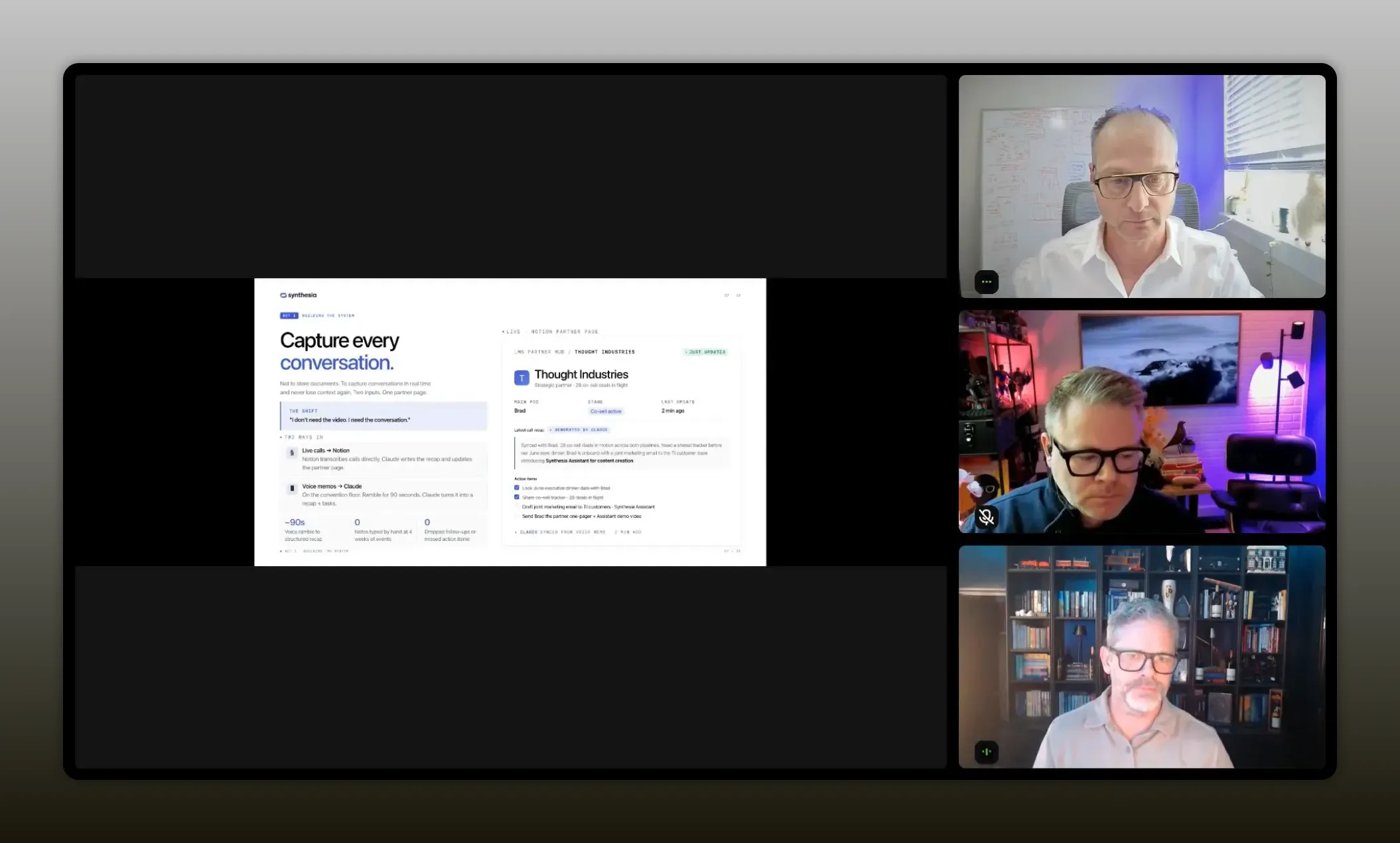
“The memory layer is what turns AI from a one-off assistant into a system of record—so after every call, I’m not starting over, I’m building on what Claude already knows about that partner.” -Corey Snyder
Why Notion became the action layer
Corey did not just use Notion as a place to dump notes. He used it to make partner information consumable.
He had Claude build an LMS partner hub inside Notion, then created individual pages for each partner. Those pages included things like:
- Primary points of contact
- Executive buyers
- Conversation history
- Current status
- Relevant integration pages
- Company background
- Industries served
- ICP information
That meant leadership could see progress, account teams could understand the partner, and enablement materials could be built from a common source of truth.
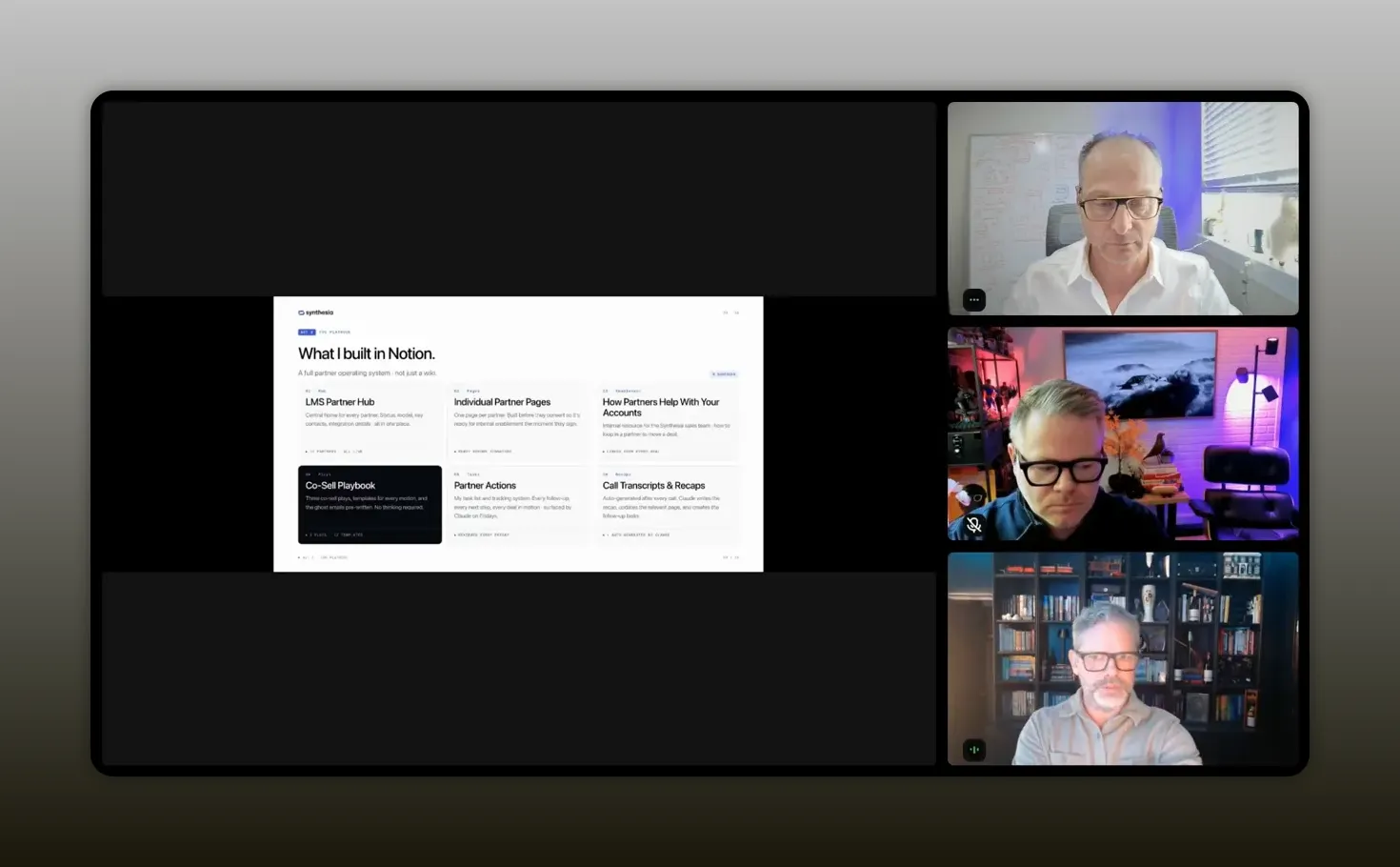
“Once the information was organized, I could hand it to account managers, CSMs, and leadership in a way they could actually use.” -Corey Snyder
This is where many AI experiments stall out. People generate good outputs, but the outputs never become part of the team’s workflow. Corey avoided that by pushing the information into a place the company could reference weekly.
He also used that same foundation to create practical internal documents for teams that need to work with partners but may not own the partner relationship directly. For example, he built material that explained how account executives and customer success managers could use partners for:
- Expanding deal size
- Getting deeper into account hierarchies
- Finding new expansion areas inside customer accounts
- Understanding when a partner could unlock new influence
That is a huge step up from vague partner enablement. It turns partner context into action.
Turning partner data into usable assets
Another smart move in Corey’s workflow was using the same memory layer to create outward-facing and inward-facing assets.
He needed one-pagers for partner account teams. He needed internal materials that explained the partnership. He needed co-sell messages. He needed email copy for introductions. He needed call briefs. He needed video content that could help account teams make warm outreach.
Instead of building each of those from scratch, he asked Claude to use everything it knew about a partner and generate the raw material. Then he used Claude’s design capabilities and Synthesia’s video tools to package those materials into polished assets.
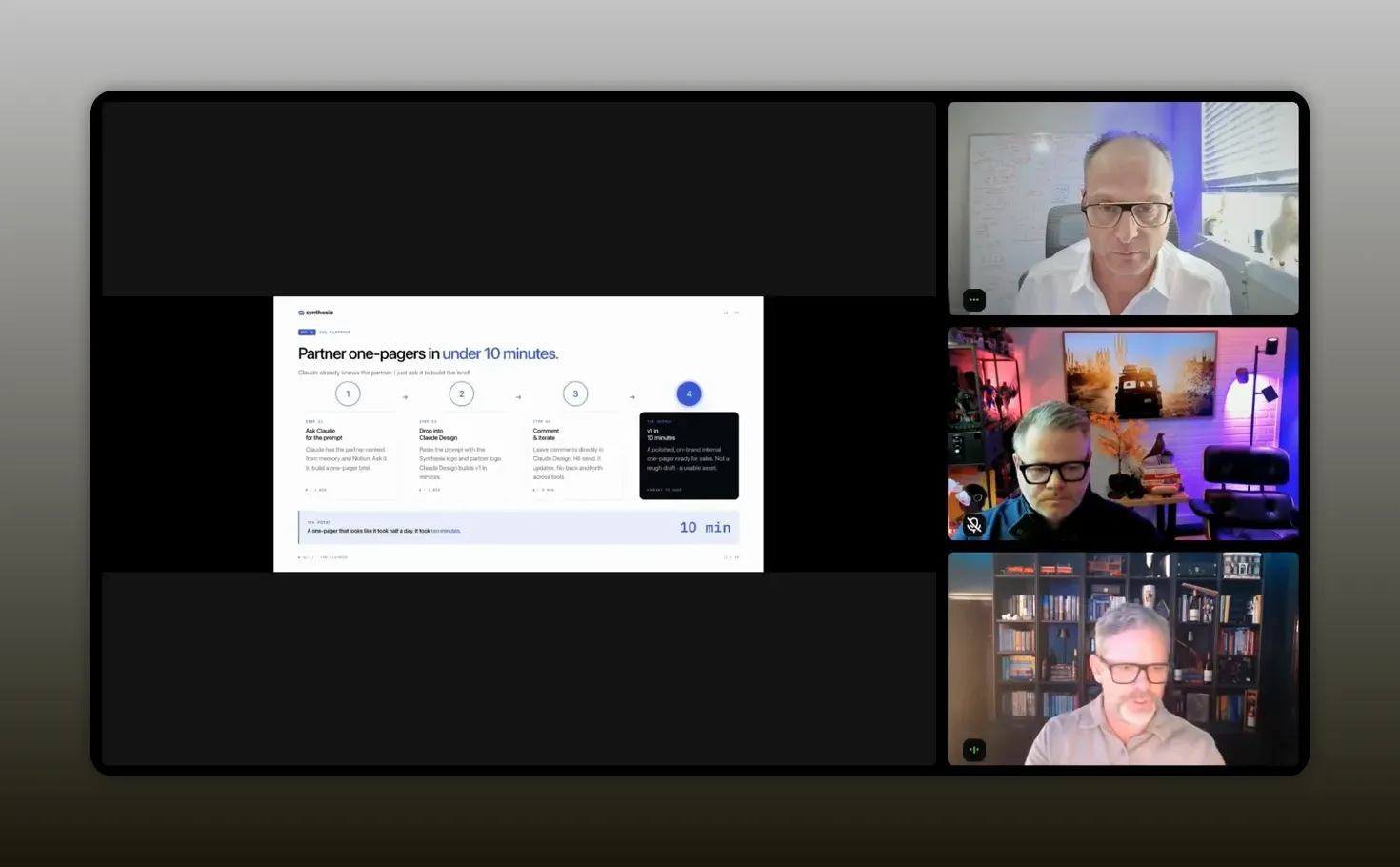
“The same partner context can become one-pagers, briefs, emails, and content once your system knows enough about the relationship.” -Corey Snyder
One example he shared was creating a custom video for a co-sell motion where an account executive could send a personalized message tied to a target account. That is a great reminder that AI leverage is not limited to text. Once you have structured context, you can repurpose it into multiple formats quickly.
This is also where teams can gain a real edge. A lot of partner programs still move slowly because every asset request is treated like a separate project. But if your research, positioning, and relationship data are already captured, many of those assets become variations of the same underlying information.
In practical terms, that means:
- Research the partner once.
- Store the context in a way AI can access.
- Generate the materials needed for internal alignment and external activation.
- Refresh those materials as new conversations happen.
That is what scalable partner enablement starts to look like.
How the weekly review workflow works
The most emotionally resonant part of Corey’s setup was not the research automation. It was the task tracking.
He described something most partner operators know well: lying awake wondering if you forgot to reply to an email, missed a legal update, dropped a Slack follow-up, or failed to capture the next step from a meeting.
So he built a Friday review workflow.
Here is how it works at a high level:
- Claude scans connected systems including Gmail, Slack, Calendar, Notion, and meeting information.
- It looks back over the previous week.
- It identifies tasks, open loops, missing due dates, completed items, and things that still need attention.
- It updates a structured tracker in Notion.
- It moves unfinished items forward and marks completed work where appropriate.
This was not perfect on the first try. Corey refined it through multiple iterations. That is an important detail. Good AI workflows are usually designed, tested, adjusted, and improved over time.
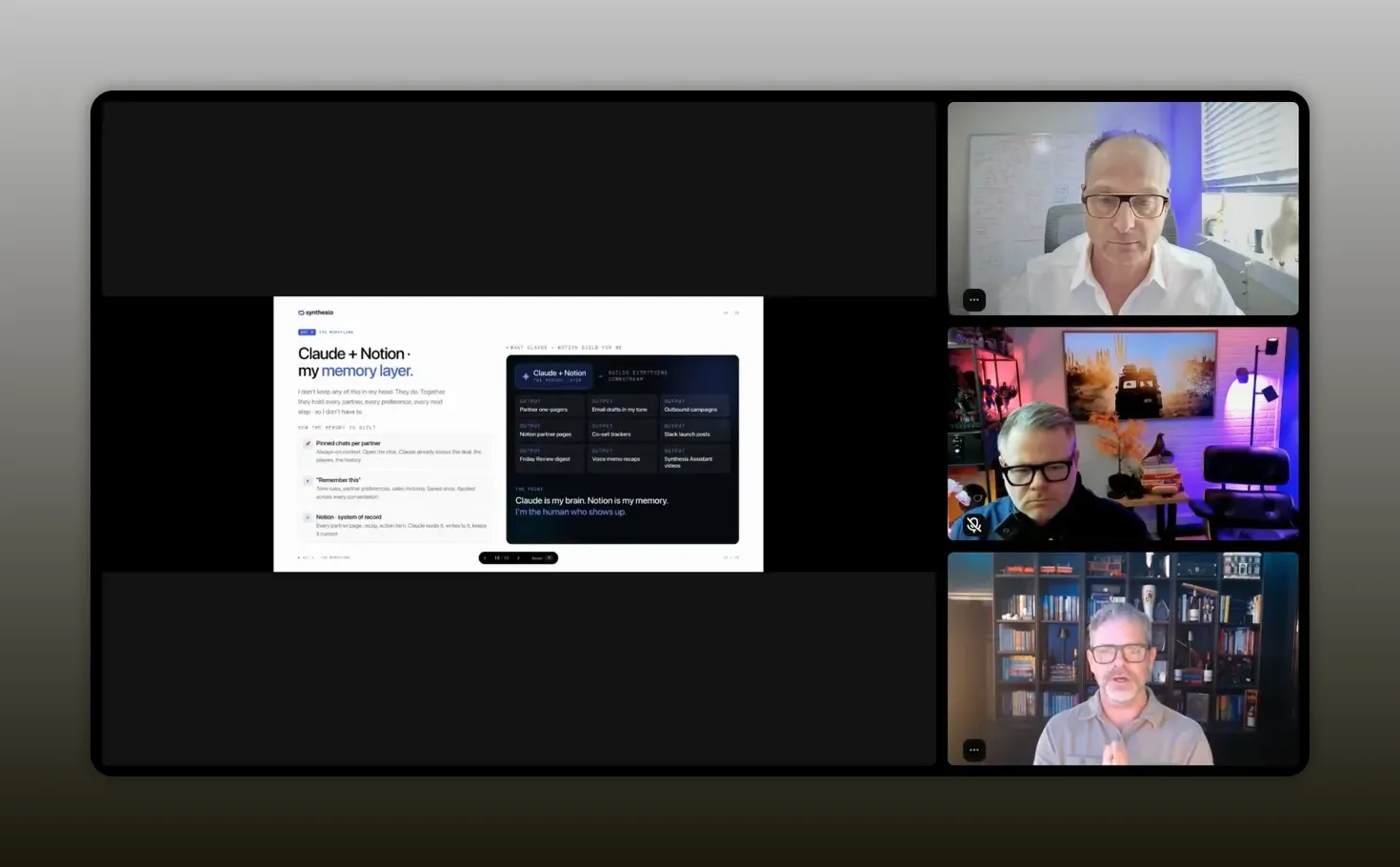
“That weekly review changed everything because I stopped relying on my head to carry every open loop.” -Corey Snyder
The outcome was bigger than time savings. It reduced mental overhead.
That point is easy to miss when people talk about productivity. The real benefit is not only that a workflow gets faster. It is that your cognitive load drops. You stop acting like the integration layer between every conversation, system, reminder, and handoff.
Corey even described using Claude in the moment, right after face-to-face meetings, to capture what had just happened and update the relevant partner record and tasks. That kind of quick post-meeting memory capture is incredibly practical, especially during travel or conferences when formal notes tend to slip.
How connectors make this practical
Justin paused the conversation at one point to make something clear for people earlier in their AI journey. The magic here is not hidden behind some complicated engineering setup. A lot of it starts with simple connectors.
Claude can connect to tools directly through its connector settings. Once those systems are connected, it can work across the information inside them, subject to company permissions and governance.
That matters because partner work is naturally fragmented. Your data lives in many places:
- Calendar
- Call transcripts
- Slack threads
- Documents
- CRM records
- Meeting notes
- Internal strategy docs
Before AI, you were the one connecting all of it manually. Justin described partner managers as the human integration point between disconnected systems. That is exactly right.
Once AI can access those sources safely, your role changes. You spend less time stitching context together and more time making decisions.
For teams with stricter security policies, Corey also made another important point: even without full connector access, you can still get value by copying and pasting information into the model intentionally. It is slower, but the workflow still works. The principle matters more than the exact setup.
If you want broader context on where AI-enabled ecosystems are heading, this discussion on ecosystems and AI in 2025 adds another layer to the same trend.
When a PRM does and does not make sense
One of the most useful parts of the session was the nuance around PRMs.
Corey is clearly a believer in PRMs. He has launched many partner programs and used tools like PartnerStack repeatedly. But he was very direct about timing: a PRM is not automatically the first thing you should buy.
That is refreshing, because too many conversations treat tooling like the answer before the program itself has momentum.
Corey’s view is that a PRM becomes valuable when the manual work caused by partner momentum starts turning into lost time and lost revenue. In the early stages, when you are still proving the model and building the foundational materials, you may be better off staying lean and using AI to organize the work.
His reasoning is straightforward:
- If you do not yet know your repeatable motions, a PRM may be premature.
- If you do not have enough partners, registration flow, attribution, and activity to justify the cost, the tool may sit underused.
- If you are still manually discovering what assets, processes, and partner experiences matter most, AI can help you build that foundation first.
Then, once there is momentum, a PRM can amplify what is already working.
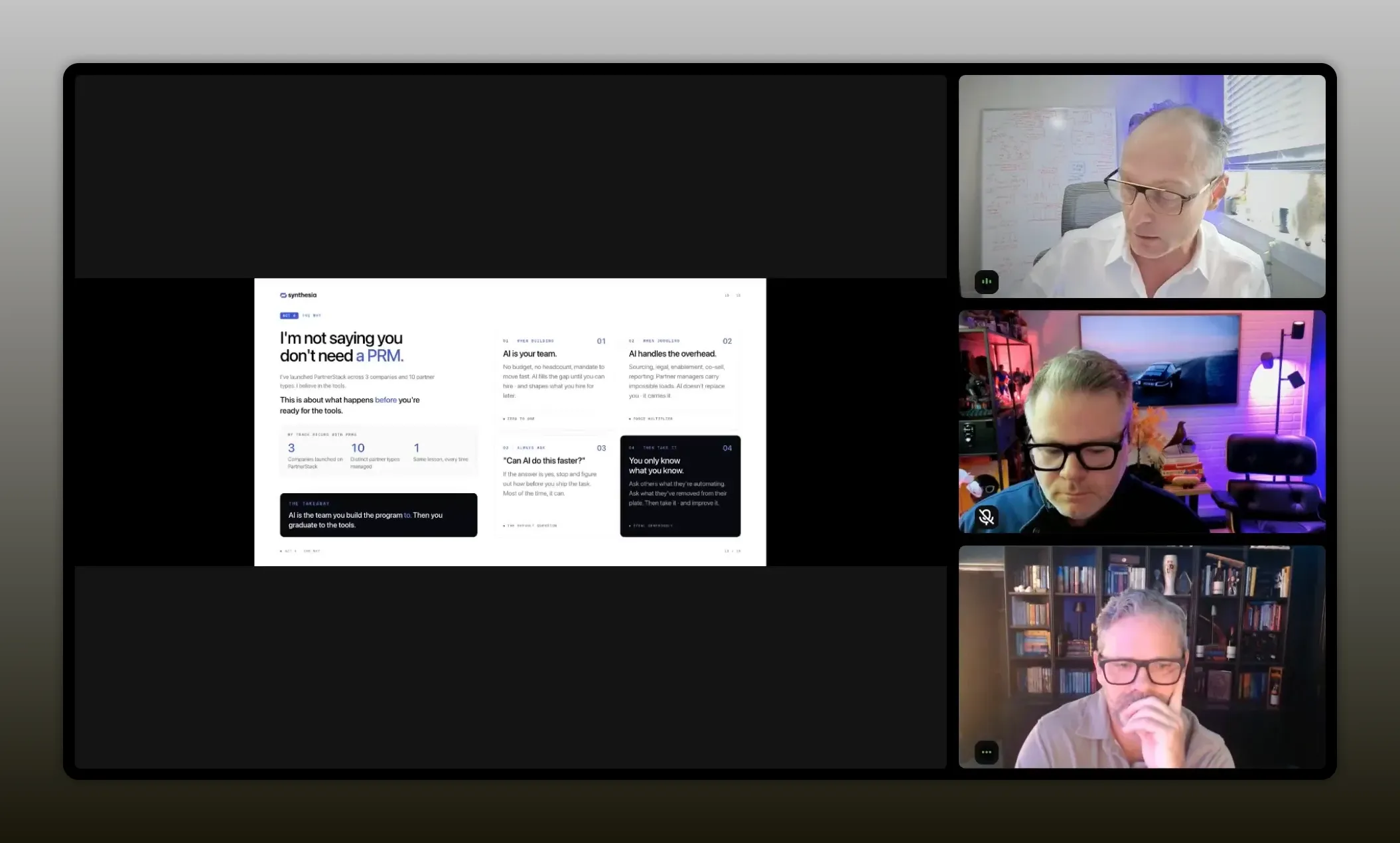
“A PRM makes sense when the manual work from partner momentum starts costing more than the tool does.” -Corey Snyder
He pointed to a few clear threshold signals:
- A growing number of active partners
- Manual lead registration becoming a bottleneck
- Attribution and tracking becoming too time-consuming
- Multiple team members needing coordinated partner workflows
- Enough repeatable motion to justify automation inside a PRM
That is a strong framework for deciding whether you need a PRM now, later, or not yet. If you are evaluating that next step, this PRM buying guide is worth reviewing alongside Corey’s logic.
What Tyler sees coming next
Tyler took the conversation in an interesting direction. Instead of giving a standard presentation, he asked for feedback on the kinds of AI skills and agents partner leaders would actually want in a marketplace.
The premise was simple. People keep asking for prompts, skills, and repeatable workflows. So why not package the most useful ones into a place where partner teams can grab and apply them?
He shared an example called a stalled deals finder that connects to PartnerStack and identifies partner-sourced deals that have stalled, why they stalled, which contacts need follow-up, and what actions to take next.
That is not just a cool demo. It points to something bigger: partner AI is moving from general prompting into task-specific, workflow-specific agents.
Tyler then rapid-fired a long list of possible skills to gauge what resonated most. The strongest ideas included:
- Executive board update generation
- QBR deck creation
- Partner slippage detection
- Daily brief on which partners need attention
- Co-sell opportunity discovery
- Stalled partner deal diagnosis
- Pipeline quality auditing
- Enablement gap identification
- Partner recruitment support
- Performance anomaly detection
- Commission structure optimization
- Affiliate landing page conversion advice
- Dormant partner reactivation
- Campaign brief creation
- AI visibility and content opportunity support
- Partner health and risk analysis
- Expansion partner identification
If you step back, that list tells you a lot about where the category is headed. The future is not one giant AI assistant doing everything vaguely. The future is a set of focused helpers that each solve a recurring partner problem well.
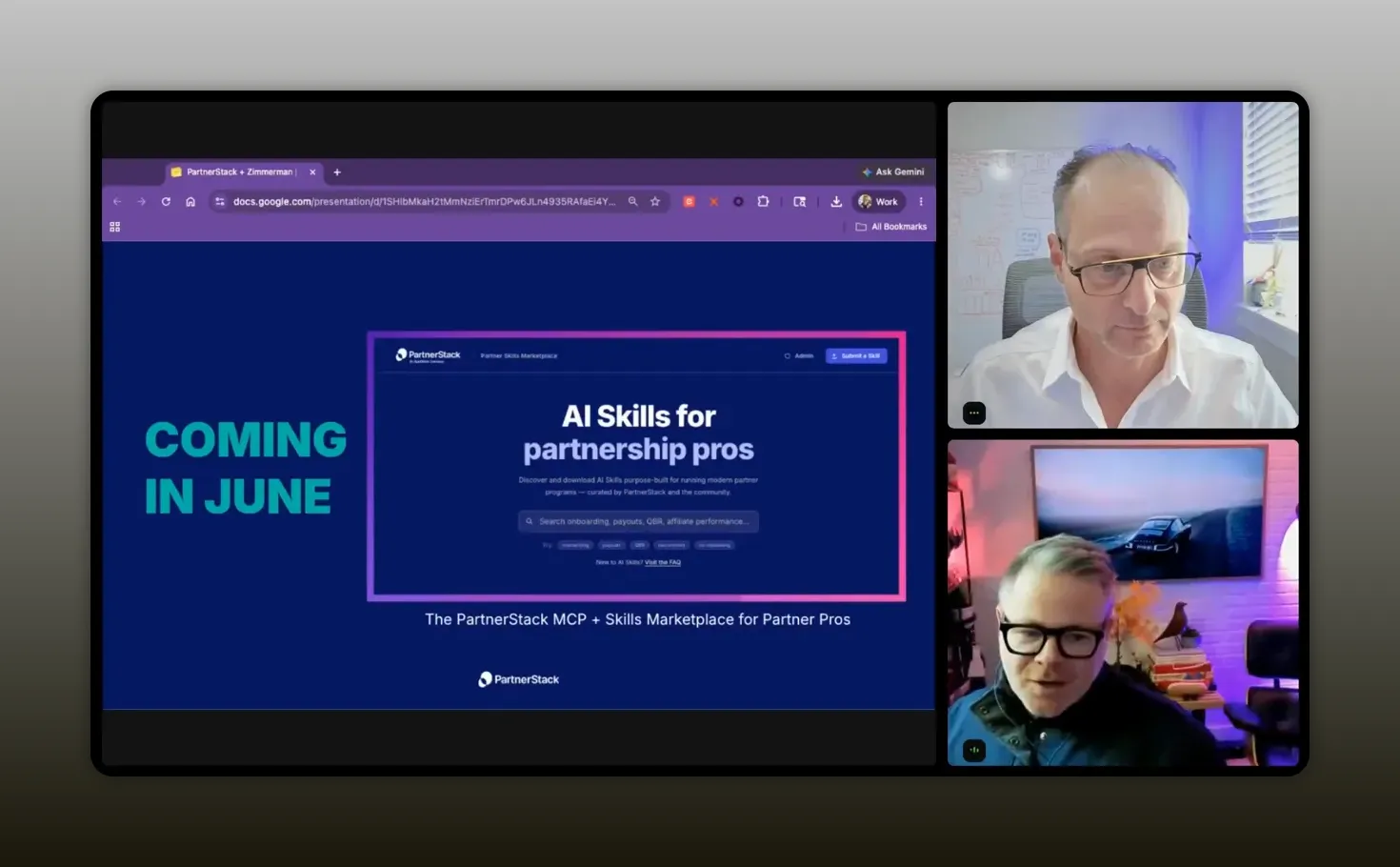
“The most common question is not whether AI can help. It is whether you can share the exact skill or workflow that already works.” -Tyler Calder
This is also why Tyler’s segment matters even beyond PartnerStack. He is highlighting a shift from experimentation to packaging. Once a workflow proves useful, teams want it standardized, shared, and reused.
Recommended tools
You do not need an overly complex stack to start building this kind of system. Based on the workflows discussed, these are the tools and categories that mattered most.
Claude
The central AI layer for research, synthesis, drafting, recap creation, partner tracking prompts, and weekly review workflows. Claude was especially useful because it could connect to other systems and retain ongoing context in a way that helped Corey build a practical memory layer.
Notion
The structured destination for partner hubs, partner records, trackers, and internal documentation. It turned AI output into something the wider company could use.
Gmail and Slack
These were key sources of real partner context. Once connected, they helped surface follow-ups, open loops, and communication history.
Calendar and meeting transcripts
These gave the system temporal context. That is essential when you are trying to track what happened recently, what is due next, and what changed after a conversation.
PartnerStack
Important once program momentum is strong enough to justify dedicated PRM workflows, especially for registration, tracking, partner operations, and more advanced automation. Tyler’s examples also show how PRM data can power more specialized AI skills.
Synthesia
Useful for turning partner insight into quick, personalized video assets that support co-sell and enablement motions.
Keyboard shortcuts and lightweight automation
Not glamorous, but extremely effective. One of Corey’s best workflow improvements was simply eliminating repetitive prompt entry with shortcuts.
FAQs
Do you need a PRM before using AI in partnerships?
No. One of the clearest points from Corey was that AI can help you build structure before a PRM makes financial or operational sense. If you are still creating your partner motions, materials, and process, AI can help you stay organized and move faster without prematurely adding more software.
What is the memory layer in an AI partnership workflow?
It is the growing body of partner context stored across your AI conversations and connected tools. Instead of starting from zero every time, the model can pull from prior research, recent notes, emails, transcripts, and updates. That makes the output more relevant and reduces repetitive prompting.
What is the easiest place to start?
Start with one recurring workflow that costs you time every week. That could be partner research, recap emails, weekly follow-up reviews, or internal status reporting. Connect the tools you can access, define the outcome you want, and refine the prompt until the output becomes genuinely useful.
How accurate do these workflows need to be before they are useful?
They do not need to be perfect on day one. Corey was open that some workflows reached roughly 90 percent usefulness before refinement. That was still enough to save significant time. The key is to use AI as a strong first pass that reduces manual work, then improve the system over time.
Can this work without full system connectors?
Yes. Connectors make it smoother, but you can still get value by manually pasting information into the model and building structured prompts around it. The workflow is less elegant, yet the underlying benefit still exists.
What kinds of partnership tasks are best suited for AI right now?
The strongest fits are tasks that depend on gathering context, organizing information, drafting repeatable materials, surfacing next actions, and tracking changes across many conversations. Research, recaps, follow-up planning, partner status reviews, and asset creation are all strong candidates.
Conclusion
The biggest lesson here is not that Claude can write emails or summarize notes. It is that you can redesign how partner work gets organized.
Corey showed what happens when you stop treating AI as a chatbot and start treating it as an operating layer between your scattered systems and your actual next actions. Tyler showed where this goes next, with specialized skills built for recurring partner problems. Justin kept the whole conversation grounded in the reality that partner professionals do not need more hype. They need role-specific workflows that produce leverage.
If you take one thing from all of this, let it be this: start with the messiest, most repetitive part of your partner workflow and build a system that remembers, updates, and helps you act. That is where the breakthrough starts.