AI-Powered Partner Enablement Content
Expert advice from Brian Jambor (Head of Partnerships, Synthesia).
Snapshot
You are probably spending far too much time creating partner onboarding decks, certification guides, and recruitment materials that partners never fully consume. You sign a partner, launch a portal, publish the docs, and still end up with slow activation, weak retention, and very little pipeline movement. The old enablement format is breaking down at exactly the moment partnerships need to move faster. As AI accelerates product updates, global expansion, and content expectations, static PDFs and slide decks cannot keep up. Video, however, can. And now, AI video can make that shift practical, scalable, and affordable. If your team wants faster onboarding, better certification completion, and more engaged partners, this is a true competitive advantage that is becoming available right now.
If you want to solve ignored onboarding docs, low certification completion, and slow partner activation, keep reading to see how Brian Jambor and Justin Zimmerman can help you do it.
“All of our partners are drowning in PDFs and slide decks. They’re not reading them.” -Brian Jambor
Table of Contents
- Snapshot
- The real problem with partner enablement
- Why video changes the numbers
- The three partner workflows where AI video matters most
- Partner recruitment with personalized AI video
- Partner onboarding that gets to first deal faster
- Certification and ongoing education at AI speed
- The FOCUS framework for effective partner videos
- How AI changes the video production equation
- How to turn existing PDFs and decks into video
- A practical Claude-to-Synthesia workflow
- Why interactivity matters
- Recommended tools
- FAQs
- Conclusion
The real problem with partner enablement
Have you created a partner onboarding document, certification guide, or recruitment deck in the last six months?
Of course you have.
The better question is this: how confident are you that partners actually read it all?
That is where things get uncomfortable. Most teams know the truth. The content exists, it’s polished, and marketing has approved it. Legal has even blessed it. But the people it was built for are not engaging with it deeply enough to change behavior.
Brian put hard numbers behind that frustration:
- 88% of organizations do not onboard partners well
- 19% is the average onboarding completion rate for partners
- 8% to 10% retention is typical for PDF-based training
- Only 12% of learners apply what they learned in their work
Those numbers should hit hard if you own partner revenue. They mean you can have a full enablement motion on paper and still fail operationally.
If 100 partners enter your program and only 19 finish onboarding, you do not have an engagement problem at the margins. You have a system problem. If even the ones who finish only retain a small fraction of what they read, then your program is leaking value before it ever reaches pipeline.
This is one reason so many partnership teams are rethinking how they deliver knowledge, not just what knowledge they deliver. If you are trying to build predictable partner-led growth, the format of your enablement content matters as much as the quality of the content itself. That principle shows up in broader partner program design too, especially when you start thinking about activation plans, operational discipline, and measurable revenue outcomes, which is covered well in this playbook on building predictable partner-led growth.
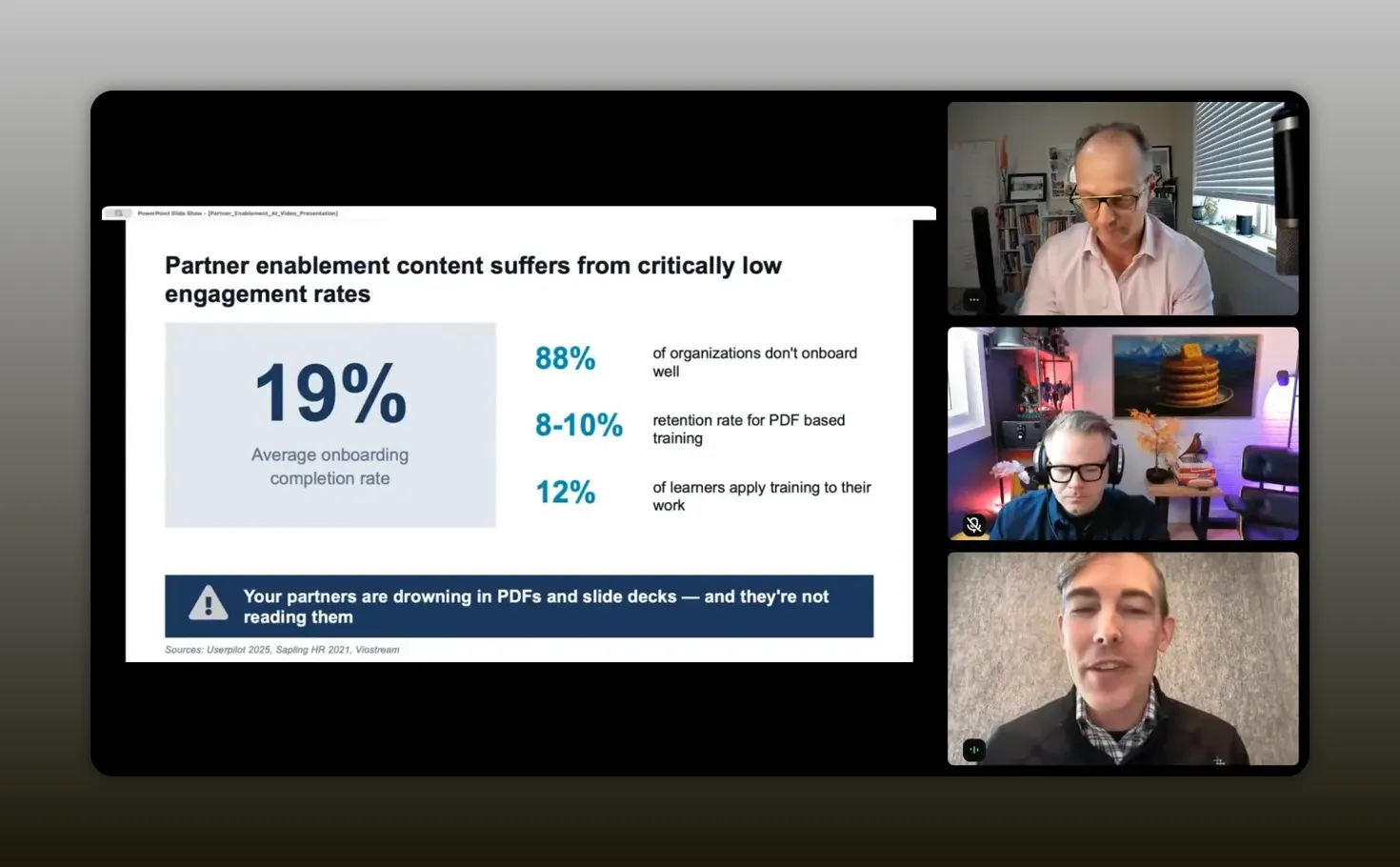
“You and I have spent weeks, sometimes months, building beautiful 40-slide partner onboarding decks, and roughly 80% of your partners aren’t finishing it.” -Brian Jambor
Why video changes the numbers
Brian’s argument is not simply that video is more modern than PDFs. It is that video aligns better with how people already consume information.
He asked a simple question: how many people had consumed a short-form video in the last 24 hours?
Almost everyone has.
Your partners are no different. They are already trained by habit to engage with short, visual, on-demand content. So when you take enablement material and convert it into short-form micro-learning video, performance changes fast.
Here are the numbers Brian shared for video-based learning:
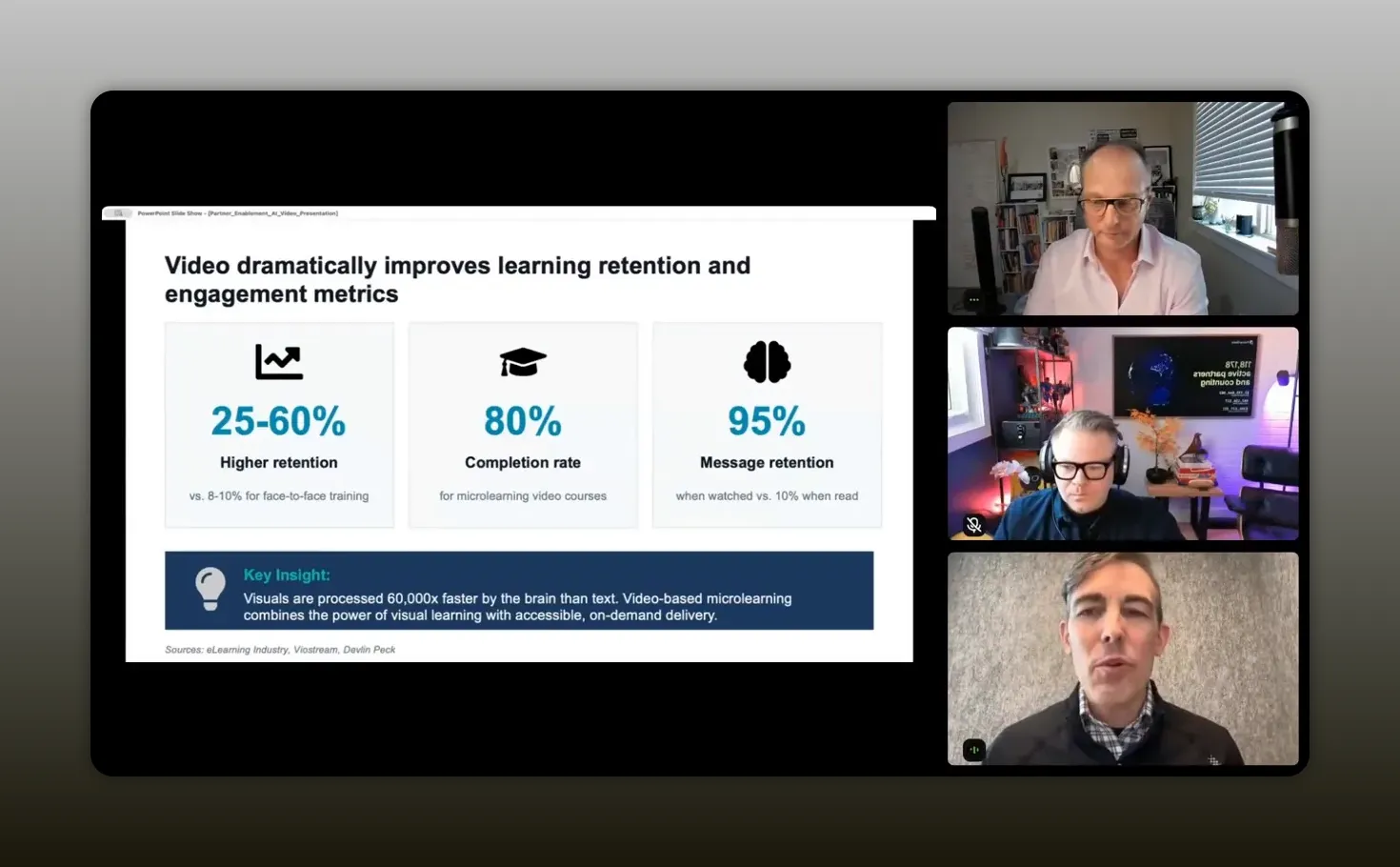
- 25% to 60% higher retention versus static document-based training
- 80% completion rates for microlearning video courses
- 95% message retention when content is watched versus about 10% when it is read
He also cited a striking cognitive point: the brain processes visuals much faster than text. Whether you quote the exact speed claim or just stick with the practical conclusion, the implication is clear. Visual learning is easier to absorb, easier to remember, and easier to revisit.
That matters because partner enablement is not just about exposure to content. It is about actual behavioral change. You need a partner to understand your offer, know how to position it, navigate your process, stay current on changes, and then act.
Video supports that in ways static content often does not:
- It is easier to consume in short bursts
- It feels more conversational and less formal
- It can be paused and replayed on demand
- It works across regions and languages more naturally
- It can combine visuals, narration, and interaction in one flow
That is why Brian framed the shift not as an incremental improvement, but as a step change. Same content, different medium, dramatically different outcomes.
“It’s not marginal improvement, it’s a huge step change.” -Brian Jambor
The three partner workflows where AI video matters most
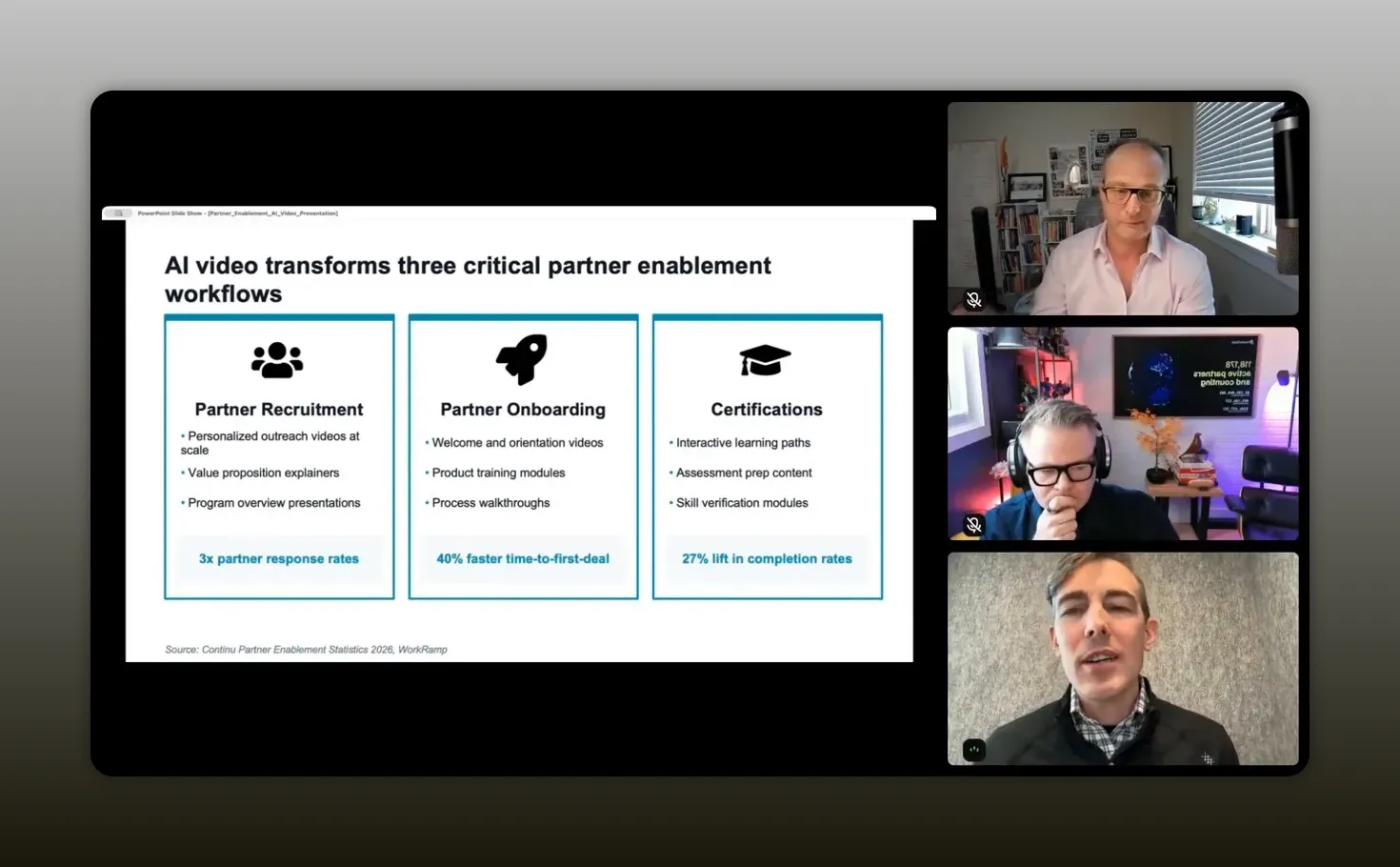
Brian narrowed the use cases down to three workflows where he sees the biggest impact:
- Partner recruitment
- Partner onboarding
- Partner certifications and continuous learning
That framing is useful because it keeps the conversation grounded. AI video is not just a shiny content format. It should map to a specific point in the partner journey where a better experience creates a measurable business result.
Partner recruitment with personalized AI video
Most partner recruitment still depends on the usual motions: outbound emails, LinkedIn messages, some ecosystem networking, maybe a deck attached if the prospect is warm.
Brian’s point is that AI video lets you make that outreach feel personal without turning your team into a production studio.
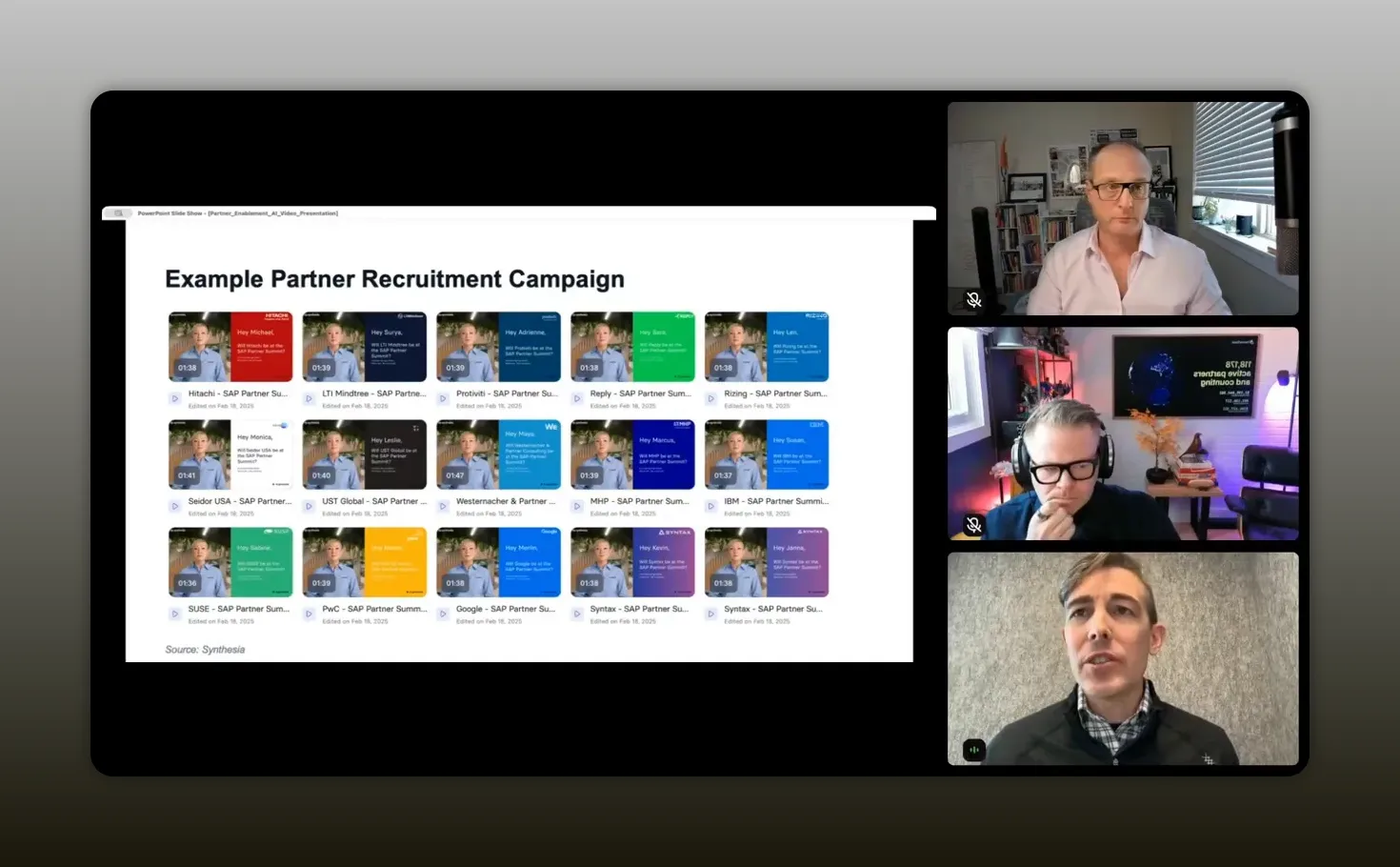
Instead of sending text-heavy emails, you can create personalized outreach videos at scale that:
- Address the prospective partner by name
- Reference the partner’s market or business focus
- Explain why they are a strong fit
- Use the partner’s language for global programs
- Reflect their brand or company colors
That kind of personalization used to be expensive and slow. With AI video, Brian said his team could build a campaign with customized videos for each company in around two hours.
The result he shared was a 3x increase in partner response rates compared with standard text-based outreach.
That is the type of multiplier that gets attention from leadership, because now content format is directly influencing top-of-funnel partner recruitment efficiency.
It also fits neatly with a larger shift happening across partnerships: AI is no longer just helping with internal operations. It is reshaping how partner teams communicate externally and execute at scale. If that broader topic is on your radar, these principles for AI in partnerships provide a useful companion perspective.
“With AI video, you can create personalized outreach videos at scale.” -Brian Jambor
Partner onboarding that gets to first deal faster
If recruitment is where you win attention, onboarding is where you either create momentum or lose it.
Brian described onboarding as the place where many programs are hemorrhaging partners. Signing the agreement is the easy part. Getting a partner ramped, productive, and capable of driving referrals or resold deals is much harder.
That friction usually comes from a familiar set of issues:
- Content is too dense
- Training is too formal
- Ramp timelines are too slow
- Partners have to hunt for answers across multiple formats
- Updates are difficult to distribute consistently
AI video changes onboarding because it helps you create a more structured journey:
- Welcome videos that set expectations
- Short product training modules
- Process walkthroughs for referrals, co-sell, or resell
- Role-specific training clips
- Regional or language-specific versions of the same core content
The metric Brian shared here was one of the strongest in the session: 40% faster time to first deal with video-based onboarding.
That matters because time to first deal is one of the cleanest indicators of whether a partner program is producing value. It is also one of the hardest things to improve with policy or process changes alone. If a better enablement experience can shorten the time between signed agreement and first revenue event, that is a material operational advantage.
And there is a second-order effect here. Better onboarding does not just move faster. It also changes how your partner brand is perceived. When the experience feels clear, modern, and easy to follow, partners are more likely to trust that doing business with you will stay efficient later.
“Everybody’s quick to sign the deal but really hard to enable.” -Brian Jambor
Certification and ongoing education at AI speed
Certifications are often where partner education breaks down completely.
The content is long. The experience is repetitive. Product changes move faster than the certification content itself. Before long, the training is stale, completion rates dip, and the people who need the knowledge most are the least likely to sit through the materials.
Brian highlighted a bigger force making this worse: AI is speeding up product development. At Synthesia, he said the company ships more than 300 new commits to the GA codebase every month, and he expects that velocity to increase as engineering teams use more AI coding tools.
If your company is shipping quickly, then partner education has to keep pace. That is where interactive video learning paths become valuable.
Brian emphasized features like:
- Embedded quizzes
- Knowledge checks
- Short modular lessons
- Easy content refreshes when the platform changes
The result he cited was a 27% lift in certification completion rates.
That may sound smaller than the onboarding jump, but it is hugely important. Certification programs often suffer from completion drop-off because they are treated as one-time information dumps. Breaking them into digestible video sequences makes the learning path more realistic for busy partner teams.
And in a world where products evolve constantly, the ability to quickly regenerate updated training content may matter even more than the original content creation itself.
The FOCUS framework for effective partner videos
Brian was very clear about one thing: bad video is easy to make.
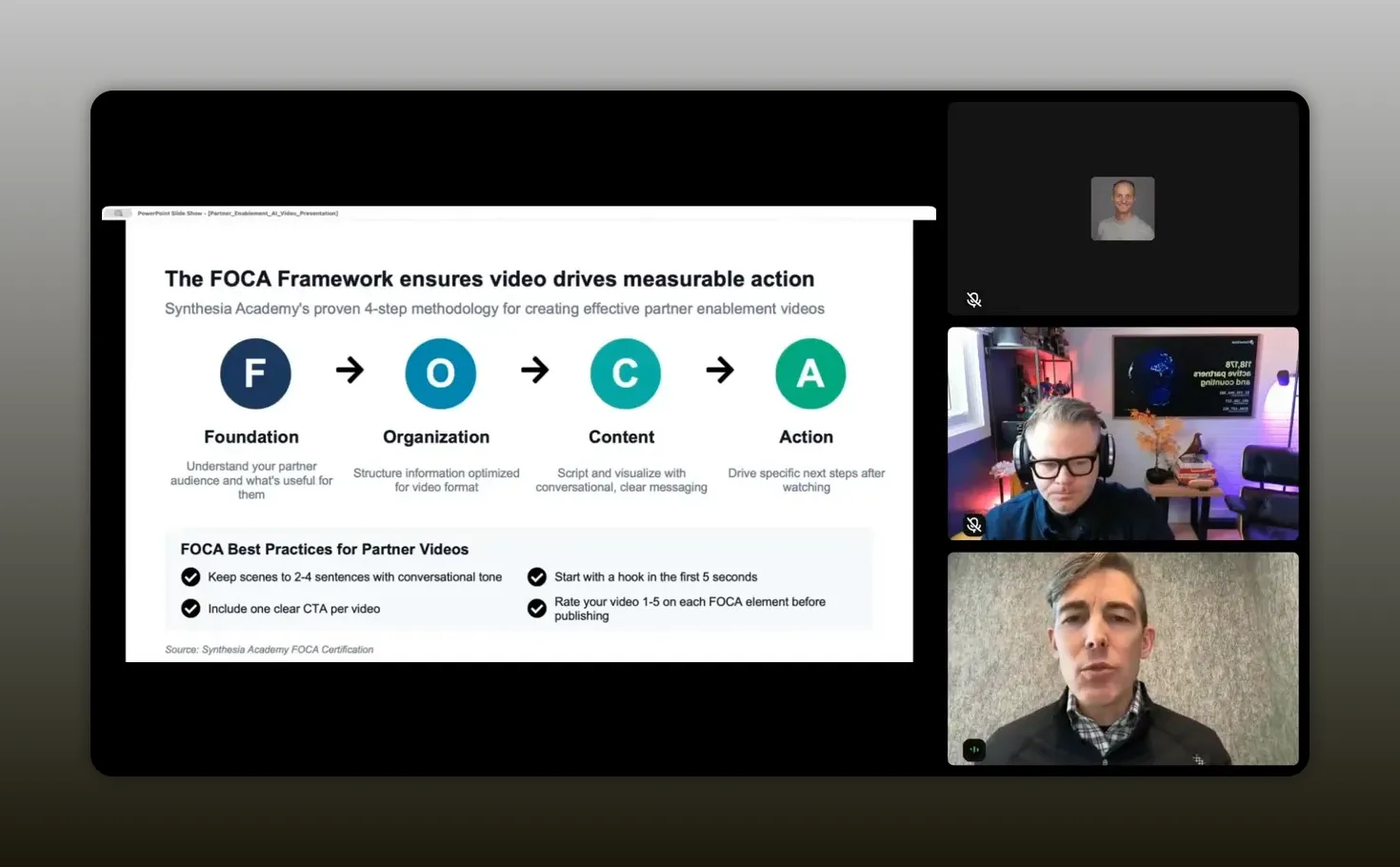
You cannot just turn a slide deck into a talking head and assume it will perform. To create effective partner content, his team uses the FOCUS framework, which stands for:
- Foundation
- Organization
- Content
- Action
Foundation
This is about understanding your partner audience. Not what you want to say, but what they need in order to succeed with you.
If the video is for a prospective agency partner, their needs are different from a reseller or a technology alliance partner. Start there.
Organization
Video needs a different structure than slides or long-form documents. You cannot just dump ten bullets onto a scene and expect engagement.
The sequence needs to feel natural, focused, and easy to process.
Content
Your script and visuals need to be clear, conversational, and concise. Brian recommended keeping scenes to around two to four sentences and opening with a hook in the first five seconds.
This is where a lot of teams struggle, because their source material is usually written in a formal internal tone. Good video often requires rewriting for clarity and energy.
Action
Every video should drive one specific next step. Not five. One.
Do you want the partner to book a meeting, complete a module, register a deal, or take an assessment? Choose the primary action and make it obvious.
Brian also shared a practical review habit: score each FOCUS element on a scale of one to five before publishing. If any area scores a two, the video is not ready.
That is a strong operating principle because it forces quality control without making the process too complex.
“Every video needs to drive a specific next step.” -Brian Jambor
How AI changes the video production equation
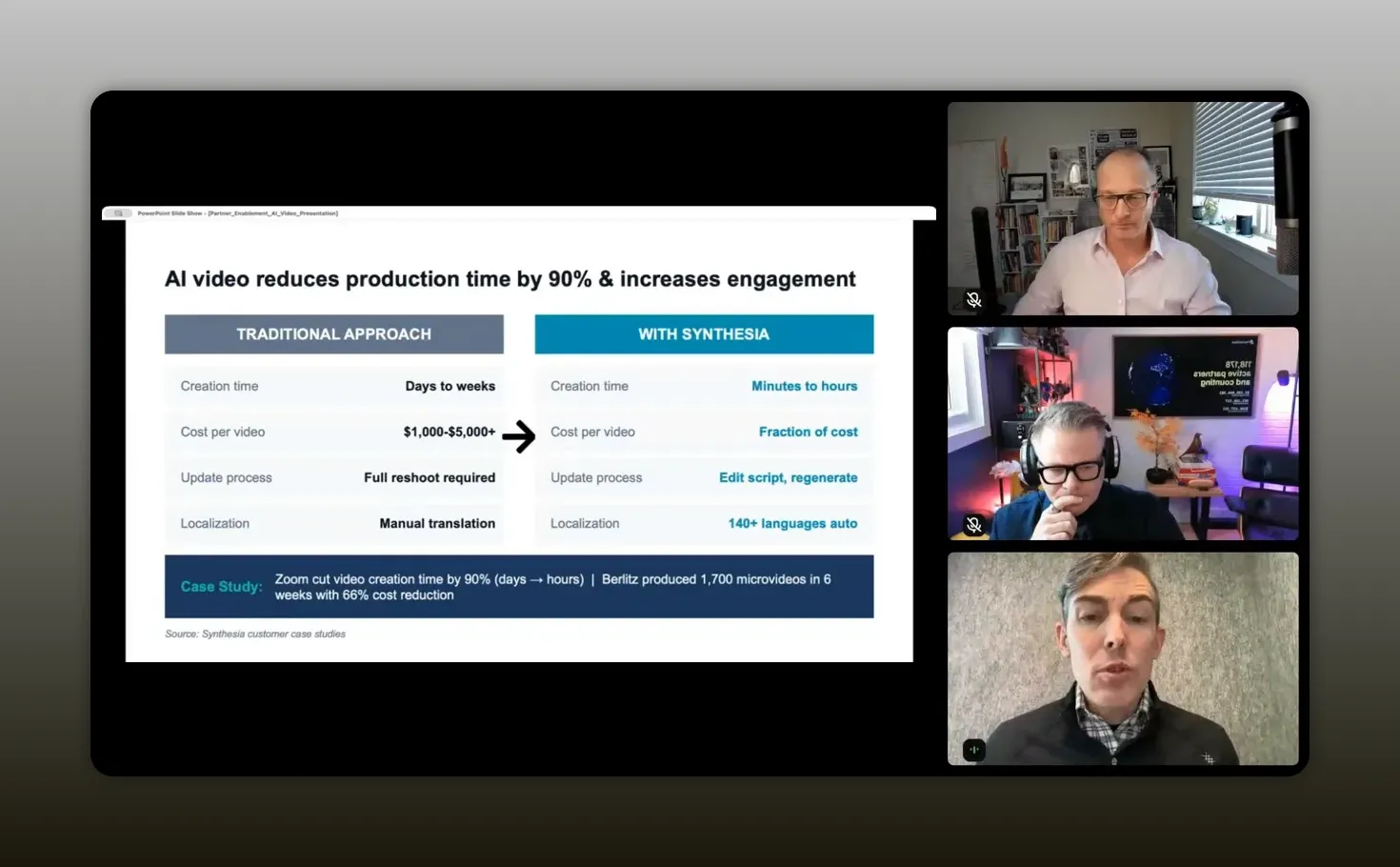
One of the main objections to video has always been valid: traditional production is slow and expensive.
Under the old model, creating video meant scripting, filming, editing, wrangling talent, revising, localizing, and potentially reshooting if anything changed.
For most partnership teams, that simply is not practical.
Brian’s point is that AI changes the economics.
With AI video tools, the process becomes much closer to editing a deck than running a production shoot. You can update the script, regenerate the scene, and push the refreshed content back into your partner portal or LMS. Localization also becomes dramatically easier.
He gave two concrete examples:
- Zoom reduced video creation time by 90%, from multiple days to a couple of hours per video
- Berlitz created 1,700 micro videos in six weeks and cut cost by 66%
That is the real breakthrough. Video is no longer reserved for a few flagship assets. It becomes a scalable medium for operational content.
Brian also pointed to another threshold that matters for adoption: avatar realism. He said the quality of Synthesia’s avatars has improved to the point that around 60% of people cannot tell the difference between some avatar videos and live footage.
Whether that percentage holds in every context is less important than the direction of travel. AI-generated presentation and training content is becoming normal enough to use in day-to-day partner communications.
“AI video helps us turn those slow, expensive production cycles into something we can update like a slide deck—regenerating scenes and pushing refreshed enablement to partners without the usual reshoots.” -Brian Jambor
How to turn existing PDFs and decks into video
One of the most useful parts of Brian’s approach is that he does not suggest starting from zero.
You already have the raw material.
You have:
- PDF onboarding guides
- PowerPoint decks
- Google Slides presentations
- Docs pages
- Internal training notes
The job is to transform, not reinvent.
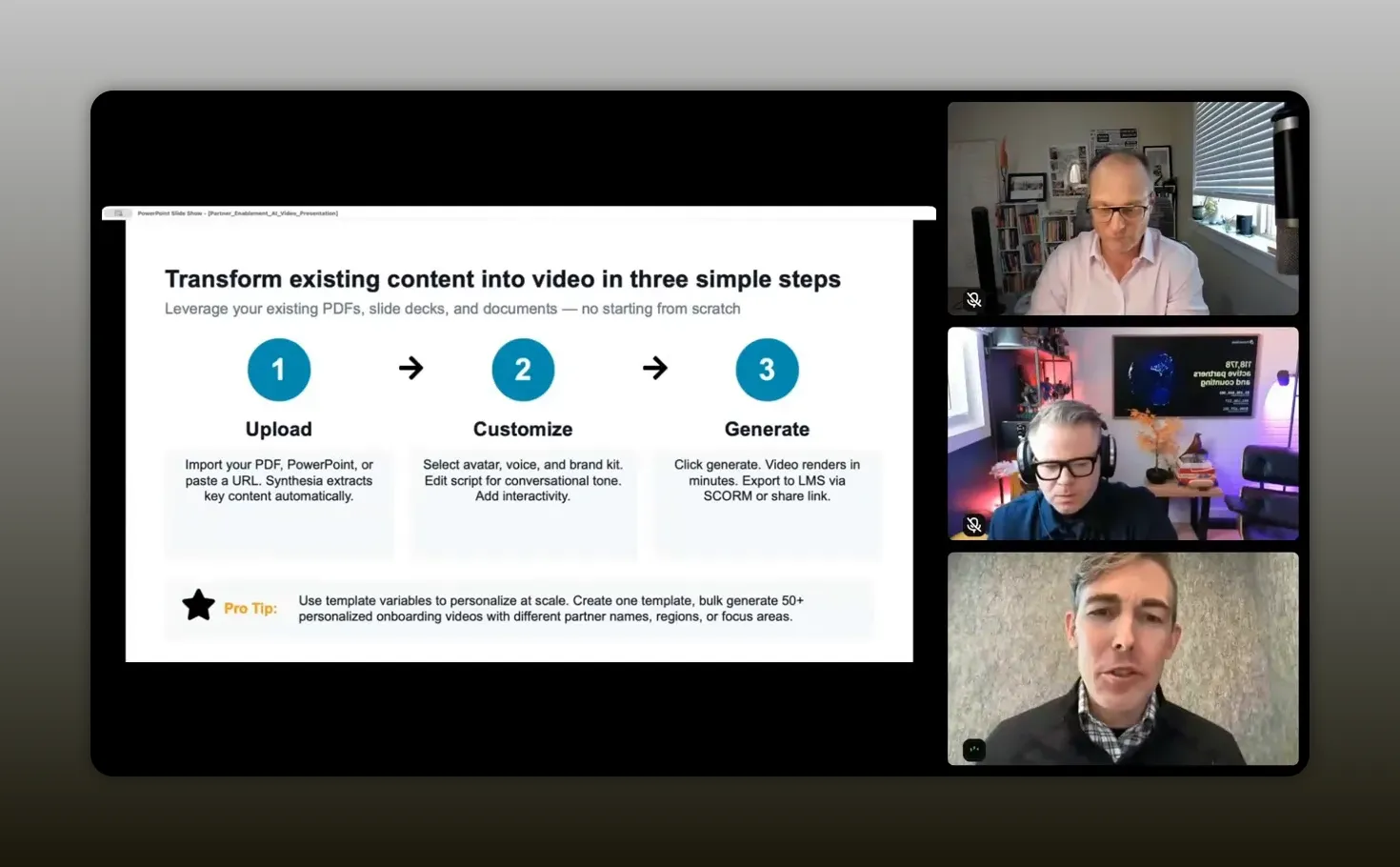
Brian described a straightforward process for doing that with AI video tools:
- Import your PDF, PowerPoint, or documentation URL
- Let the platform extract key content
- Select an avatar, voice, and brand kit
- Edit the script so it sounds conversational
- Add interactivity where useful
- Generate the video
- Export it to your LMS, PRM, or partner portal
The important nuance is the script edit step. Static documents are usually written in a formal business tone. Microlearning videos should feel more direct and natural.
You are not trying to create a corporate keynote. You are trying to make the information easy to absorb and easy to act on.
Brian also shared a practical personalization tip: create one template video and inject variables into it. With bulk personalization, you can generate many versions of the same video with different partner names, regions, or focus areas.
That gives you high-touch delivery without manual one-off creation every time.
“Taking your existing partner enablement content—PDFs, decks, certification guides—and transforming it into short-form video is how you turn content that gets skimmed into content partners actually retain and act on.” -Brian Jambor
A practical Claude-to-Synthesia workflow
Brian went a step further and described a workflow his team uses to accelerate production even more by combining AI tools.
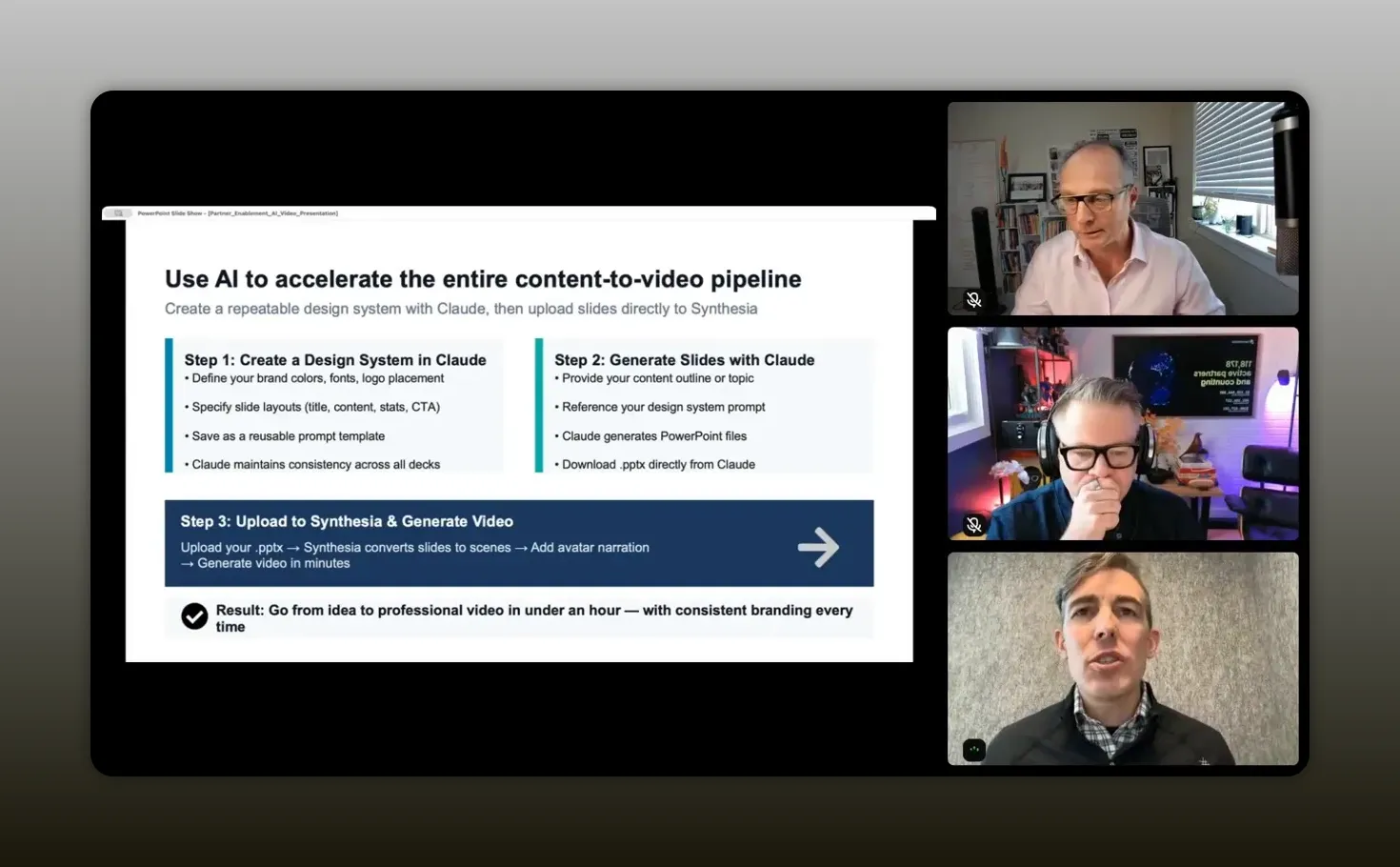
The basic system looks like this:
- Create a presentation design system in Claude
- Use Claude to generate an on-brand slide deck
- Upload the deck into Synthesia
- Convert the slides into video scenes
- Add avatar narration and generate the video
This is smart for two reasons.
First, it keeps your outputs visually consistent. Second, it removes a task that many partnership teams either hate or overinvest in: slide building.
What Brian means by a design system
He explained that a design system should include:
- Brand colors with hex codes
- Typography specifications
- Logo placement rules
- Slide layout templates
- Component styles for stats, icons, and calls to action
- Guardrails for what to include or avoid
You can save that system as a reusable prompt file and then reference it whenever you want Claude to create a new deck.
That means future presentations stay on-brand without you starting from scratch every time.
“You don’t have to create slide decks anymore, which I know is really painful for a lot of us.” -Brian Jambor
Brian said the slides used in his own session were created using this exact method, with only minor edits to get them to around 90% ready.
That is a meaningful insight for partnership teams because it points to a broader content workflow:
- Use one AI system to structure and design the information
- Use another AI system to turn it into a deliverable medium
- Publish and personalize at scale
It is also a reminder that AI in partnerships is rarely about one tool replacing your process entirely. It is more often about stitching together a few high-leverage workflows.
Why interactivity matters
Brian made an important distinction near the end: static video is better than static PDFs, but interactive video is where engagement compounds.
That can include:
- Clickable hotspots
- Embedded quizzes
- Knowledge checks
- Branching learning paths
- Clear next-step prompts
This matters because passive consumption is not the end goal. You want proof of understanding and a bridge to action.
If a partner finishes an onboarding video and immediately clicks into deal registration, that is better than a partner vaguely recalling that a PDF once mentioned it.
Interactivity also improves signal. It gives you more ways to see what content is working, where people are dropping off, and which messages need refinement.
That level of feedback is one reason video is becoming more operationally useful than static content. It is not just easier to consume. It is easier to improve.
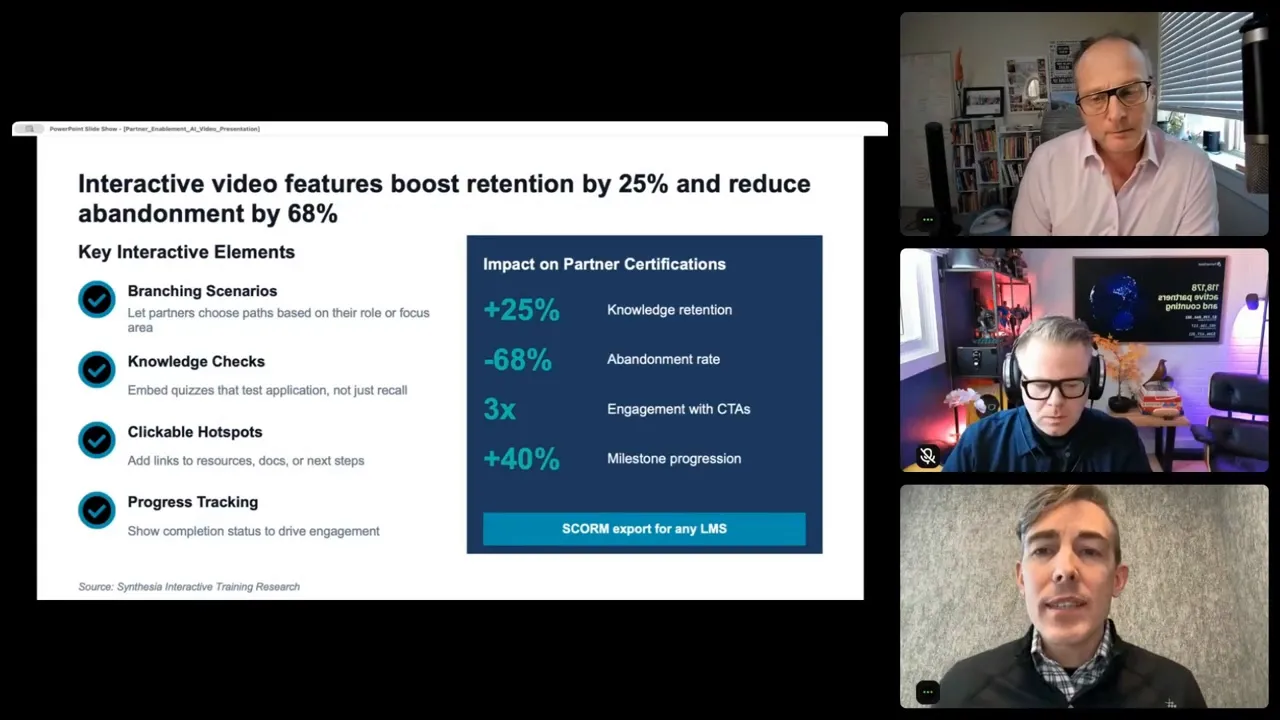
“Static video is better than static PDFs—but interactive videos are where engagement compounds, because you’re no longer just delivering content, you’re proving understanding and driving the next action.” -Brian Jambor
Recommended tools
If you want to apply Brian’s workflow, these are the core tools and categories he referenced directly or indirectly.
AI video platform
- Synthesia for avatar-based video creation, localization, personalization, and slide-to-video workflows
AI presentation and prompt workflow
- Claude for creating a reusable presentation design system and generating on-brand slide decks
Partner portal or distribution layer
- PartnerStack as a partner platform where onboarding and enablement content can be delivered
Supporting AI tools for content consumption
Brian mentioned that many partners are already dropping documents into AI assistants for summaries. That alone is a signal that your content needs to be easier to consume in its original format.
Research and credibility references
- Columbia University was cited as part of research partnerships around learning outcomes
- Zoom and Berlitz were shared as examples of reduced production time and scaled output
If you are thinking about AI implementation more broadly across your partner motion, you may also find value in this discussion on accelerating partner ROI with AI.
FAQs
Is AI video only useful for large partner programs?
No. Brian’s examples focused on scale, but the logic applies just as much to smaller programs. If you have even a handful of onboarding guides, recruitment decks, or certification materials, you can benefit from turning the highest-friction content into short videos. The advantage is not just volume. It is clarity, completion, and retention.
What partner content should you convert first?
Start with the content that sits closest to revenue friction. For most teams that means onboarding modules, first-call product explainers, process walkthroughs, and certification refreshers. If partners commonly ask the same questions or fail to complete a step, that content is a strong candidate.
Do you need to create brand-new content to make AI videos?
No. Brian’s recommendation was to transform what you already have. Import your PDFs, decks, or docs, extract the key points, and then rewrite the script to feel more conversational. The biggest shift is usually delivery format, not starting over.
How personalized can AI partner videos become?
Quite personalized. Brian described using variables and bulk personalization to create one template and generate many versions with different partner names, regions, or focus areas. That lets you scale personalized recruitment and onboarding without manual video creation for each account.
What makes a partner training video effective?
Brian’s FOCUS framework is the clearest answer. Build on partner needs, organize for video instead of slides, keep the script concise and conversational, and include one clear action. Short scenes, a strong opening hook, and a single next step matter more than flashy production.
Can AI video help with multilingual partner programs?
Yes. One of the strongest use cases Brian highlighted was localization. Instead of re-recording content manually for each region, AI video platforms can generate localized versions in many languages, which is especially helpful for global partner onboarding and recruitment.
Is static video enough, or should you add interactivity?
Static video is already a major improvement over PDFs, but Brian emphasized that interactivity compounds engagement. Clickable elements, quizzes, and knowledge checks create stronger learning outcomes and help connect content consumption to action.
Conclusion
The clearest takeaway from Brian’s session is that partner teams no longer have to choose between quality and scale. For years, enablement content lived in a frustrating middle ground. It took real effort to create, but it was rarely consumed well enough to justify the effort. AI video changes that equation. It lets you turn static partner content into something more engaging, more flexible, and more measurable. It shortens time to value, improves completion, supports localization, and makes it easier to keep up with rapid product change. If your partner program depends on activation, certification, and ongoing partner confidence, then your content format is not a side issue. It is part of your growth engine. The teams that figure this out early will not just create nicer training assets. They will create faster, smarter partner experiences that drive revenue.