The CMO Starter Playbook To True Agentic Teams
Expert advice from Curtis Fenn (CMO, REDX).
Snapshot
Here’s the truth: despite the hype, most teams are actually underutilizing AI. This is because they’re mistaking activity for actual progress.
The real opportunity is bigger than writing faster emails or generating more content drafts. If you can define your workflows, map your division of labor, and use AI where reasoning is required instead of where automation already works, you can multiply output without multiplying headcount. That matters whether you lead a marketing org, run partnerships, manage a team of one, or wear all the hats yourself.
If you want to solve wasted AI effort, unclear workflows, and half-built systems, keep reading to see how Justin and Curtis can help you do it.
“AI can trick you into think you’re making progress, but it’s really just output and there’s no outcome.” – Curtis Fenn
Table of Contents
- Snapshot
- Table of Contents
- Why most AI projects stall
- Start with the role, not the tool
- The role charter framework
- How to break work into agent-ready parts
- Automation vs prompts vs agents
- A real example: customer story engine
- How to train AI on you first
- How to keep context portable
- Where human judgment still matters
- Recommended tools
- FAQs
- Conclusion
Why most AI projects stall
A lot of teams are scrambling right now. They know AI matters. They know workflows are changing. They know they should be doing something. So, they start building.
They prompt, they test, and vibe-code little tools. They wire together a few automations. They get halfway to a useful system and then stall out.
That stall is expensive. It wastes time and creates frustration. Worst of all, it often pushes people back into their old workflows because the new thing never fully crossed the finish line.
Curtis has a name for this: totes progress.
We’ve all been there. You buy the storage totes because you are finally going to organize the garage. The totes make you feel like you started. But months later, the garage is still a disaster and now you just have a few empty plastic bins sitting around.
That is exactly how a lot of AI work feels.
Yes, you invested and experimented. But nothing actually changed in the day-to-day system that creates results.
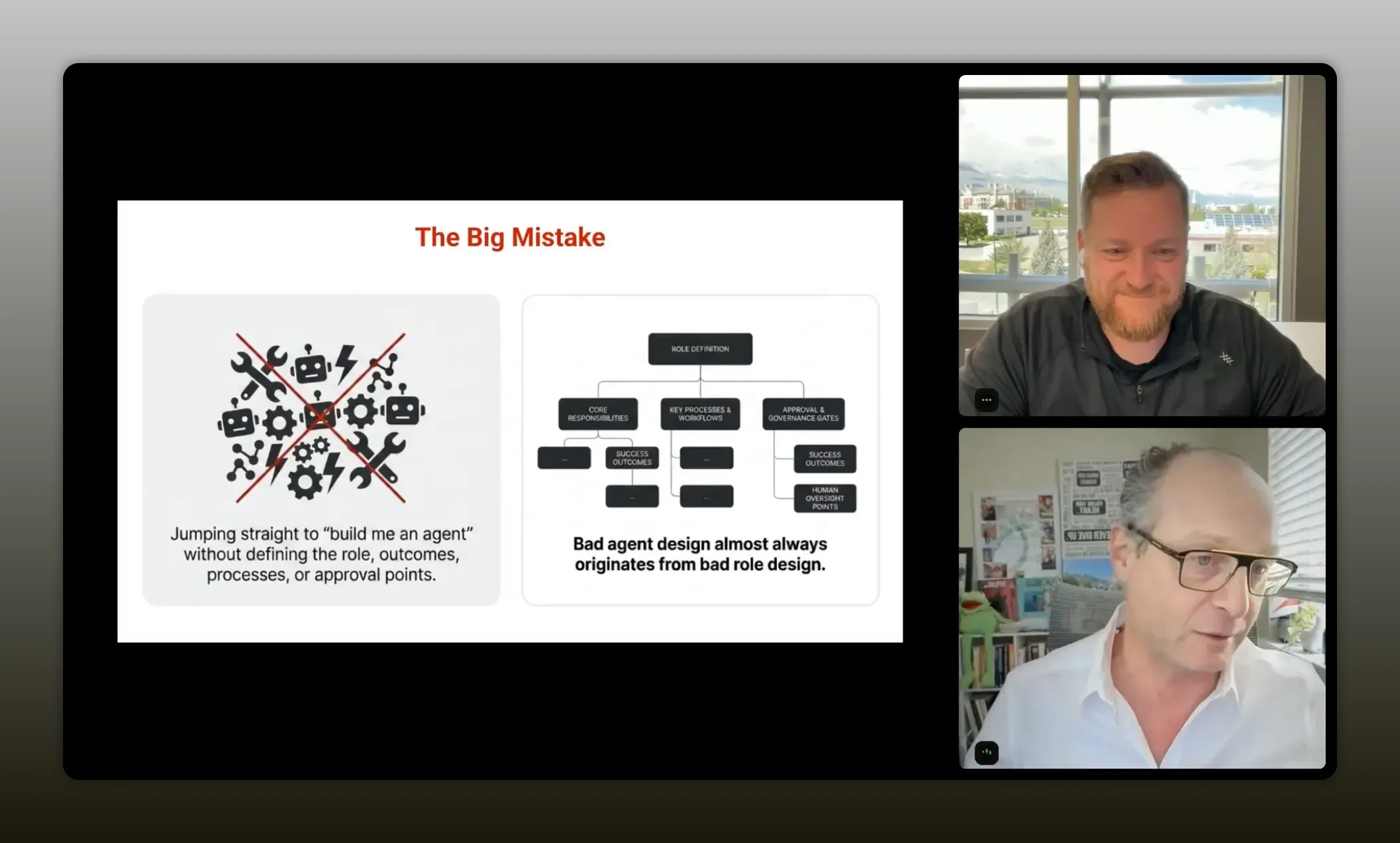
“People are making totes progress. They’re doing stuff that feels productive and feels like it’s going to make a difference, but it doesn’t actually make the difference.” – Curtis Fenn
The fix is not “use more AI.” The fix is to think more clearly about work itself.
That means asking:
- What role is this work supposed to accomplish?
- What decisions require reasoning?
- What tasks are already deterministic?
- What context actually matters?
- Where should automation handle the work cheaper and faster?
If you get those questions right, AI becomes a force multiplier. If you skip them, you get more output and less outcome.
This is also why disciplined operating systems in partnerships and marketing matter so much. If you want a broader framework for that kind of operating rigor, this practical playbook for revenue teams is a strong companion read.
Start with the role, not the tool
One of the most useful ideas in this conversation is simple: if you want to build agentic workflows, start without AI.
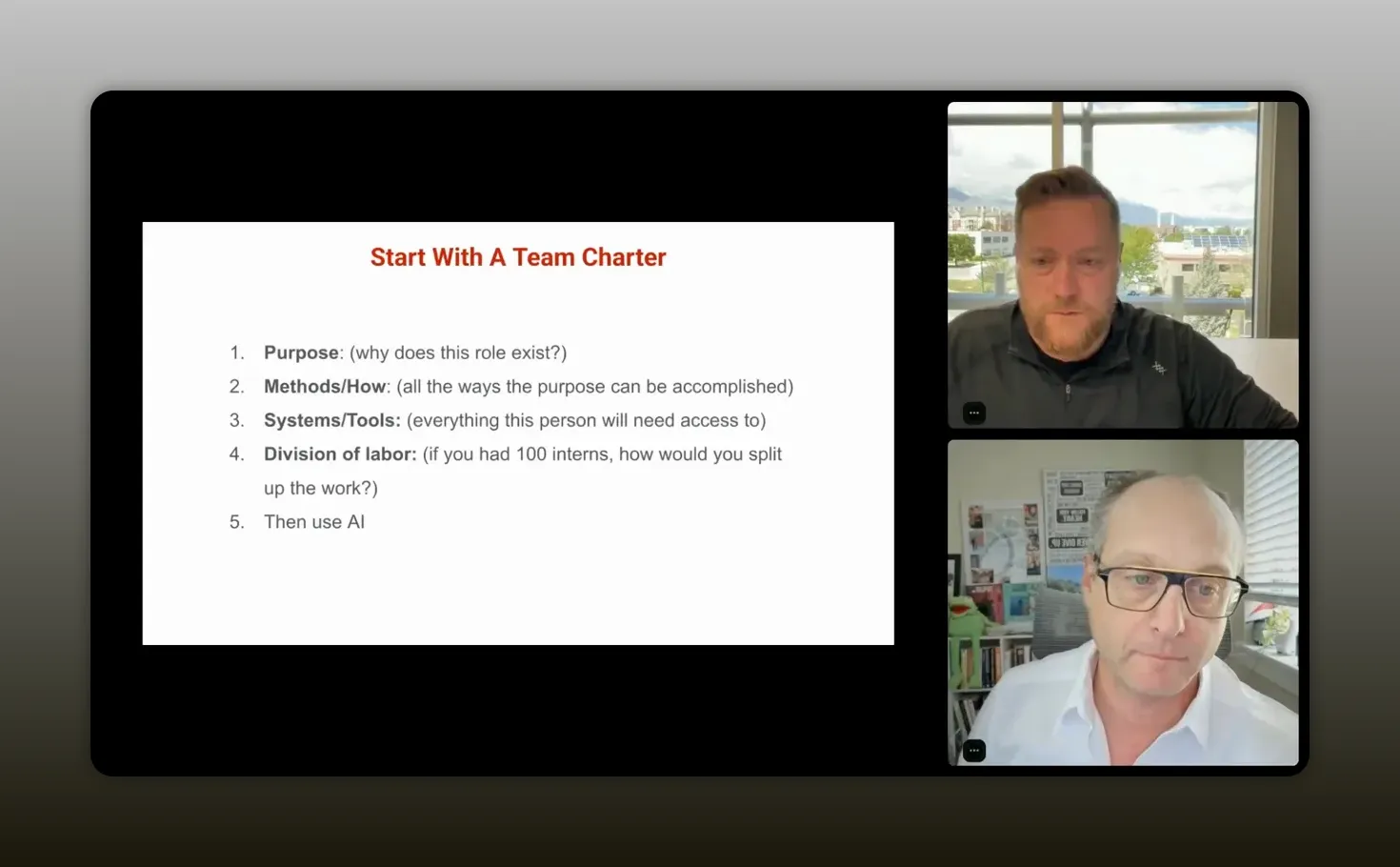
“If you want to start to use agentic AI and use AI at a completely next level, then you have to start without any AI.” – Curtis Fenn
That sounds backward until you think about why most AI systems disappoint. If you begin with the tool, the tool brings the internet’s average understanding of how work should be done. That can be useful, but it is generic. It often creates a process you now have to fit into.
Alternatively, if you begin with your own brain dump, you start from what already works in your company, your role, your market, and your operating style.
Curtis put it this way: you succeed when you exploit your strengths and fix your weaknesses. If you go AI-first too early, you lose the strength side of that equation because you are borrowing a general model of work instead of building on your actual one.
This applies whether you are:
- A CMO designing a modern marketing team
- A partnerships leader building an affiliate program
- A manager trying to scale a small team
- A solo operator trying to 10x output without burning out
The breakthrough is realizing every role is really a team. Even if one person currently does everything, that work still contains multiple functions, decisions, systems, and responsibilities.
Once you can see that structure, you can decide what stays human, what becomes automation, and what rises to the level of an agent.
The role charter framework
Curtis traced this back to something he and Justin were working on years ago: charter docs, org charts, and role design. Before AI agents existed, they were already thinking this way. What does this system need in order to function correctly? Then they would hire people or products to fill the gaps.
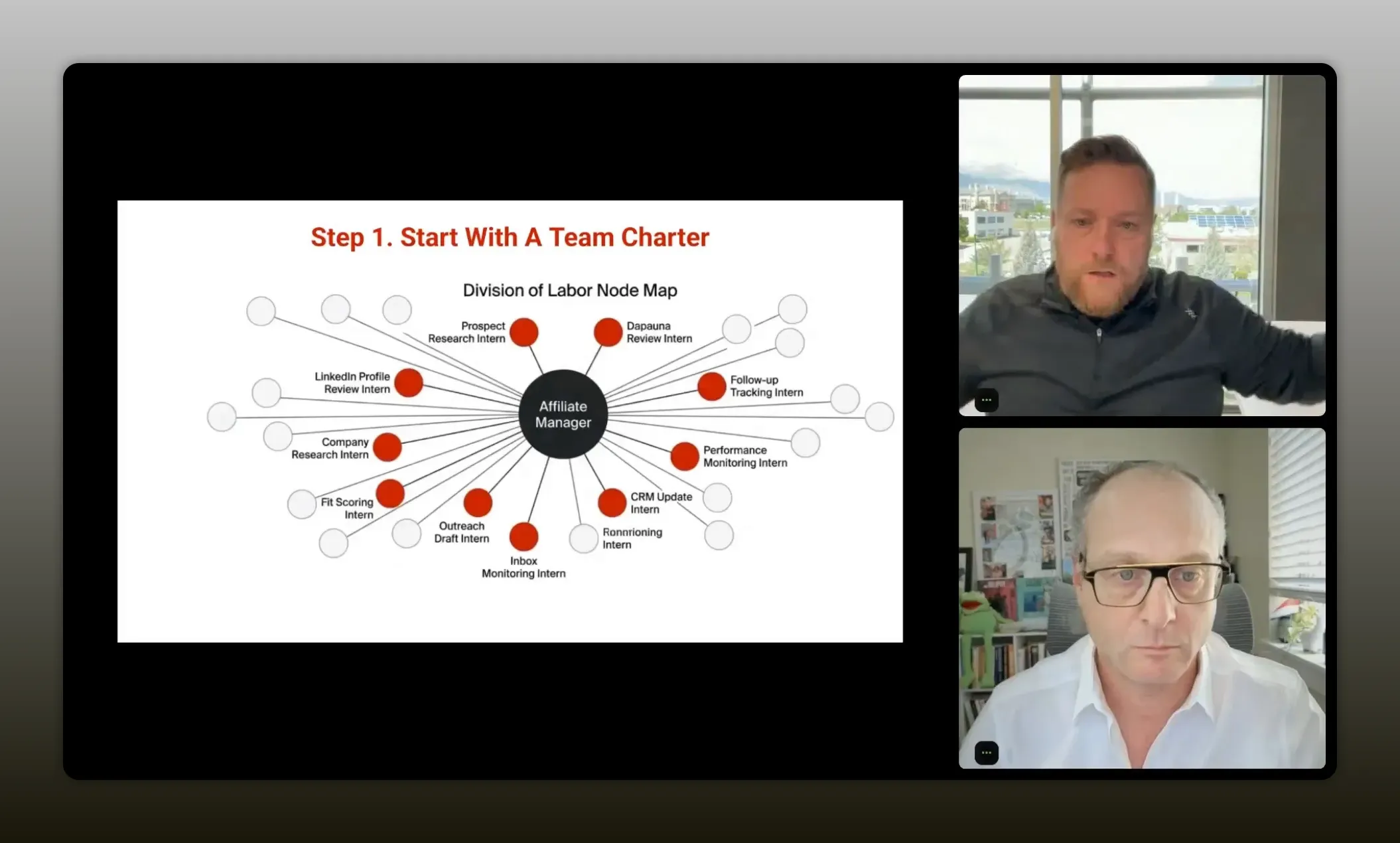
“Start with a charter doc—shut AI down for a second, do a brain dump, define the role’s purpose, map the methods, then only after that bring AI in.” – Curtis Fenn
That same thinking now becomes the foundation for agentic teams.
Here is the framework.
1. Define the purpose of the role
Start with one role. Curtis used an affiliate manager as the example.
Ask: Why does this role exist?
Not the job title. Not the task list. The purpose.
For an affiliate or partner manager, that might be:
- Identify potential partners
- Curate relationships with those partners
- Support partners with content and communication
- Maintain a healthy partner pipeline
The purpose statement matters because everything else should connect back to it.
2. Brain dump every way the role currently gets the job done
This is where you go from vague to concrete.
Do not write “find potential partners.” Write how that happens.
- Search LinkedIn for relevant profiles
- Review social presence and audience fit
- Compare partner ICP to your ICP
- Check engagement signals
- Review prior collaborations or brand alignment
- Reach out through email or direct messages
- Maintain inbox follow-up cadence
Get painfully specific.
Most people already have process. They just have not documented it. Process is simply how you do things. If the work exists, the process exists, even if it is still trapped in someone’s head.
3. List every system and tool the role needs
Think like you are onboarding a new employee.
- Email account
- Slack access
- Task management system
- CRM
- Analytics tools
- Internal docs
- Content assets
This matters because tools become integrations later. If you skip this step, your future agent may know what to do but have no way to do it.
4. Break the work into division of labor
This is one of the best mental models in the whole conversation.
Ask yourself: If I had 100 interns, how would I divide this work?
That question forces the hidden sub-roles into the open.
In an affiliate function, you might create mini-roles like:
- Prospect researcher
- Partner vetting analyst
- Inbox manager
- Copywriter
- Relationship manager
- Performance tracker
Now you are no longer staring at one giant, fuzzy role. You are looking at units of work that can be assigned, documented, automated, or agentified.
5. Only then bring AI in
Once your brain dump exists, AI becomes useful in the right way.
Now you can ask it to:
- Suggest missing methods you forgot
- Expand the division of labor
- Categorize tasks by human, agent, prompt, or automation
- Draft SOPs and skill docs
- Recommend tool and workflow structures
That is a totally different use of AI than asking it to invent your operating model from scratch.
How to break work into agent-ready parts
Once you have that role charter, the next step is translation.
Curtis gave a great way to think about how your current business assets map into an agentic system:
- SOPs become prompts and skills
- Training docs become knowledge base
- Tools become integrations and connections
- Intern jobs become agent candidates
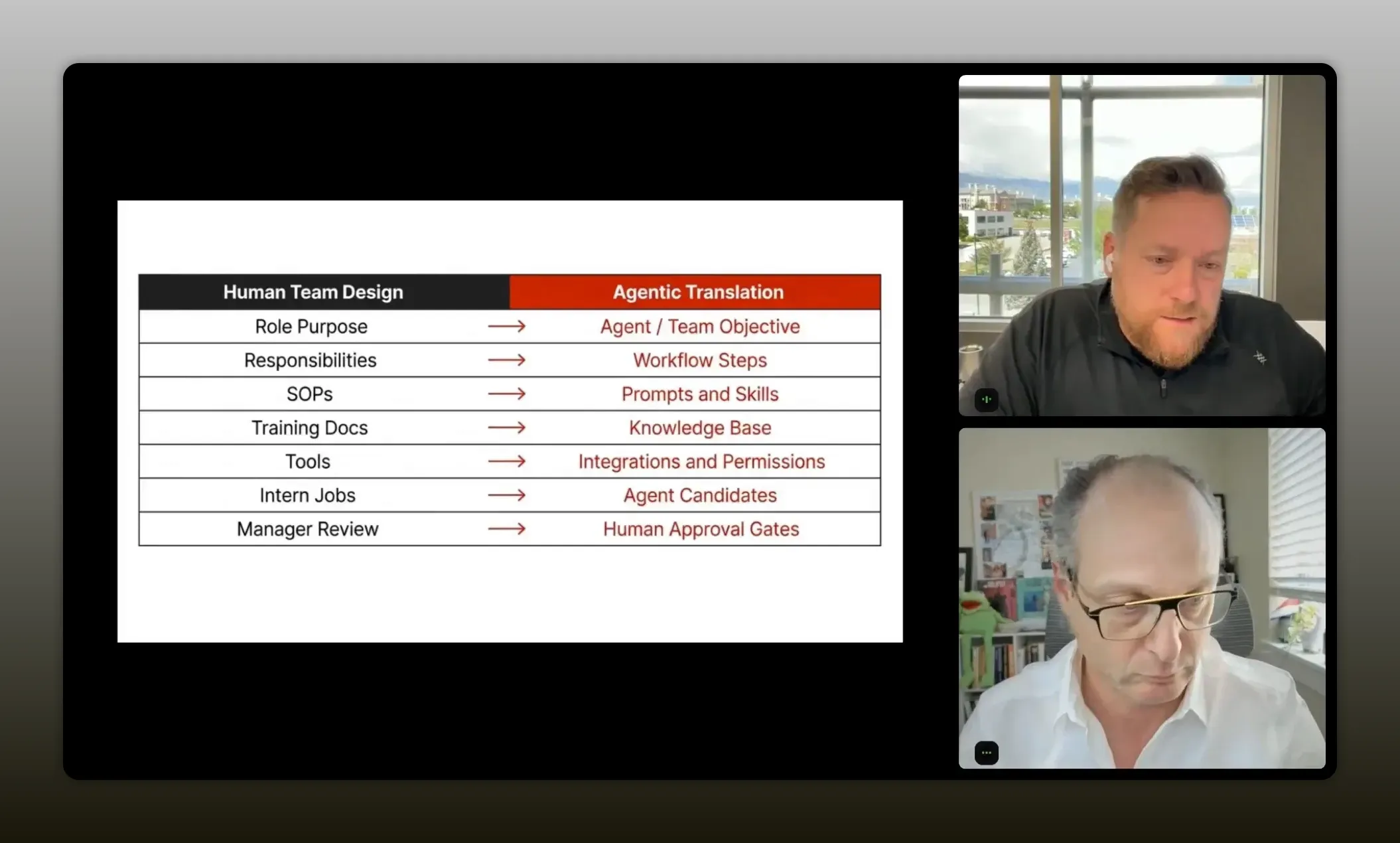
“Think of your current assets like building blocks for an agentic system: SOPs become prompts and skills, training docs become the knowledge base, tools become integrations and connections, and intern jobs become agent candidates.” – Curtis Fenn
Instead of just a pile of AI agents, a true “agentic team” is a combination of:
- Good automation
- Clear prompts
- Well-defined skills
- Structured knowledge
- Human review where needed
That hybrid model is what actually works right now.
It is also highly relevant in partner-led growth environments. If you are designing systems that combine people, data, and repeated workflows across a partner ecosystem, this piece on ecosystem orchestration pairs well with Curtis’s framework.
Automation vs prompts vs agents
This is where a lot of confusion clears up.
Not everything should be “agentic.” In fact, forcing everything into an agent is often the wrong move.
Justin asked Curtis to separate three categories that people often blur together. Curtis answered with a practical lens: use AI when you need reasoning. Use automation when the decision is already known.
Use automation when the path is deterministic
If a CRM field changes and you want that to trigger an action, that should usually be automation.
You do not need an agent to repeatedly discover the same condition and make the same decision over and over. That burns money, tokens, and time.
Examples:
- A field change triggers a follow-up
- An NPS score of 9 or 10 sends an invitation email
- A record status routes to a pipeline stage
- A scheduled newsletter goes out on Monday
Use prompts for bounded tasks
If the work is a one-off task with a known ask, a good prompt is often enough.
Examples:
- Write an email using these talking points
- Summarize this meeting
- Draft a partner outreach note
- Rewrite this paragraph in a cleaner style
Curtis made a sharp point here: if the task could have been handled by an older model like earlier ChatGPT versions, it probably does not need to be an agent. It just needs a strong prompt.
Use agents for bigger roles and decisions
Agents should own bigger outcomes, not tiny tasks.
If you want something to manage a larger process, make judgments using guidelines, and carry responsibility across multiple steps, then an agent starts to make sense.
Examples:
- Manage the process of producing a newsletter
- Review interview transcripts and determine the best content format
- Own the partner prospecting pipeline
- Monitor and coordinate multi-step research and output generation
That is the cleanest distinction in the whole article:
Reasoning belongs to agents. Repetition belongs to automation. Tasks belong to prompts.
“Agents should own bigger roles. They should own bigger outcomes.”- Curtis Fenn
A real example: customer story engine
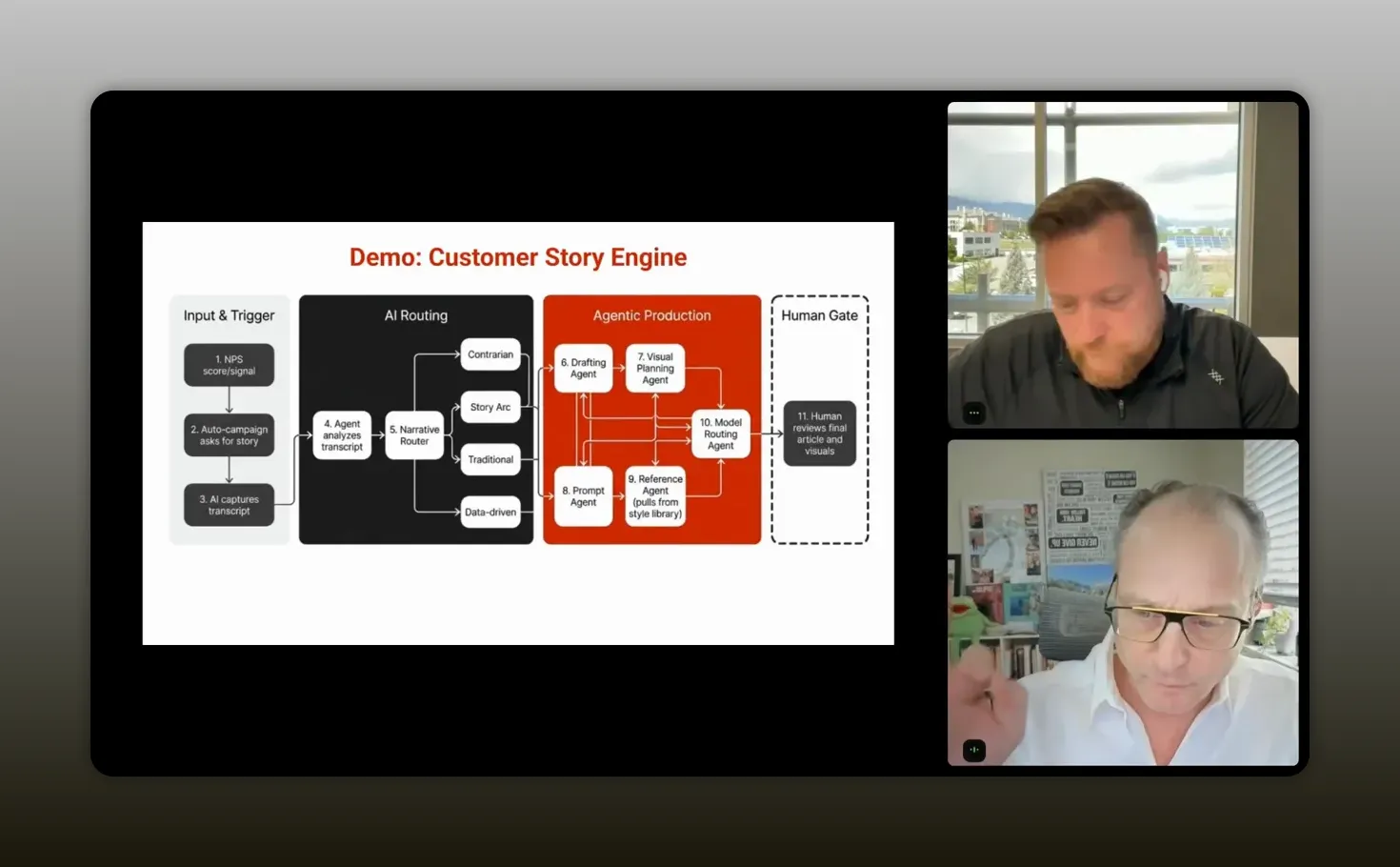
To make this real, Curtis walked through a workflow his team uses around customer stories.
He and Justin both argued that customer stories are one of the only forms of marketing that truly matter. People might use AI for research, but when it comes time to decide, they still want proof from real people. Most of us immediately go to the reviews when perusing products on Amazon. And increasingly, you trust the reviews with photos from actual customers more than the polished marketing copy.
That is why the workflow matters.
Step 1: Let automation detect the opportunity
When a customer gives a high NPS score, say a 9 or 10, an automation sends them an invitation to do an interview.
No agent needed. The decision is already made.
Step 2: Use AI to conduct the interview
The interview itself is handled by AI. Curtis mentioned using tools like ElevenLabs along with workflow tools and lightweight app builders to create a system that asks strong interview questions and collects the conversation.
This is where AI is doing work that is scalable and useful.
Step 3: Send the transcript to an agent for reasoning
Once the interview is done, the transcript goes to an agent.
Now you need judgment.
The agent has to decide:
- Is there enough useful material here?
- Is this a story worth publishing?
- What kind of format fits the transcript best?
- Should this become a case study, blog article, or a more narrative piece?
This is not basic prompting. This is interpretation.
Curtis described the agent as needing real skills:
- Copywriting
- Journalistic discernment
- Story extraction
- Content format selection
Step 4: Hand off the known path back to automation
Once the agent makes the judgment call and selects a direction, the workflow can drop back into automation and prompting.
If the content format is known, you no longer need expensive reasoning on every next step. You can route the draft into the appropriate content generation or publishing process.
That handoff is the key.
A lot of bad AI workflows keep the agent active too long. They ask it to continue deciding things that are already decided. Curtis’s approach is more efficient: let the agent do the thinking, then let the system do the doing.
How to train AI on you first
Another standout idea from Curtis is where to start if you feel overwhelmed.
Do not begin by building a giant multi-agent system. Start by teaching AI who you are.
His reasoning is simple. If you could hire a person who instantly knew:
- How you think
- How you solve problems
- How you brainstorm
- How you give feedback
- How you like writing to sound
- How you evaluate quality
that person would become useful much faster.
AI can do something close to that, but only if you intentionally extract and transfer that knowledge.
A practical starter prompt
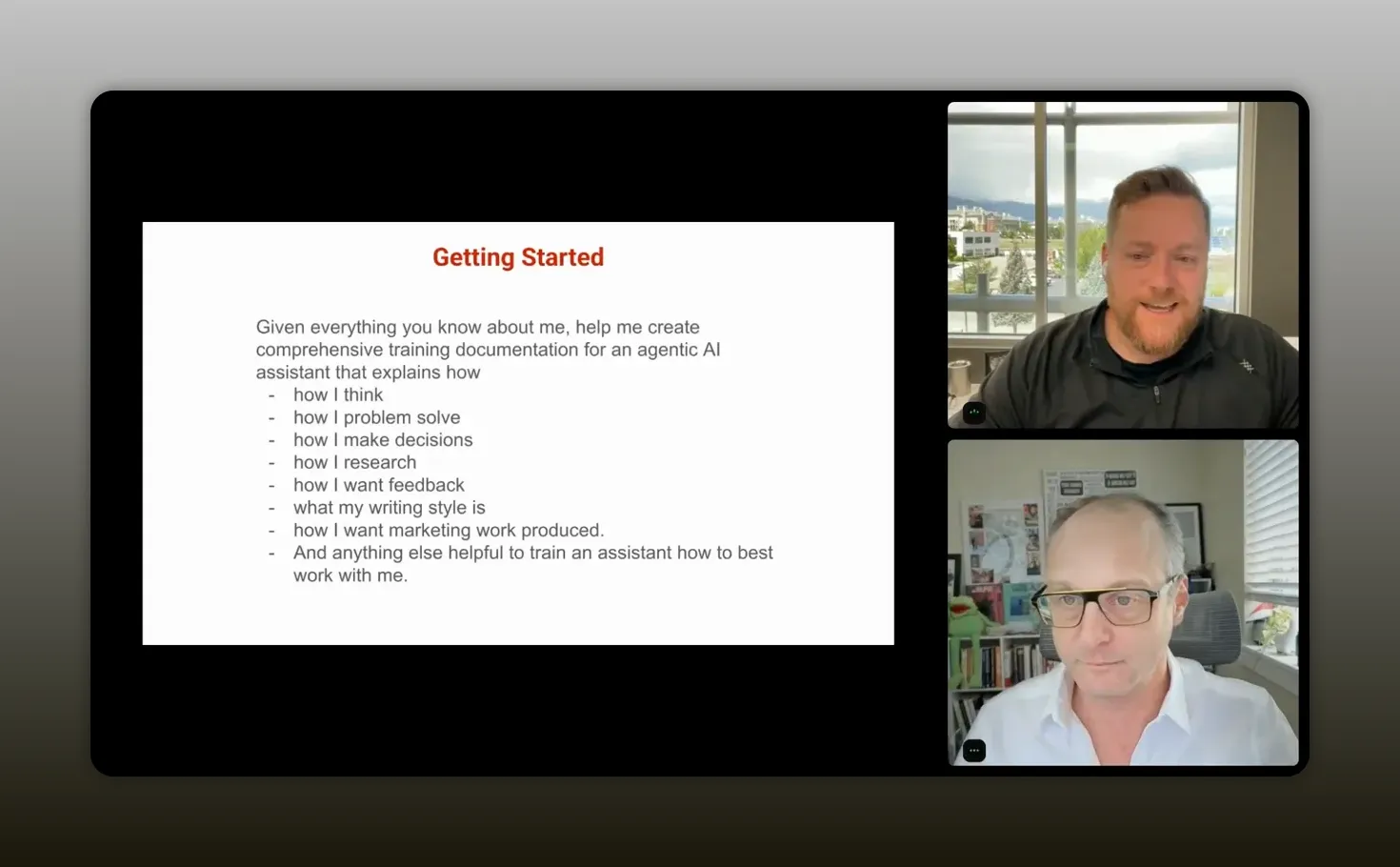
Curtis recommended using your preferred chat tool and asking it to generate training documentation based on everything it already knows about you.
The idea is to ask for comprehensive guidance on your style, preferences, reasoning patterns, and ways of working.
If you have spent months or years using a chat tool, the result can be surprisingly good. It has already learned a lot from your feedback loops.
That documentation can then be used to personalize an agentic tool like Manus or a more advanced environment later.
“The best way to train an agentic AI to get started is to train them on you.” -Curtis Fenn
Why this works so well
Most people have a rough first experience with AI because they are starting from zero every time.
They think the model is dumb. And in a sense, it is. Curtis joked that it can feel like “the dumbest employee with all of the knowledge of the world.”
That changes when the system understands your preferences up front.
You get:
- Less repetitive correction
- Better first drafts
- Faster alignment on tone and structure
- More useful brainstorming
- More productive collaboration with the model
From personal style to reusable skills
Once you have that personal documentation, the next move is to ask AI which parts should be turned into skills.
Skills are exactly what they sound like: specific capabilities the AI can use repeatedly.
Examples might include:
- How to brainstorm with you
- How to critique ideas the way you prefer
- How to write in your style
- How to structure feedback
- How to prioritize ideas in your business context
That is where a one-off chat starts becoming a reusable operating asset.
How to keep context portable
One of the better questions raised in the conversation was about portability. If tools change quickly, how do you avoid being trapped inside one system?
Curtis’s answer was practical: build your own onboarding and context documentation in portable formats.
That means storing the important stuff outside the vendor whenever possible.
What should be portable?
- Your personal operating instructions
- Role charters
- SOPs
- Knowledge files
- Architecture docs
- Workflow diagrams
- Skill descriptions
What format should you use?
Curtis recommended Markdown as the base layer.
That includes standard documentation as well as Mermaid diagrams for process flows and architecture maps. Mermaid is a text-based diagramming syntax that many AI tools can read and generate well. You can learn more at Mermaid’s official documentation.
He also mentioned using Obsidian as a second brain, where those Markdown files can live in a durable, accessible structure.
“Obsidian then becomes my second brain of everything, where whatever I’m using, I can give access to the Obsidian files.” – Curtis Fenn
Three agent docs worth knowing
Curtis referenced three specific files used in his own agent systems:
- Soul markdown file
- Identity markdown file
- Agent markdown file
He did not unpack each one in detail, but the core principle is easy to grasp: keep the essential behavior, identity, and operational guidance separate and reusable.
This is the modern version of lowering switching costs. Instead of being locked into one CRM or project tool, you are preserving the most valuable layer: how your system thinks and works.
Where human judgment still matters
With all the excitement around agents, it is worth saying clearly: more context is not always better, and more AI is not always smarter.
Instructions are usually good
Instructions help the system behave correctly.
Examples:
- How to communicate with you
- How to structure brainstorming
- How to format outputs
- What tone or style to use
Context can become noisy
Context includes project history, goals, business priorities, design rules, and prior decisions. That can help, but too much of it can also degrade performance.
Curtis even noted that in some coding scenarios, more context can lead to worse output.
There are also times when you do not want personalization at all. For example, in pure research tasks, you may want a model that is less biased by what it thinks you want to hear.
That is why some operators use different tools for different jobs:
- One model for deep research
- Another for reasoning and coding
- Another for personalized collaboration
The point is not loyalty to one model. The point is fit.
And if you are using AI inside a partner or revenue motion, this is the same maturity curve you see in good programs generally. Strong systems beat clever one-offs. This article on flywheels over funnels reinforces that principle from the partnerships side.
Recommended tools
Curtis named a handful of tools and categories that fit different stages of the journey. The specific stack will change, but the roles they play are useful to understand.
Core chat and reasoning tools
- ChatGPT for ongoing personalized interaction and memory-rich collaboration
- Claude for reasoning and advanced work, especially as systems get more sophisticated
- Gemini for research-oriented tasks where broader search intelligence can help
Starter agentic tool
- Manus as an accessible place to begin building and personalizing agents
Advanced workflow and build tools
- ElevenLabs for voice and conversational experiences
- Make or similar workflow tools for automation orchestration
- Replit, Lovable, or Bolt for lightweight app creation and experimentation
Documentation and portability
- Obsidian for maintaining a portable second brain in Markdown
- Mermaid diagrams for mapping workflows and architecture in AI-readable form
The most important takeaway is not “use this exact stack.” It is this:
Choose tools based on the role they play in your system, not based on hype.
FAQs
Where should you start if your AI workflows feel messy?
Start by turning AI off for a moment and documenting the role, purpose, tasks, tools, and division of labor behind the work. If you skip that step, you usually end up building around the tool instead of around the actual job to be done.
What is the difference between an automation and an agent?
An automation handles deterministic actions where the rule is already known. An agent is better when the system needs to reason, interpret, or choose between paths. If the decision is obvious and repeatable, automate it. If it requires judgment, consider an agent.
Do you need agents for simple writing tasks?
Usually not. If the job is a bounded task like drafting an email or summarizing notes, a strong prompt is often enough. Agents make more sense when you want the system to own a larger outcome across multiple steps.
How do you avoid “totes progress” with AI?
Focus on outcomes instead of activity. Ask whether the system changed the actual workflow, reduced effort, improved quality, or increased throughput. If it only created more output without improving the business result, it is probably totes progress.
What is the fastest way to improve AI output quality?
Train the system on your preferences first. Use an existing chat history to generate documentation about how you think, communicate, brainstorm, and evaluate work. Then use that documentation to personalize your agents and workflows.
Should you keep all of your context inside one AI tool?
No. It is smarter to keep your most important operating documents in portable formats like Markdown. That gives you flexibility to move between tools as capabilities and pricing change.
Is more context always better for AI?
No. Too much context can muddy outputs, especially in technical or coding workflows. Clear instructions are usually helpful, but context should be curated so the model gets what it needs without excess noise.
Conclusion
The big lesson here is not that AI replaces process. It is that AI finally exposes whether you have process.
If your workflows are fuzzy, your results with AI will be fuzzy too. If your roles are clear, your systems documented, and your decisions properly separated from your automations, you can create something much more valuable than a clever prompt library.
You can create a working operating system.
That is what Curtis is really pointing to. Do not chase the flashiest agent demo. Do not overcomplicate a simple problem. Do not mistake output for progress.
Map the work. Define the role. Split the labor. Use agents where reasoning matters. Use automation where the path is known. Train the system on how you think. Keep your context portable. Then iterate.
That is how you move from AI experiments to force multiplication.