Get 1,000+ Paid Installs: Build HubSpot Integrations Like Fathom.ai
Expert advice from Johan Jansson, Jesse Cunningham and Arlo Hill.
Introduction
It’s become clear integrations are no longer a checkbox; they are a differentiator that decides whether your product becomes essential or disposable. The marketplace has thousands of apps, and the pressure to stand out is intense. What used to be “does it integrate?” has evolved into “how deeply does it integrate?” and that difference defines acquisition, stickiness, and long-term growth.
Build integrations that solve real customer pain points; bad integrations can become detractors and even cause internal teams to advise customers not to use them. -Jesse Cunningham
Table of Contents
- Introduction
- Why integration depth matters
- The integration paradox
- Surface-level vs deep integrations: what actually changes
- Core extensibility tools in HubSpot: app cards and workflow extensions
- Run the workflow disruption test
- Build for stickiness — integration features that lock in value
- Partner feedback loops: how agencies and solution partners accelerate impact
- OneFlow case study: practical lessons from a contract management integration
- Fathom case study: how a note-taker became a CRM-native forecasting engine
- How to measure integration success
- How to design for stickiness
- How to pick partner types and build go-to-market plays
- Common pitfalls and how to avoid them
- Implementation checklist for deep integrations
- Practical prioritization framework
- How to use customer stories to scale adoption
- Checklist: monitoring and continuous improvement
- FAQs
- Conclusion
Why integration depth matters
When you embed your product into a customer’s daily workflow, you stop being a separate tool and start being a force multiplier. That shift is why integration depth matters. Shallow integrations can create friction, manual work, and frustrated customers. Deep integrations remove friction, automate routine work, and surface value where customers already live — their CRM.
The outcomes you get from depth are measurable and strategic: higher activation, better retention, improved net retention, stronger word-of-mouth, and a longer competitive moat. It’s not just about sending data back and forth. It is about becoming part of an existing workflow, so changing you becomes costly and unnecessary.
The integration paradox
You must accept an important paradox: an integration is a growth lever only when you do it well. One deeply integrated feature that solves a clear pain point can produce exponential value — one plus one equals three. Conversely, a poorly executed integration can be a liability. Teams may tell customers not to use it, and negative reviews will spread through marketplaces and partner networks.
Measure the risk of doing nothing versus doing something half-heartedly. A shallow integration often costs more than it saves: it increases cognitive load, demands manual exports and imports, and ultimately leaks trust. The right strategy is to invest deliberately and iteratively in features that map to high-impact workflows.
Surface-level vs deep integrations: what actually changes
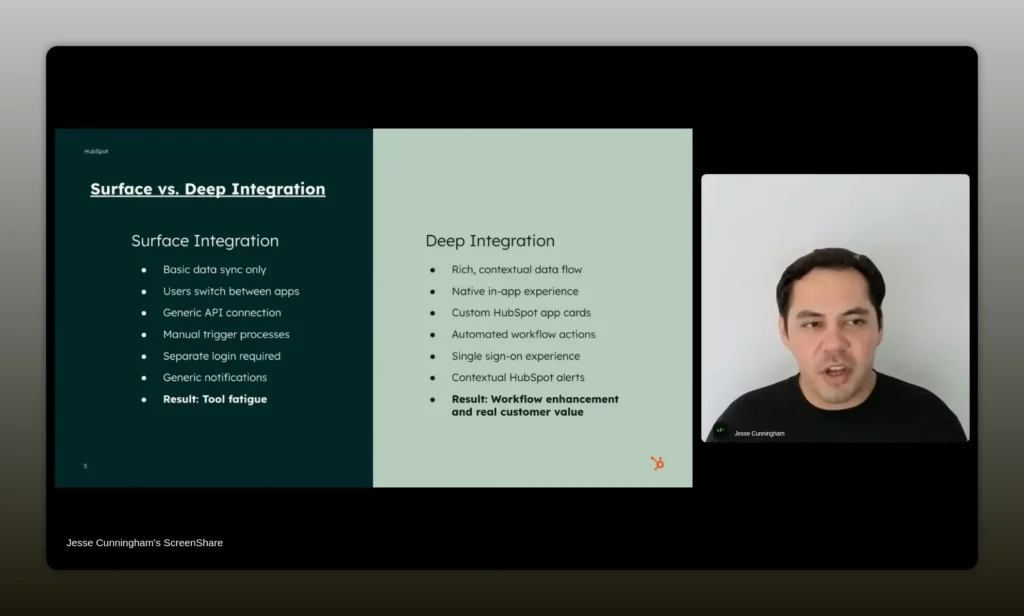
Surface-level connections typically bring a handful of fields over, maybe a couple of generic API calls. They prove connectivity but rarely change behavior. You still have tab hopping, manual reconciliations, and partial data. Customers feel the friction and stop relying on the integration.
Deep integrations, by contrast, are about experience. They embed your app into the CRM interface, use automation to remove manual steps, and update structured fields so downstream processes and reports work seamlessly. The goal: change behavior so your product becomes indispensable.
Core extensibility tools in HubSpot: app cards and workflow extensions
Two practical building blocks make deep HubSpot integrations achievable and highly effective:
- App cards: These let you embed an interactive UI directly into contact, company, and deal records. Users no longer have to toggle tabs. Your content, actions, and summaries live where decisions are made.
- Workflow extensions: These let your app trigger actions or respond to HubSpot events. When a piece of data arrives, your app can create tasks, update deals, or fire off notifications. That automation is how you remove manual work and create repeatable outcomes.
Embedding with the right React components and leveraging workflow extensions allows you to be both visible and actionable at the moment of decision. That is how integrations move from “nice to have” to “how we operate.”
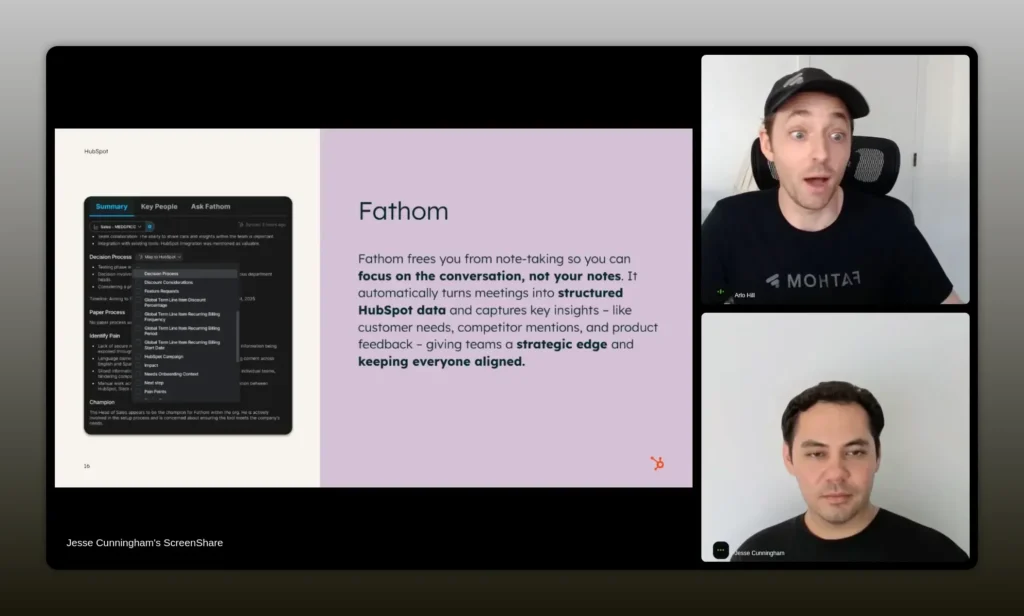
Displays of your most recent meetings, the thumbnails, the summaries are all able to appear natively in HubSpot. -Arlo Hill
Run the workflow disruption test
To assess whether an integration is truly valuable, simulate a user’s experience and count the steps. If using your product requires exports, imports, or switching between multiple tabs more than a few times, you have a workflow disruption problem.
Talk to existing customers to map their workflows, and if you need to scale quickly, use modern language models to identify common patterns. Most workflows are not infinitely variable — you’ll often find a top 80 percent pattern that, if optimized, will cover the majority of customers.
Build for stickiness — integration features that lock in value
A sticky integration accomplishes two things: it provides immediate convenience, and it surfaces structured data that improves other processes. When the CRM becomes the system of record for information your app produces, multiple teams begin relying on that shared truth. Sales, marketing, and customer success can each use the same fields to coordinate activities — and that’s when switching costs jump up.
Examples of sticky functionality:
- Writing meeting summaries and action items back to deal records
- Updating opportunity likelihood or custom scoring fields based on meeting transcripts
- Creating tasks for follow-ups automatically when a specific phrase or intent is detected
- Embedding context-sensitive app cards so reps see the exact notes or assets they need at the right time
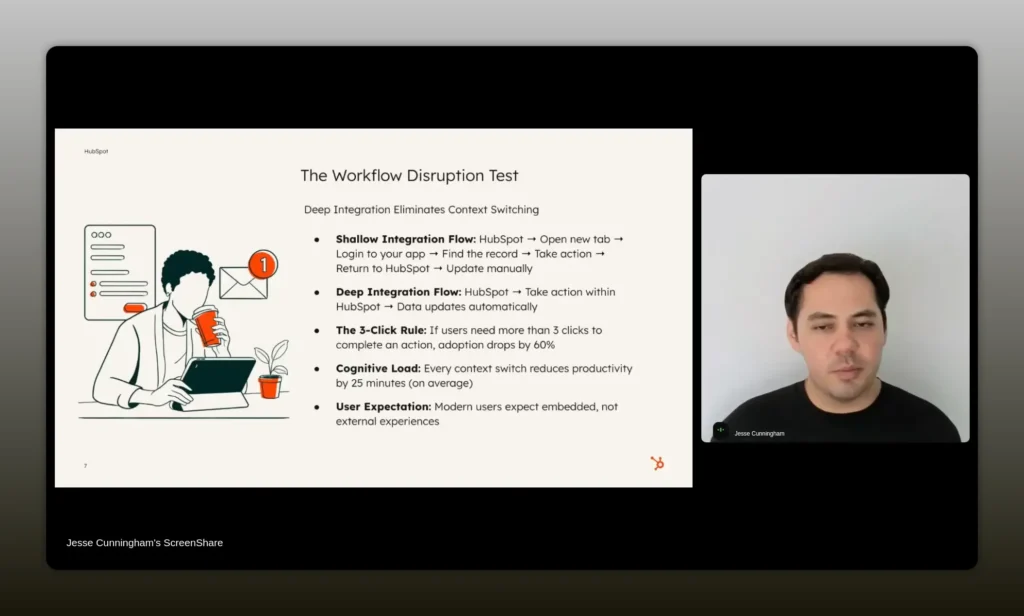
Seamless workflow feels like native HubSpot functionality. -Jesse Cunningham
Partner feedback loops: how agencies and solution partners accelerate impact
Solution partners and agencies live at the intersection of customer needs and the HubSpot platform. They can reveal the real workflows customers use and propose actionable product changes. Instead of sending generic outreach to large partners, find a smaller set of engaged, expert partners and co-create solutions with them.
When partners become early adopters and validators, they can:
- Provide vertical-specific requirements that unlock new markets
- Pilot workflow automations with paying customers
- Act as references and distribution channels in a trusted way
- Help build content that educates other customers
Johan explains how OneFlow used that approach to prioritize workflow development that unlocked financial services customers in the US. He and his team treated the solution partner as a data source and a co-seller — a relationship that produced measurable revenue and a long-term partnership.
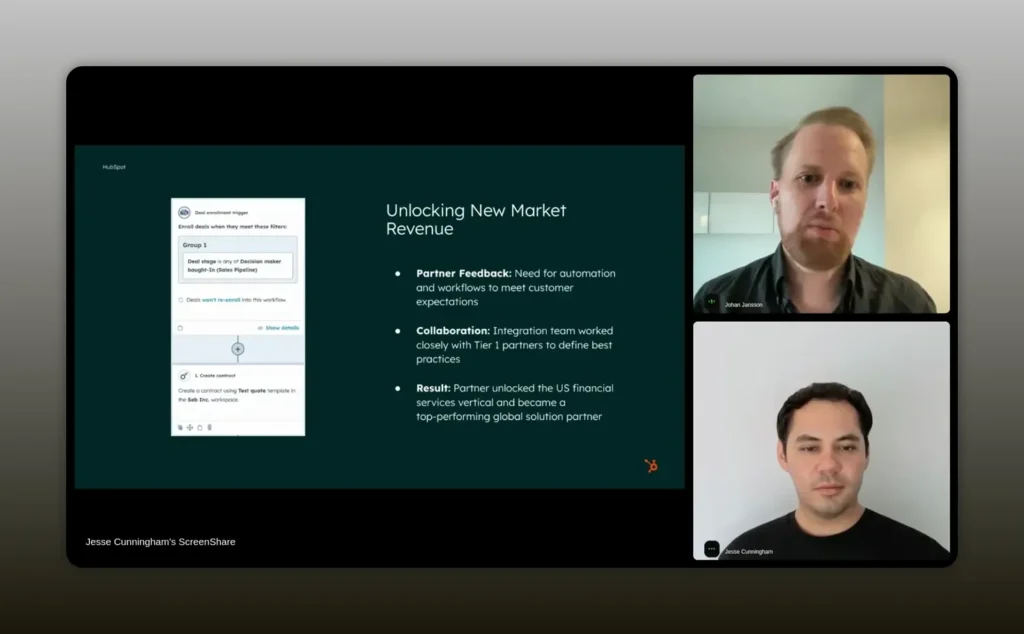
We worked with a solution partner, built workflows driven by KPI goals, and unlocked the financial services vertical in the US. -Johan Jansson
OneFlow case study: practical lessons from a contract management integration
OneFlow had a clear problem to solve: contracts as static PDFs scattered across systems. The business value was obvious — convert documents and contract data into actionable CRM properties and automations.
How they approached it:
- Talk to solution partners who deeply understand HubSpot and vertical requirements.
- Prototype workflows that bring contract metadata and status into HubSpot properties.
- Measure outcomes: Are deals closing faster? Are users working from a single source of truth?
- Iterate on KPIs and expand into adjacent verticals once the core behavior shows positive lift.
As a result, OneFlow made sales the source of truth for contracts, and the integration became a lever to open new verticals. The lesson: pair product investment with partner-led GTM and measurable KPIs to de-risk and accelerate the payoff.
Fathom case study: how a note-taker became a CRM-native forecasting engine
Fathom is an AI note taker. On the surface, that sounds commodity—lots of tools transcribe meetings—but Fathom turned its integration with HubSpot into a strategic advantage by focusing on where the notes went and how they were used.
Three phases of their integration evolution:
- Initial sync: Attach meeting summaries to contacts, companies, and deal records so notes live where the team expects them.
- App cards: Use HubSpot app cards to show recent meetings, thumbnails, and summaries directly inside CRM records so reps don’t have to leave HubSpot to access insights.
- Deal sync and structured fields: Transform call-level insights into deal-level properties that auto-update after each call. Those properties then feed forecasting and reporting automation.
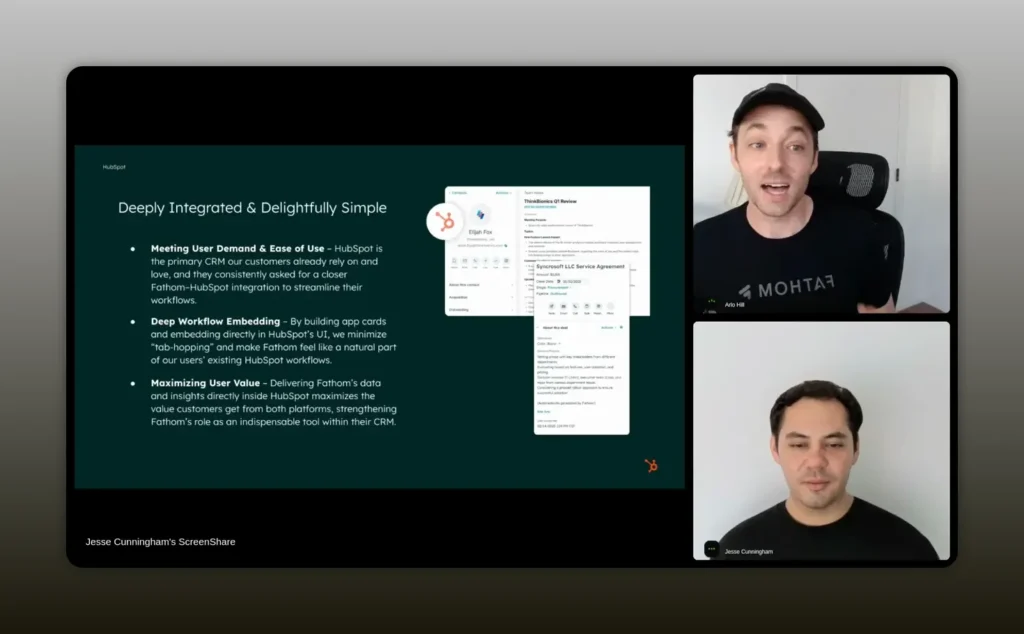
Once you have structured data updating properties within HubSpot, there are a lot of magical things you can do. -Arlo Hill
Real customer impact:
- Automated forecasting: A customer automated their forecasting model using fields updated after every call, which improved forecast accuracy and reduced manual adjustments.
- Time savings: Reps saved substantial time previously spent copying notes into the CRM.
- Higher retention: Users of the HubSpot integration saw a 33 percent higher net retention rate, because the combined product made both tools more valuable.
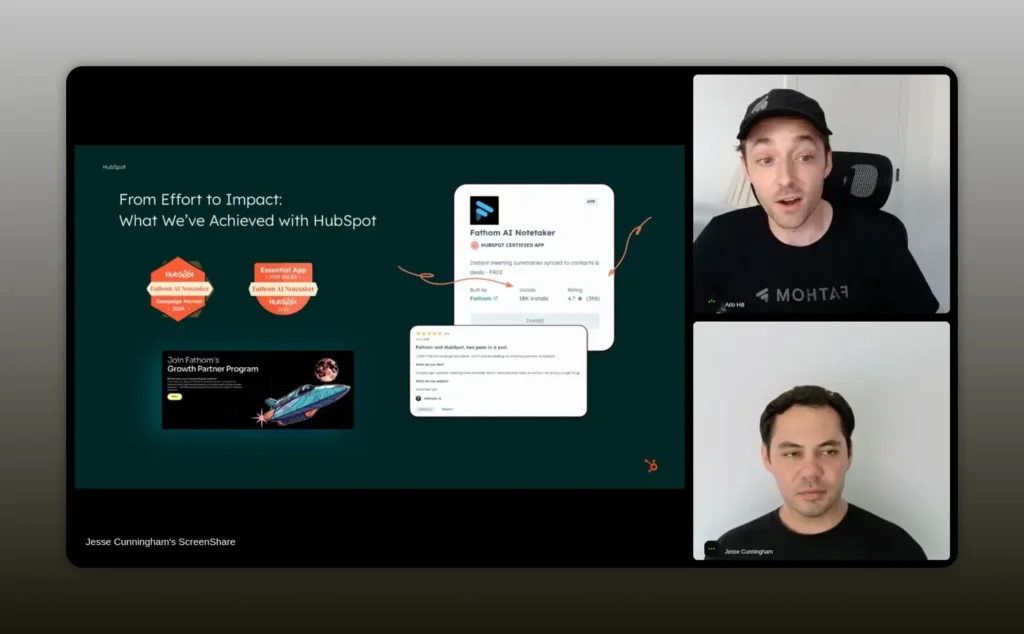
Customers who install HubSpot become better users of Fathom; the integration drives retention and growth. -Arlo
How to measure integration success
Metrics provide the signal you need to justify further investment. Track a mix of adoption, behavioral, and business metrics:
- Installs and active installations — initial interest vs active use.
- API activity — frequency and pattern of API calls indicate real usage.
- Feature adoption — are app cards opened, are workflow actions triggered?
- Retention and net retention — customers who use the integration should have better retention metrics.
- Support ticket trends and marketplace reviews — negative reviews and unresolved tickets are early warning signs.
- Revenue impact — referrals, upsells, shorter sales cycles in accounts using the integration.
When API activity declines for a given customer, treat it as a churn risk signal and have customer success proactively engage. When you see a cluster of customers using your integration in a specific way, capture that use case and produce content and templates to scale it.
How to design for stickiness
Design decisions that create stickiness:
- Make the integration visible where decisions happen. App cards and native fields are essential.
- Update structured properties rather than just attaching documents. Structured properties enable automation and reporting.
- Make actions reversible and transparent so ops teams trust the automation.
- Offer default templates and presets for common verticals to reduce time-to-value.
- Collect usage analytics and instrument feedback loops so you can iterate quickly on the highest-impact features.
Stickiness is both product and process: embed the product in workflows and work with partners to embed it in organizational processes.
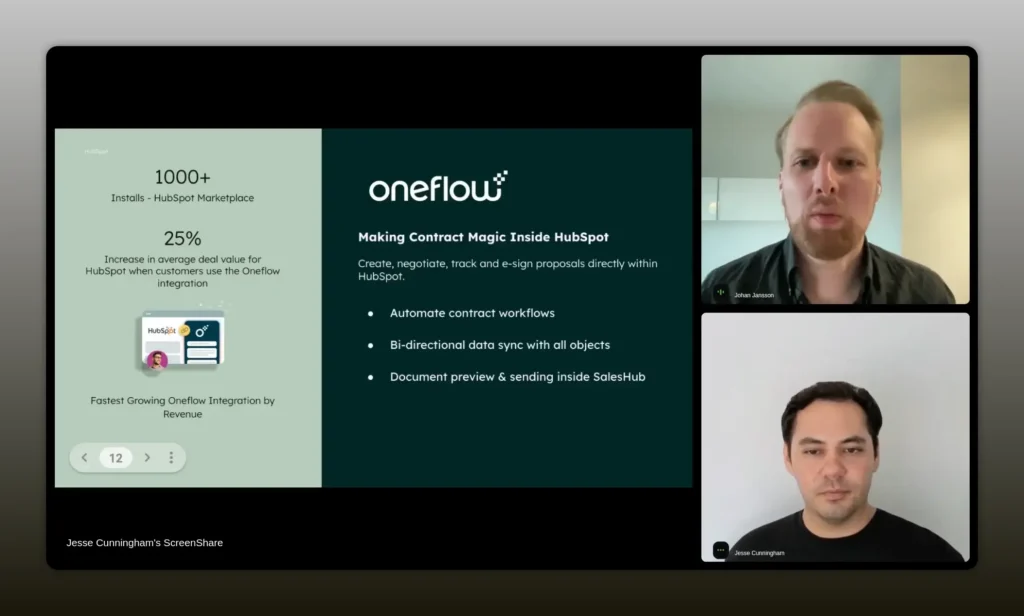
Start somewhere. Work with partners who are experts in the platform to validate the investment and scale usage. -Johan Jansson
How to pick partner types and build go-to-market plays
Partners are not one-size-fits-all. Consider three partner archetypes and what they bring:
- Solution partners and agencies — deep HubSpot experts who implement solutions and advise customers. They help identify workflows and mutual customers.
- App partners — complementary tools that can co-sell and create bundled solutions that solve broader problems.
- Referrers and channel partners — help with scale and introduce your product into new customer bases.
Best practices for partner selection and enablement:
- Start with a small number of engaged partners and co-create a repeatable playbook.
- Align on metrics and KPIs before building the integration, so you can measure success.
- Provide partner-focused content: installers, configuration guides, and vertical use cases.
- Build referral mechanics and incentives, but focus first on delivering customer value that makes recommendations natural.
Common pitfalls and how to avoid them
Common mistakes partners make:
- Chasing every partner type and losing focus. Prioritize the 1-2 partner archetypes that align with your ICP and product strengths.
- Building a shallow integration first and never iterating. Ship something minimal to learn, but plan the roadmap to deepen the most-used workflows.
- Relying only on large enterprise partners for credibility. Smaller, nimble partners can become champions and co-sellers.
- Ignoring marketplace reviews and failing to respond. Reply to negative reviews, fix issues, and demonstrate you care.
Implementation checklist for deep integrations
Use this checklist to move from a minimal connector to a sticky, deep integration:
- Map the user workflow end-to-end and identify the friction points your integration will remove.
- Define measurable KPIs: installs, API calls, retention lift, and revenue impact.
- Choose where to embed: contact views, deal records, company records, and app cards.
- Design property mapping for structured data to be written back to HubSpot.
- Implement workflow extensions for common automation triggers and actions.
- Instrument analytics for API activity, app card interactions, and workflow triggers.
- Onboard an initial set of solution partners for feedback and validation.
- Create partner enablement content and joint GTM assets.
- Monitor reviews and support tickets and iterate quickly on fixes and UX pain points.
- Scale by packaging vertical templates, content, and playbooks based on early user success stories.
Practical prioritization framework
When deciding what to build next, weigh opportunities against three dimensions:
- Impact — How many customers will benefit? How much time or revenue will it save?
- Effort — Engineering cost and time to market.
- Moat — How hard will it be for competitors to replicate?
Focus first on features with high impact, moderate effort, and a strong moat. Examples include embedding an app card that surfaces critical decision data, or creating an automated property update that feeds forecasting models.
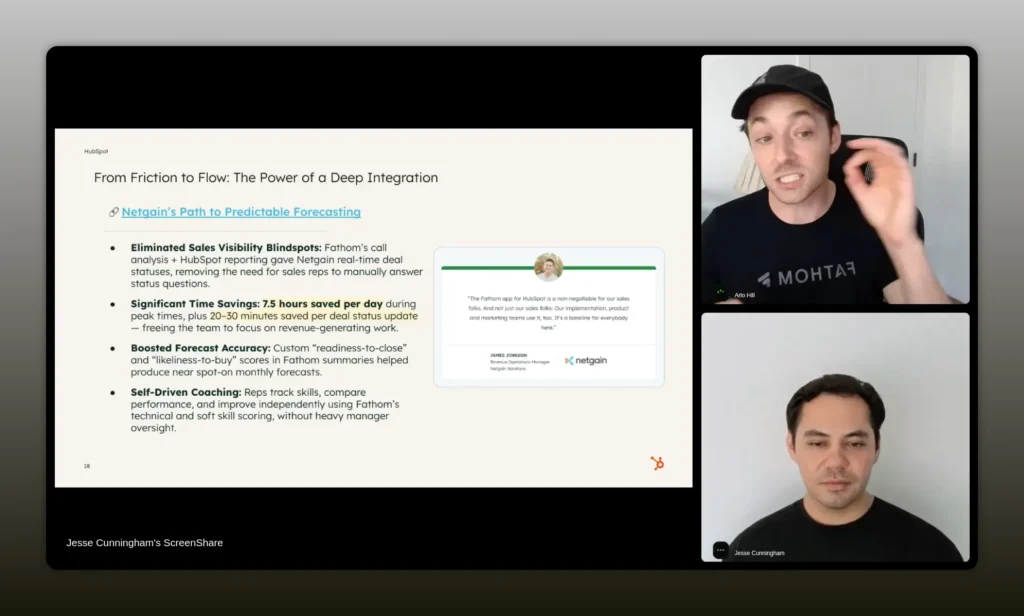
There is no silver bullet. It is a collection of things: the go-to-market, the integration, the partnerships. -Jesse Cunningham
How to use customer stories to scale adoption
Two types of content accelerate adoption:
- Operational templates — concrete playbooks, screenshots, and step-by-step instructions that show how to configure the integration for specific outcomes.
- Outcome stories — concise narratives that quantify impact (time saved, forecast accuracy improved, retention lift) and include the specific setup the customer used.
Interview champions, capture their API activity and use patterns, and convert those into templated automations and setup guides. Those materials turn early adopters into repeatable growth channels.
Checklist: monitoring and continuous improvement
Make continuous improvement systematic:
- Weekly: review API usage and error rates.
- Monthly: aggregate marketplace reviews and support trends.
- Quarterly: run partner review sessions to capture new vertical requirements and co-marketing opportunities.
- Annually: measure retention lift and revenue attribution for integrated accounts.
FAQs
How do I know if my integration is shallow or deep?
A shallow integration primarily moves a small amount of data and may require manual steps or tab hopping. A deep integration embeds into users’ workflows, updates structured properties inside the CRM, provides in-app experiences such as app cards, and enables automation with workflow extensions. If users rely on your data for reporting, forecasting, or automated actions, your integration is deep.
What are the fastest wins to make an integration feel native?
Fast wins include adding an app card to surface key content in contact, company, and deal records; mapping key fields so data writes back to HubSpot properties; and creating one or two workflow extensions that automate frequent tasks. These changes dramatically reduce friction and increase perceived value.
Which partners should I work with first?
Start with partners who are technical HubSpot experts and have customers matching your ICP. They do not have to be the largest partner; engaged, mid-sized partners who will co-create solutions often deliver better early results and become strong champions.
What metrics should I track to measure integration ROI?
Track installs and active installations, API activity, app card interactions, workflow triggers, retention and net retention rates for accounts using the integration, and revenue signals such as referrals and shorter sales cycles. Monitor support tickets and marketplace reviews as qualitative signals.
How do I prioritize features for different verticals?
Use partner and customer feedback to identify vertical-specific workflows with the highest potential lift. Validate with a small set of partners or customers, measure KPIs, and then productize the solution with templates and presets for that vertical. Prioritize features that unlock measurable revenue or retention improvements.
Conclusion
Integration depth is not an optional enhancement. It is a strategic investment that turns an integration from a technical connection into a growth engine. When you embed your product where decisions are made, automate routine work, and drive structured data into the CRM, you create real competitive advantage: higher retention, better forecasting, stronger partner relationships, and ultimately more revenue.
Take a pragmatic approach: map workflows, partner with experts who know the CRM inside out, instrument usage, and iterate. Avoid chasing silver bullets. Instead, build a portfolio of tactical improvements that together create an experience so integrated and valuable that customers cannot — and will not want to — replace it.