Recruit partners with cold outbound: How To Use SmartLeads & Mailivery
Expert advice from Justin Zimmerman (Founder, Partner Playbooks) and Abdul Sethi (Email Deliverability Expert, Mailivery).
Snapshot
Cold outbound is one of the most direct ways to find and recruit channel partners, resellers, and co-marketing allies. Done correctly, it lets you target the exact partner profile you need, start meaningful conversations at scale, and convert outreach into a predictable new partner pipeline.
The power of this approach comes from precision and repeatability: clean lists, strong personalization, and measured sending turn one-off emails into ongoing partner relationships. The choices you make during setup determine whether you will generate meaningful responses or trigger deliverability issues that waste time and dilute your brand.
The playbook below shows how SmartLeads and Mailivery gives you the operational controls to make partner-focused cold outreach reliable and scalable. Keep reading to learn how Justin and Abdul can help you achieve better deliverability, scalable outreach, and faster response handling.
Start conservatively, ramp deliberately, and prioritize replies over fresh blasts. -Justin Zimmerman
Table of Contents
- Why tool choice matters
- Overview: SmartLeads and Mailivery
- Step 1: prepare your lead lists and map fields
- Step 2: sequence design, A/B tests, and Spintax
- Step 3: mailbox selection, rotation, and MX matching
- Deliverability best practices
- Scheduling, ramping, and capacity math
- Sub-sequences and reply-based routing
- Integration with HubSpot and webhooks
- Master inbox and reply workflows
- Recommended message architecture
- Recommended tools and tech stack
- FAQ
- Conclusion
- Social post
Why tool choice matters
You will get different outcomes depending on the infrastructure and features your outbound platform provides. Smart campaign tooling is the hub for sequencing, mailbox rotation, and reply triage. The outbound mailbox provider, like Mailivery, is the hands-on service that warms and manages the actual inboxes. Together they decide everything from inbox placement to how quickly you can scale.
Justin and Abdul both stress that the toolset alone will not save you. The platform gives you the levers—sequencing, variants, MX awareness, and webhooks—but you must use those levers correctly. That means rigorous list hygiene, staged ramping, personalization, and human follow-up.
Overview: SmartLeads and Mailivery
SmartLeads is the orchestration layer. It stores campaigns, sequences, templates, mailboxes, and the master inbox where replies land. Mailivery operates many of your outbound mailboxes, handles warm-up, and offers a more service-oriented approach compared to self-service providers.
Use SmartLeads to:
- Create campaigns and upload lists
- Map personalization fields
- Design sequences with A/B variants and Spintax
- Assign mailbox pools and scheduling
- Manage replies through the master inbox
Use a provider like Mailivery to manage domain health, mailbox warm-up, and hands-on troubleshooting. Having two inbox providers as a backup is a practical redundancy to avoid losing sending capacity when a provider fails or an inbox gets paused.
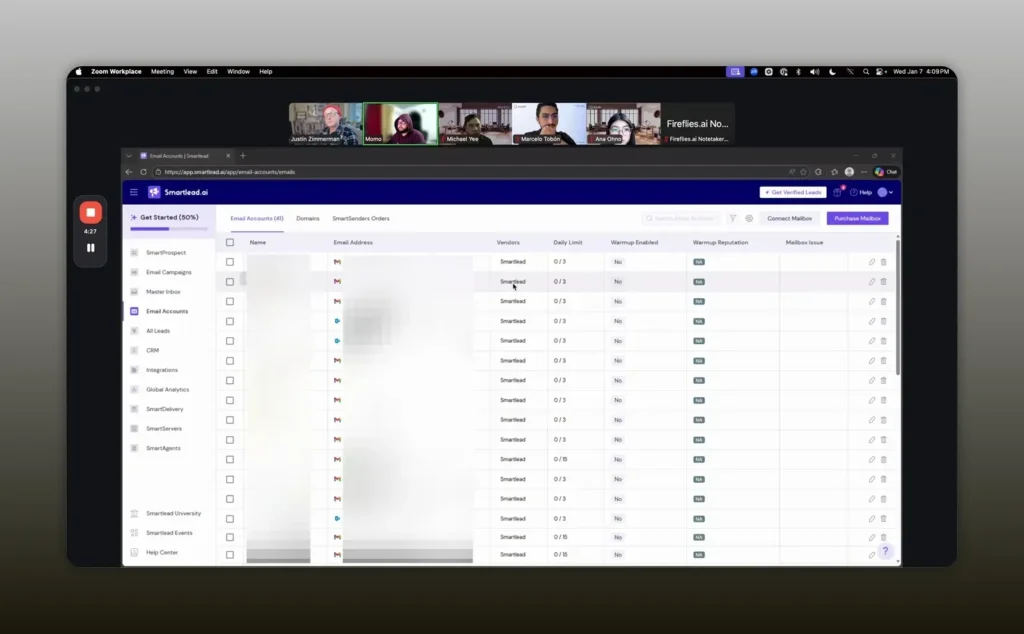
We pay for two inbox providers so failed inboxes don’t stop the whole program. -Justin Zimmerman
Step 1: prepare your lead lists and map fields
Before you touch SmartLeads, clean and enrich your list. Remove duplicates, validate emails, and include fields you’ll use for personalization: first name, last name, title, company name, and any custom attributes you plan to reference.
When you upload a CSV to SmartLeads, map each column to its corresponding variable. Proper mapping is not optional because personalization variables feed subject lines and body copy. If a field is missing, create a custom field so SmartLeads can still render the template for that contact.
Recommended pre-send checklist:
- Zero-bounce or equivalent verification of the list
- Remove role-based addresses (info@, sales@) unless intentionally targeted
- Confirm domain MX records and note the distribution (Gmail, Outlook, others)
- Tag lists by segment so you can route them to the right mailbox pool
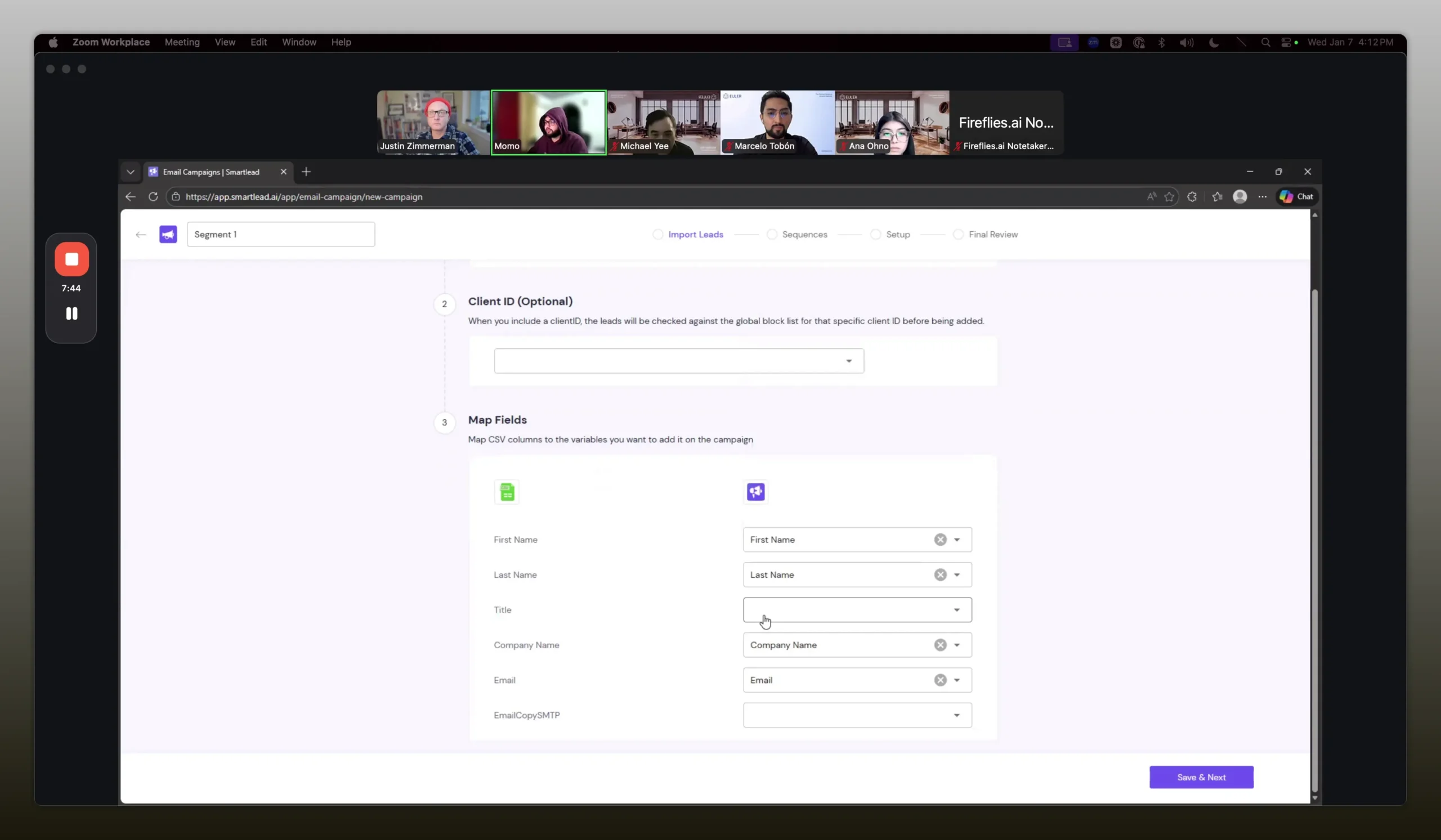
Field mapping is non‑negotiable — if your variables are wrong or missing, personalization fails and templates break. -Abdul Sethi
Step 2: sequence design, A/B tests, and Spintax
Sequence design is where you control cadence, messaging, and experimentation. Keep the first campaign simple, then iterate.
Key sequence elements:
- Number of steps (typically 2–5 for cold campaigns)
- Cadence between steps (2–4 days is common)
- Variants for A/B testing
- Spintax for micro-variation
- Plain-text enforcement to reduce tracking signals
A/B testing is built into SmartLeads: you can create variant A and B for any step and control distribution (50/50 manual or let the system randomize). Use variants to test subject lines, first lines, or a core value proposition.
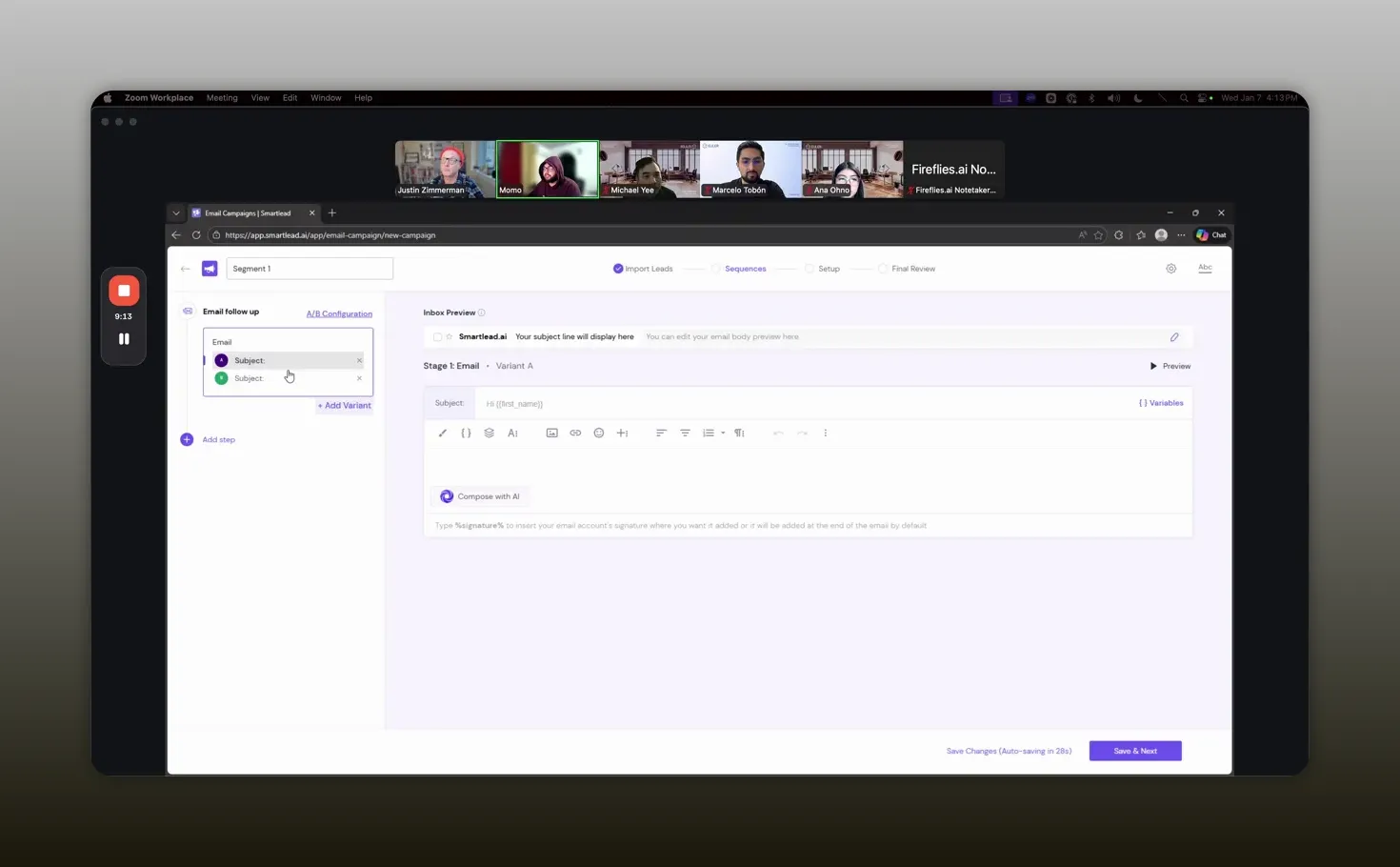
AB testing and variant distribution let you learn quickly without blowing up reputation. -Abdul Sethi
Spintax explained
Spintax inserts rotating phrases into your message to avoid sending literally identical content at scale. Example: {Hi|Hello|Hey} {FirstName}, which renders differently per email and reduces pattern detection by recipient ESPs.
Use Spintax for greetings, first lines, and small phrasing shifts, not for core claims or product details. Pair Spintax with mapped personalization so each message feels unique.
Step 3: mailbox selection, rotation, and MX matching
SmartLeads allows you to assign mailbox pools to campaigns. Pools can be filtered by tags such as Google, Microsoft, or provider-specific tags when you use Mailivery-managed accounts.
How rotation works
Rotation spreads sends across multiple mailboxes to avoid a single-sender spike. Typical behavior is sequential distribution: first lead gets mailbox A, second gets mailbox B, and so on. This distributes load across domains and inboxes.
MX-aware routing
If your lead list has many Outlook-hosted addresses, consider sending from Microsoft mailboxes to improve inbox placement. SmartLeads offers an enhanced sending option that matches sender ESP to recipient ESP when available. If you have a mixed list, evaluate enabling MX matching to reduce the chance of Gmail-to-Outlook or Gmail-to-Microsoft mismatches that can hurt placement.
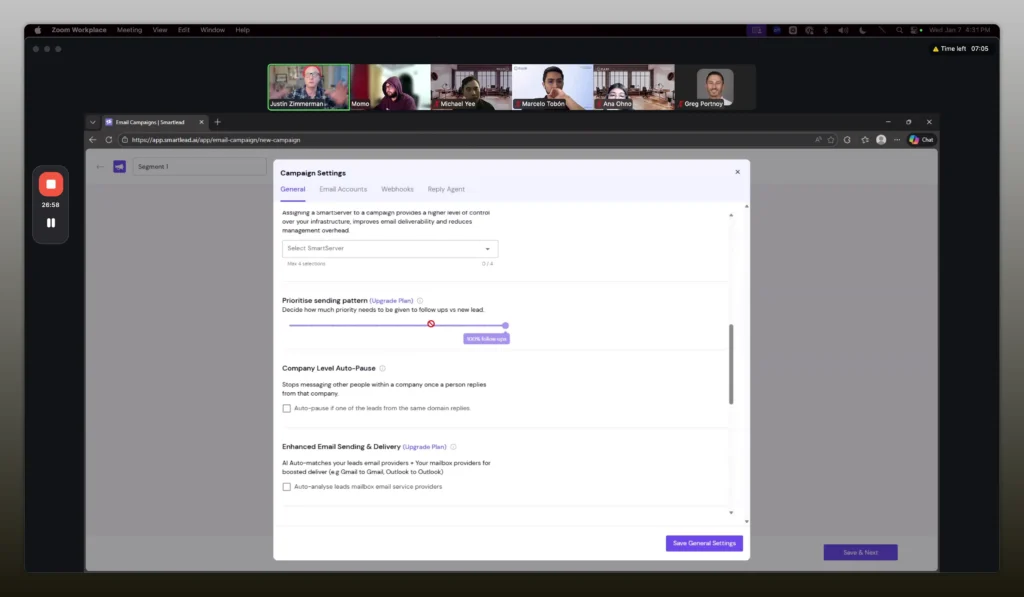
Match the sender type to the recipient when possible; it can matter for placement. -Abdul Sethi
Deliverability best practices
Deliverability is the sum of your infrastructure, sending patterns, and content choices. Follow these rules:
- Do not track opens or clicks for cold outreach unless you have a custom tracking domain and understand the risks. Tracking adds noise and can be harmful.
- Prefer plain-text messages. If you force plain text, links may be removed, so consider an explicit approach to link usage.
- Start low and ramp slowly per mailbox. Begin at 5 sends per day and increase gradually to 25–30 over 2–3 weeks.
- Maintain consistent sending volume across domains to build a reliable 30-day rolling average.
- Use webhooks to alert your team on replies so humans can engage promptly; engagement strengthens sender reputation.
- Monitor bounce rates and configure auto-pause thresholds (commonly 5%). Pause and re-verify lists when thresholds are hit.
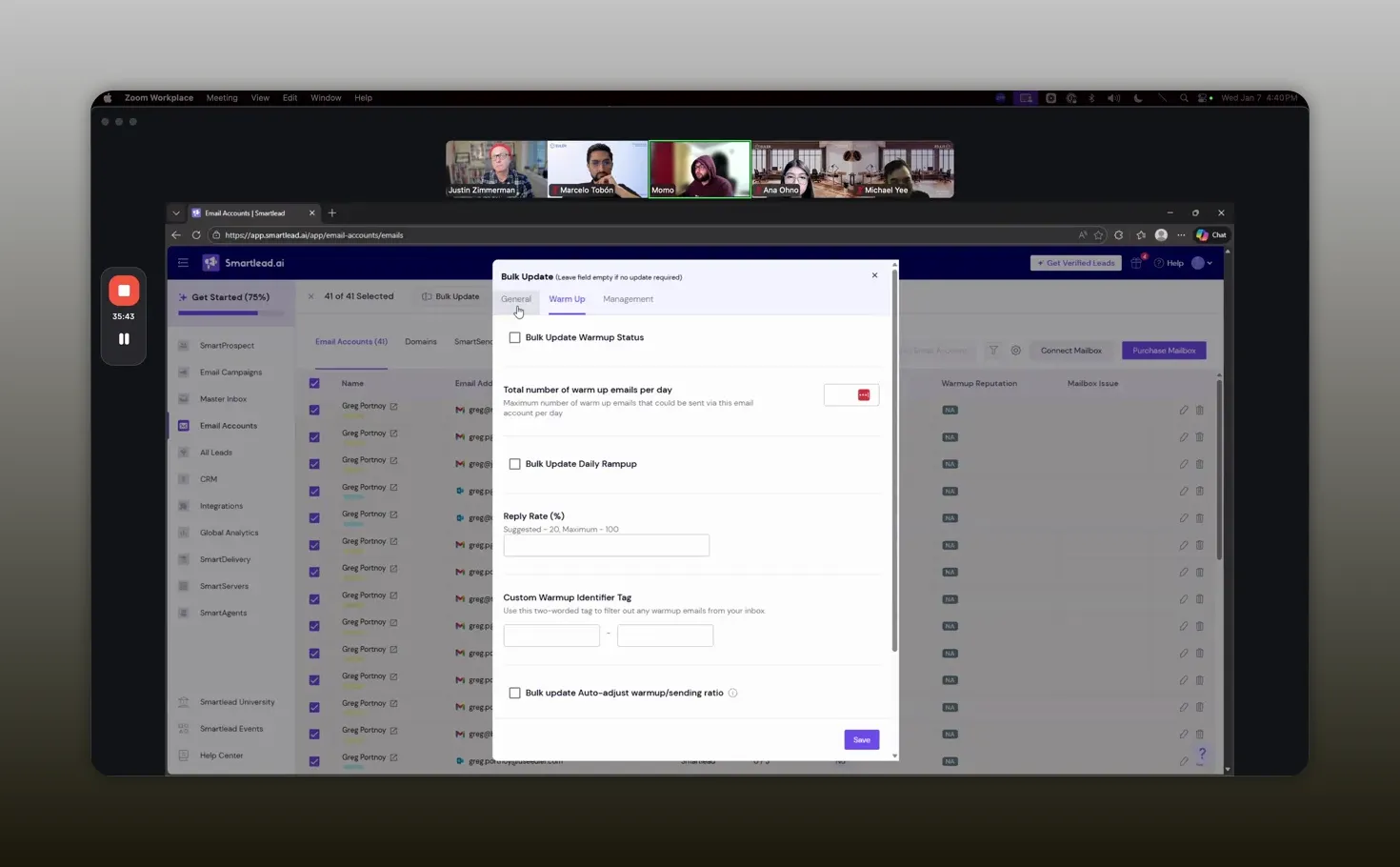
Ramp slowly and track a 30-day rolling sending volume across domains. -Justin Zimmerman
Scheduling, ramping, and capacity math
Understanding capacity arithmetic is essential. Your total daily capacity equals the sum of daily limits for each mailbox. If you have 30 mailboxes and each mailbox can safely send 10 messages per day, your enterprise capacity is 300 sends per day. Then decide how many campaigns will share that capacity.
Prioritize follow-ups
SmartLeads lets you prioritize follow-up emails over new outreach. By default some plans allocate 100% to follow-ups. That ensures follow-up steps occur before you exhaust capacity on new leads. Prioritize follow-ups if your sequences depend on momentum and previous context.
Suggested ramp schedule per mailbox
- Days 1–3: 5 messages per day
- Days 4–7: 8–10 messages per day
- Days 8–14: 15–20 messages per day
- Days 15–21: 25–30 messages per day (if domain health is good)
Adjust based on opens, replies, and bounce behavior. If you see rising bounces or spam-folder placement, reduce volume and review content.
Sub-sequences and reply-based routing
You can branch prospects into sub-sequences based on triggers such as out-of-office replies, explicit interest, or keywords. Use sub-sequences to tailor follow-ups without manually segmenting lists mid-campaign.
Practical use cases:
- Out-of-office: delay follow-up by 7 days to reattempt when they are back
- Interested reply: route to a faster cadence or a human sales outreach sequence
- Negative responses: move to an unsubscribe or longer-term nurture path
Sub-sequences preserve engagement context and give you flexibility to automate routine outcomes while keeping escalation for high-intent replies.
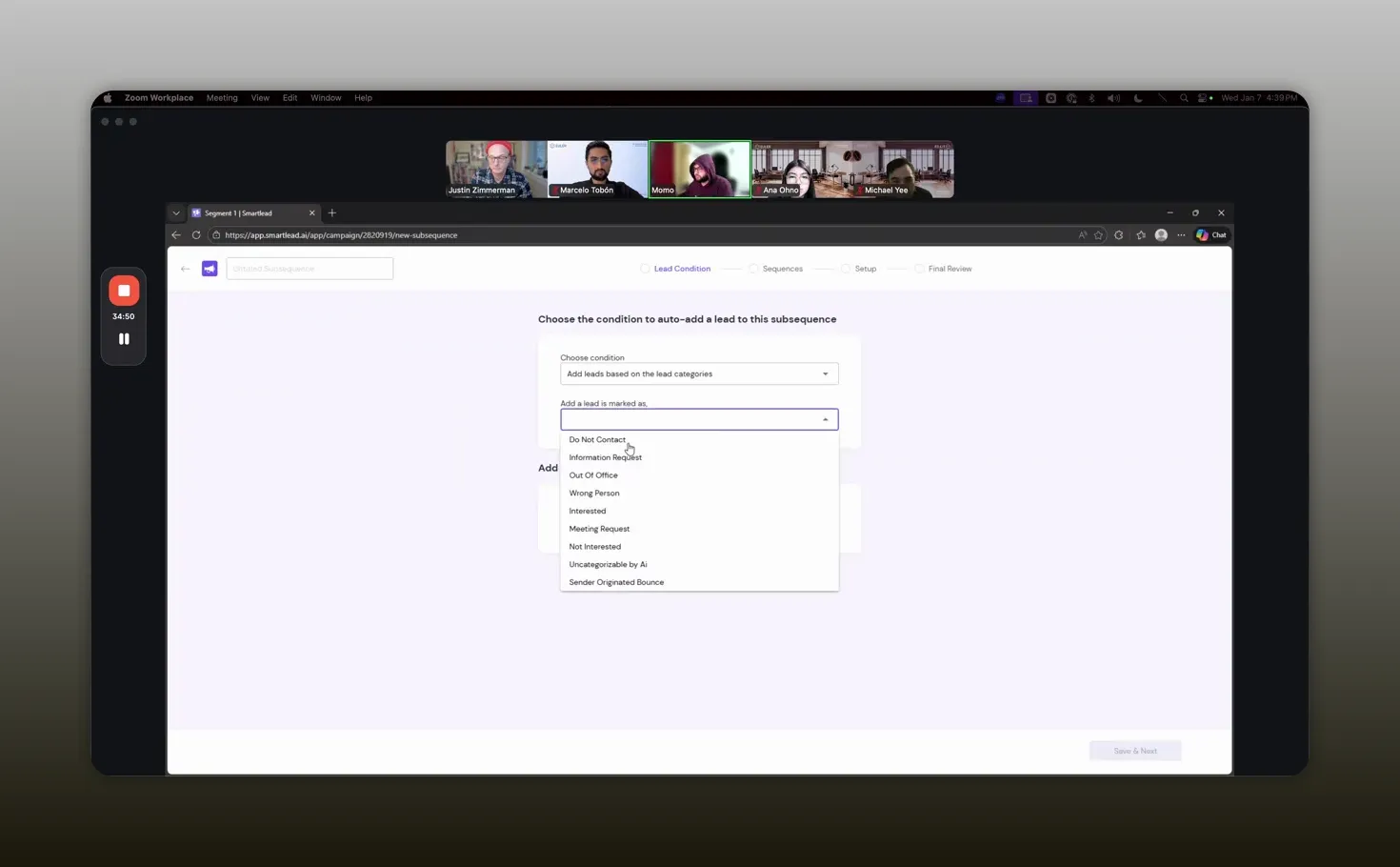
Use sub-sequences to route replies automatically and keep campaigns tidy. -Abdul Mohaiman Sethi
Integration with HubSpot and webhooks
SmartLeads can push events to HubSpot via webhooks. Use webhooks to:
- Create or update contact records
- Log replies or dispositions into HubSpot
- Trigger workflows that route contacts to the appropriate sequence based on whether they are new or already in your CRM
Integration considerations
If you want replies to show up in HubSpot and influence deal or lifecycle stages, you will need a webhook consumer (often a short API work handled by an ops team). If you are not on a HubSpot plan that catches webhooks natively, you can still have a lightweight implementation where an ops resource consumes SmartLeads webhooks and writes to HubSpot via the API.
Make sure to define which events matter to you. Typical events are lead reply, campaign started, and campaign paused. Keep the mapping simple initially and expand as you validate the data flow.
Master inbox and reply workflows
The master inbox is where incoming replies live. Treat the master inbox like a shared sales inbox with these practices:
- Assign owners and set reminder flags for follow-up
- Use simple reply templates for common scenarios while preserving natural language
- Prefer human replies for qualification; automation can handle basic dispositions but a human sells
- Use Slack webhooks or similar integrations to get notified of replies immediately
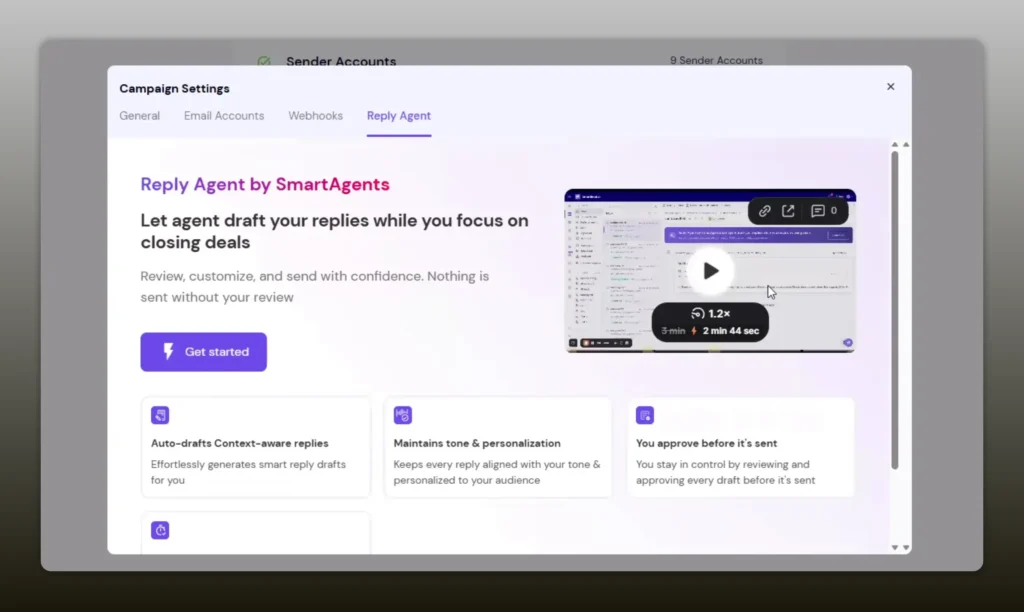
SmartLeads offers a small built-in CRM and reply agent options. The reply agent is useful when you cannot staff replies, but cold outreach performs best when a human handles conversations.
Human handling of replies keeps conversations authentic and improves conversion. -Justin Zimmerman
Recommended message architecture
Keep initial outreach short, context-driven, and plain text. Your subject line should be personalized and the opener should reference the most relevant data point. Save long-form content for landing pages or follow-up assets, but keep links to a minimum during cold outreach.
Example first message structure:
- Subject: {CompanyName} + one-line value
- Greeting with personalization: {FirstName}
- One-line reason for reaching out
- One-line social proof or quick metric
- Very simple closing with a call to reply if interested
Recommended tools and tech stack
Primary components you should consider for a high-functioning cold outbound stack:
- SmartLeads (or similar) for campaign orchestration and sequencing
- Mailivery (or another hands-on mailbox provider) for warm-up and inbox management
- ZeroBounce or equivalent for list verification
- HubSpot (or your CRM) with webhook ingestion for reply visibility and disposition tracking
- Slack or another alert system for real-time reply notifications
- Custom tracking domain only if link tracking is necessary and you understand the trade-offs
FAQ
Can I send to warm HubSpot leads from SmartLeads?
Warm leads that already know you or have an existing relationship should be contacted through HubSpot sequences. SmartLeads is intended for cold outreach where contacts do not have prior warm engagement. For blended cases, create a HubSpot workflow that routes contacts to SmartLeads only if they are new and not already in your CRM.
How do I avoid spam filters when sending thousands of emails?
Avoid spam filters by ramping sending per mailbox, using Spintax and personalization to diversify content, disabling open and click tracking for cold sends, preferring plain text messages, and keeping an eye on bounce rates. Match sender type to recipient type (Gmail to Gmail, Outlook to Outlook) when possible.
Should I track opens and clicks for cold email campaigns?
Do not track opens and clicks for cold email unless you have a custom tracking domain and accept the deliverability risk. Tracking often introduces noise and bot-driven metrics. Measure success by response rate and qualified meetings rather than open rates.
What is the safe ramp schedule per mailbox?
Start at 5 messages per day for the first few days, move to 8–10 after a short period, then 15–20 in week two, and 25–30 once domain and mailbox health are stable. Adjust based on observed bounces and placement.
Can SmartLeads match sender ESP to recipient ESP automatically?
Some platforms offer MX-aware routing to match sender ESP to recipient ESP. SmartLeads has an enhanced sending feature that can auto-match when enabled. If you depend on this behavior, test it and consider upgrading the feature to improve placement for heavy Outlook lists.
How do I get SmartLeads events into HubSpot?
Use SmartLeads webhooks to send lead reply events to a webhook consumer that then writes to HubSpot via API. If your HubSpot plan does not support native webhook ingestion, you will need a small piece of ops work (often less than an hour) to route events into HubSpot. Define the events you care about first to keep integration minimal.
Conclusion
Cold outbound works when you treat it as a technical and operational system rather than a volume contest. Use SmartLeads as the command center, Mailivery to manage mailboxes, and HubSpot for disposition and follow-up orchestration. Focus on staged ramping, plain-text personalization, variant testing, and human follow-up. Over time you will trade risky short-term volume for predictable, scalable response rates and a healthy sender reputation.
Share This Article – Social post
Announcing a new playbook for Heads of Sales, Demand Gen Managers, and RevOps leaders… Introducing Setting Up Partner Outbound with SmartLeads and Mailivery!
Inside it you will find a concise, actionable framework for building a cold outbound engine that preserves deliverability while scaling outreach. You will learn how to structure campaigns, manage inboxes, and route replies so that human follow-up captures qualified responses.
- How to prepare and verify lists before you send
- Why plain-text and Spintax reduce flags
- How to ramp mailboxes without triggering ESP alarms
- When to prioritize follow-ups over new sends
- How to use webhooks to sync replies into your CRM
- Practical templates and A/B tests to accelerate learning
- What to monitor daily to protect sender reputation
Grab this playbook if you are Heads of Sales, Demand Gen Manager, or RevOps leader and want to learn what Justin and Abdul do, so you can achieve better deliverability, scalable outreach, and faster response handling. The playbook is free, no form-fill required, no optin required.
Start conservatively, watch the metrics, and treat outbound like a long-term discipline. -Abdul Sethi