Build a Global Partner Program with Claude as a Team of One
Expert advice from Csaba Csordas (Alliance Director, Hyperproof).
Snapshot
You do not need a massive partner team to build meaningful pipeline across multiple countries, partner types, languages, and regulatory environments. You do, however, need a system. The big opportunity with AI is not simply getting through a few tasks faster but actually creating an operating model that handles repeatable volume while protecting the scarce resource that actually moves partnerships forward: your judgment.
Csaba built his European partner program as the first person on the ground, using Claude, local data files, CRM synchronization, scheduled skills, and strict operating boundaries. The result is not an autonomous machine firing off hundreds of messages. It is a practical system that finds signals overnight, limits output to what can be reviewed, and gives you a focused morning briefing for the work that matters.
Keep reading to see how Justin Zimmerman and Csaba Csordas can help you build guardrails, prioritize partner opportunities, and create a scalable weekly operating system.
“The system does all the volume overnight, and it brings the judgment in the morning.” – Csaba Csordas
Table of Contents
- Snapshot
- Stop optimizing tasks and start building an operating system
- Build on three layers before you automate anything
- Create your weekly partner operating system
- The scouting engine: how overnight work becomes morning focus
- Design AI skills as small specialized roles
- Human oversight is part of the design, not a final check
- Make continuous improvement a calendar commitment
- Recommended tools
- FAQs
- Build a system that gives you more room for judgment
Stop optimizing tasks and start building an operating system
When you run partnerships across a new region, the challenge is rarely a lack of ambition. The real limitation is time. You may be speaking with hundreds of prospects and partners across countries, managing different market conditions, keeping up with regulatory developments, and still needing to create pipeline one trusted relationship at a time.
It is tempting to use AI as a task accelerator. You write a prompt, generate a research summary, draft an email, make a list, and move to the next request. That is a useful start, but it is not enough when the work itself is interconnected.
Csaba’s shift came after building an event-attendee scoring skill in Claude. It worked well initially. Months later, the same skill produced a much richer, more detailed output because the underlying model and available context had improved. That sounds positive, until you realize the output now takes too long to review. More information is not automatically more useful.
This is the danger of treating AI output as inherently valuable. If you cannot read it, validate it, or act on it, it becomes another source of operational noise. Your goal is not to produce the largest possible output. Your goal is to create a dependable process that fits the way you actually work.
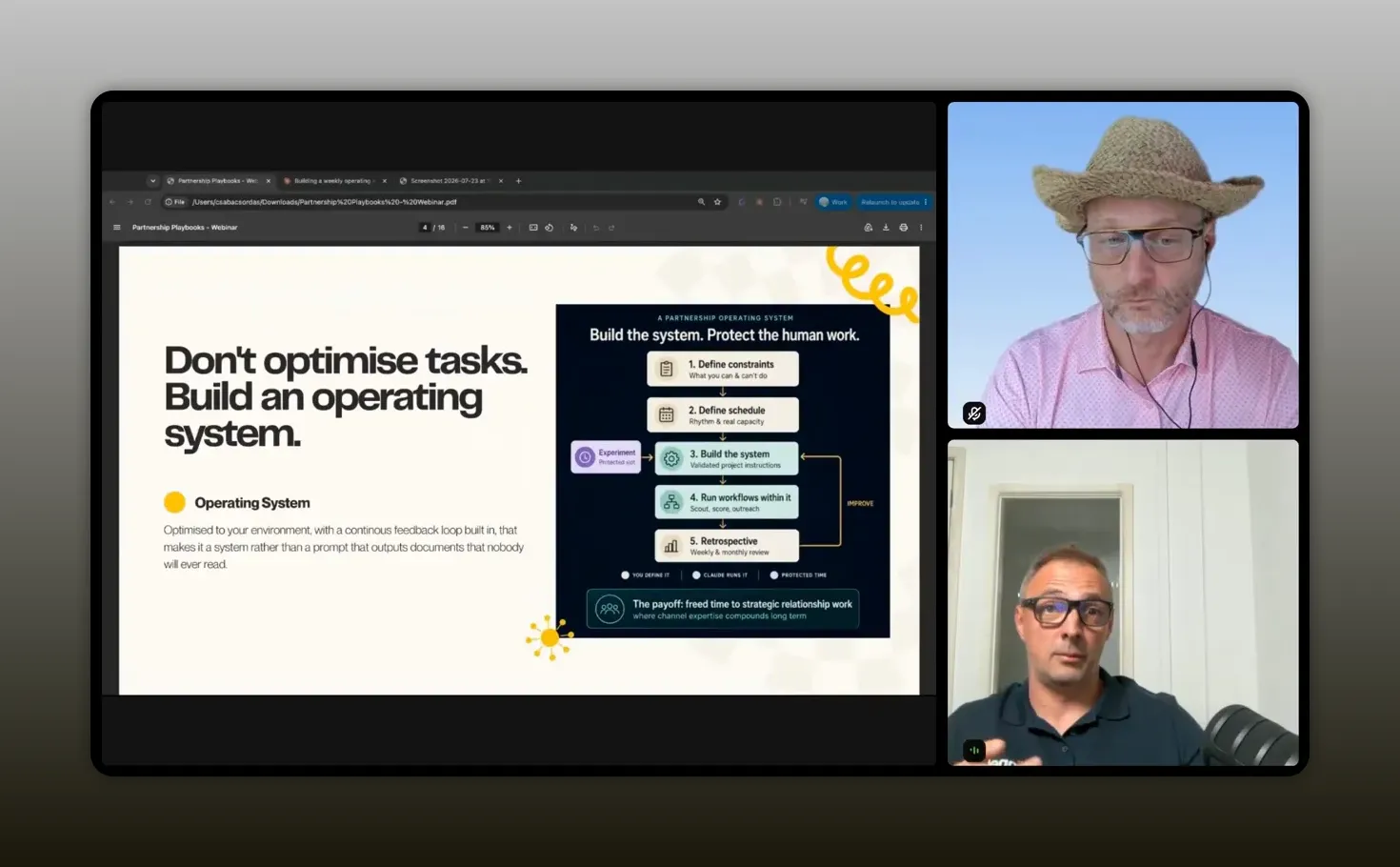
“I stopped optimizing tasks, and I started to focus to build an operating system.” – Csaba Csordas
That operating system should be yours. It should account for your market, your company policy, your data access, your calendar, your tools, and the level of quality you can personally sustain. This is especially important in cybersecurity compliance and other environments where data handling cannot be an afterthought.
If you are looking for more ways to turn AI into partner-team leverage without losing the human element, these principles for AI in partnerships provide useful context for designing workflows that support relationship-building rather than replace it.
Build on three layers before you automate anything
A useful AI partner operating system begins with three layers. They are simple in principle, but they prevent most of the mistakes that make automation frustrating, unreliable, or risky.
1. Define what you can and cannot do
Before choosing skills, prompts, or integrations, establish your boundaries. You need to know what data you are allowed to use, which systems you can access, where information can be stored, and which tools are off limits.
In a compliance-focused organization, these decisions are not minor details. Customer data, CRM records, company policy, and internal documents require deliberate handling. A workflow that looks brilliant in a demo is not helpful if it cannot operate safely in your environment.
Start with a concise inventory:
- Data that may be used in AI workflows
- Data that must not leave approved systems
- Available tools, platforms, and integrations
- CRM and database sources you can access
- Approval requirements for outreach or publishing
- Activities that require direct human review
Do not treat constraints as a reason to do less. Treat them as design inputs. They define the safe playing field where you can confidently experiment.
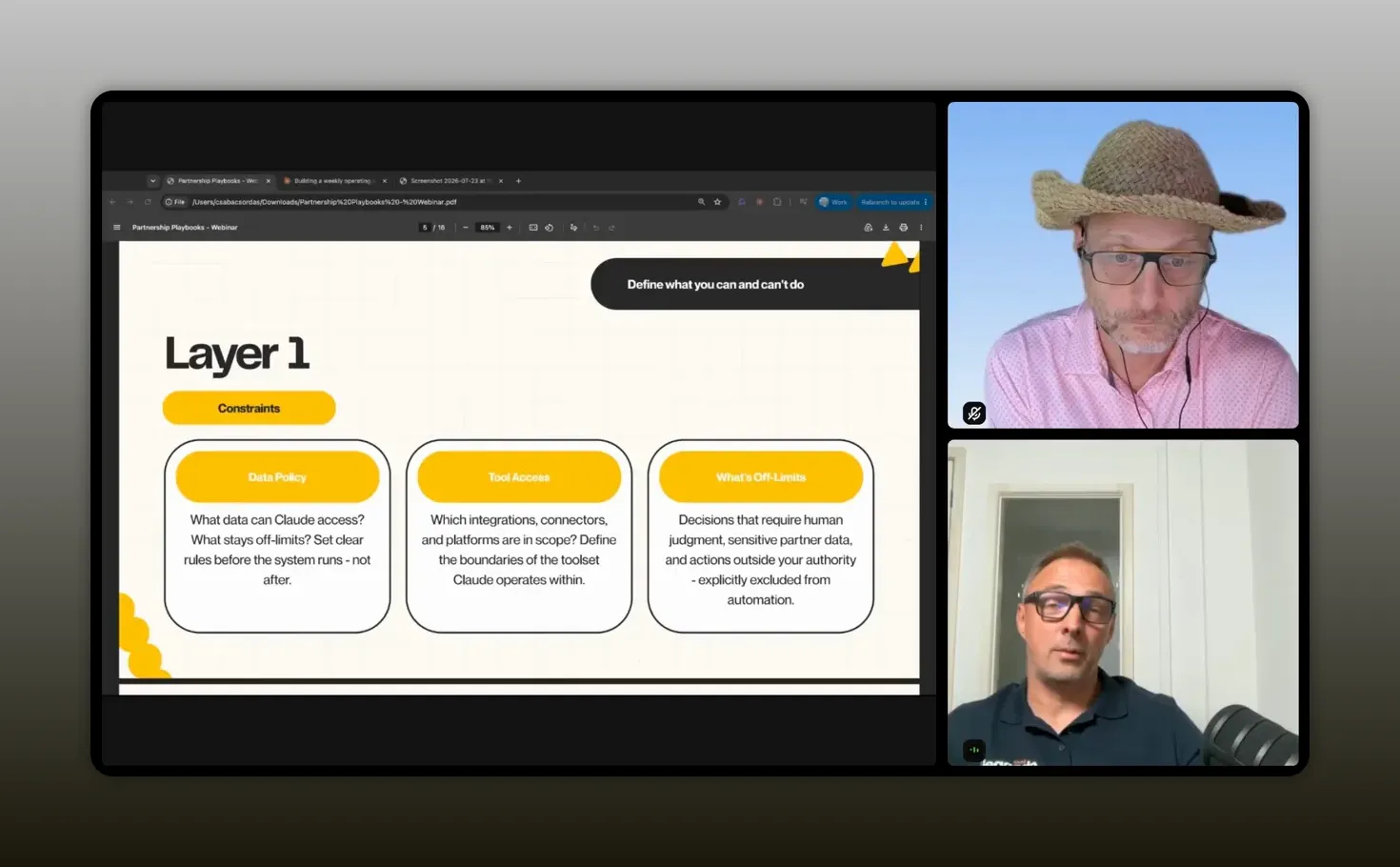
“When you start building the system, know your constraints.” – Csaba Csordas
2. Build around your actual capacity
Your calendar is part of the system. Whether you are a team of one or leading a larger partner organization, you have finite review capacity. AI can create research, analysis, messages, and summaries at a volume that quickly exceeds what you can absorb.
That creates a deceptively expensive failure mode. You spend time generating material, then feel buried by the material generated to save you time. The workflow is technically efficient but operationally useless.
Instead, define realistic limits. Ask how many partner prospects you can properly assess, how many outreach messages you can personalize, how many follow-ups you can complete, and how much time you can protect for strategy. In Csaba’s system, outreach is limited to eight drafts per night. The cap is intentional. It protects quality and trust.
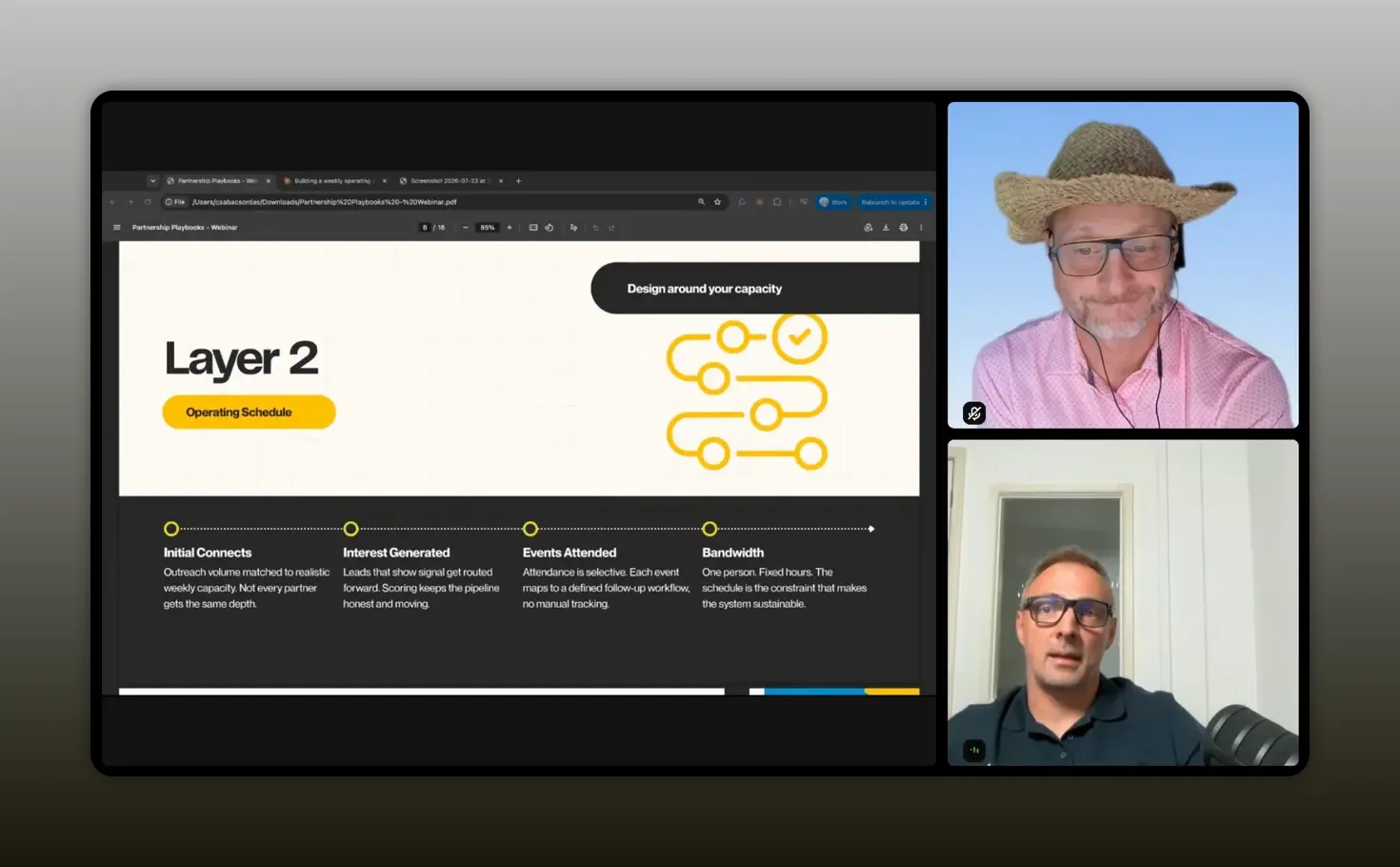
“If you generate a lot of content that you cannot review, process, or read, it is just wasted effort.” – Csaba Csordas
3. Build within your chosen platform
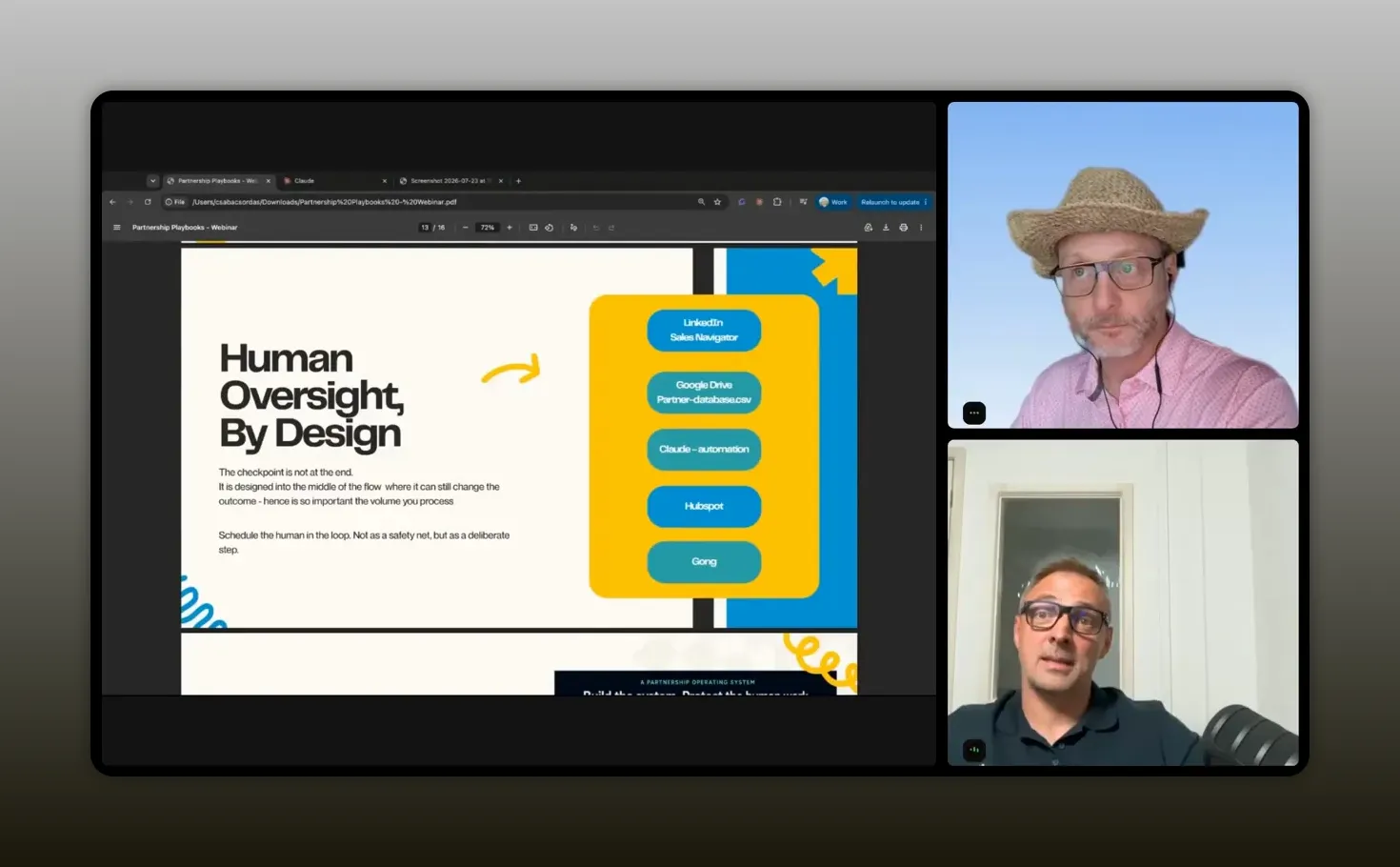
Choose the platform you can actually use and build structure inside it. Csaba uses Claude projects, CoWork, scheduled skills, local files, HubSpot synchronization, Gmail drafts, and Canva for visual assembly. The individual tools matter less than having a coherent place where instructions and context remain controlled.
For Claude users, Projects provide a way to group relevant files and instructions around a recurring body of work. The key is not to spread your process across countless disconnected chats. Create a defined environment for a defined purpose.
Once you have the platform, start with structure. A project-level instruction set means you do not need to restate your goals, constraints, and standards in every individual prompt.
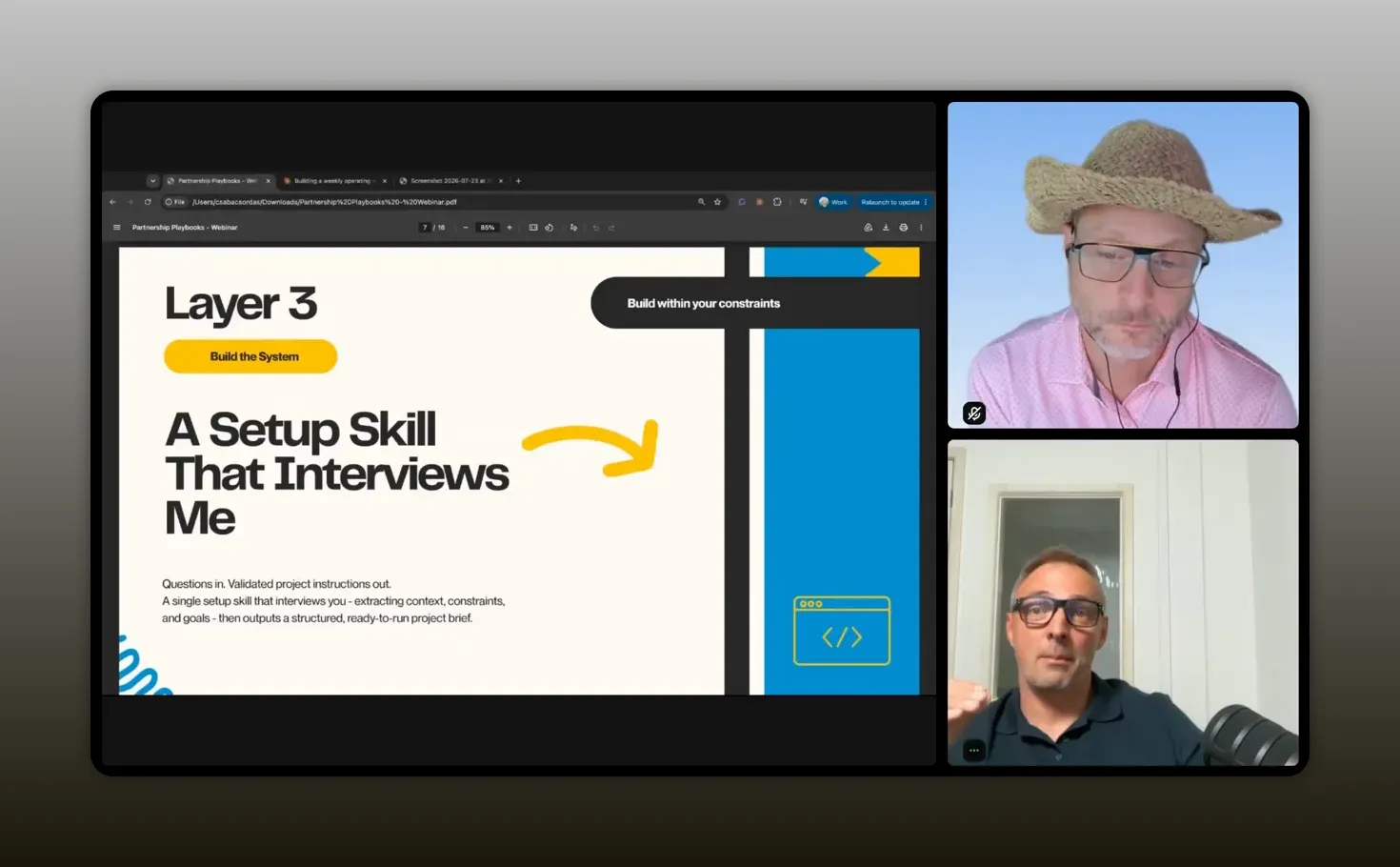
“Build the system, then run the workflows inside it.” – Csaba Csordas
Create your weekly partner operating system
The practical starting point is a guided setup conversation. Rather than asking AI for a generic partner plan, instruct it to act as a partnership operator and ask you questions one topic at a time.
Your setup should progressively clarify:
- Your scope: countries, regions, partner types, market priorities, and commercial goals.
- Your operating constraints: approved data sources, policy boundaries, and available tools.
- Your cadence: weekly meetings, forecast calls, reports, travel patterns, and recurring commitments.
- Your capacity: realistic bandwidth for prospecting, partner management, outreach, reporting, and experimentation.
- Your success measures: partner pipeline, sourced opportunities, active conversations, recruitment targets, and other KPIs.
The output should be a concise set of weekly operating instructions, not an elaborate document that gets forgotten. For Csaba, this includes fixed commitments such as team meetings, a forecast call, time in London, and a weekly report deadline. That context shapes what the system prioritizes.
Copy the instructions into your project. From then on, every prompt inside the project operates with the same underlying guardrails. Your research requests, partner evaluations, drafts, and briefings all begin from a shared understanding of what good work looks like.
More input generally improves the setup, but do not confuse detail with complexity. The point is to establish a useful working agreement with the system. Your instructions should be clear enough to guide decisions and concise enough to maintain.
The scouting engine: how overnight work becomes morning focus
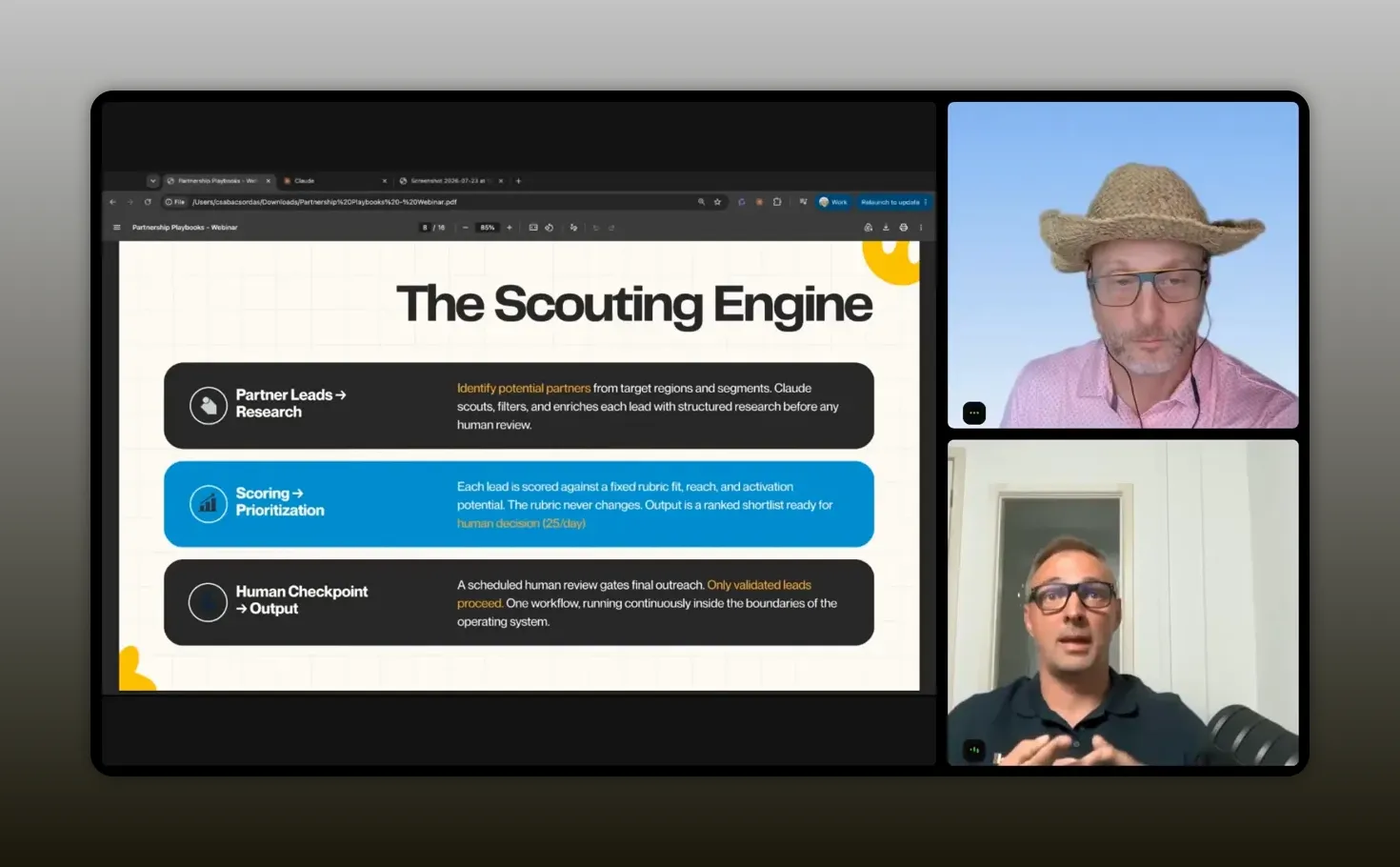
More than half of Csaba’s time goes toward finding new partners, progressing existing conversations, and building initial revenue pipeline in Europe. This is why the scouting engine is the most mature part of the operating system.
It uses five small skills scheduled to run in sequence at 3 a.m. each morning. The workflow starts with a local partner database, stored as a CSV file. This acts as an intermediate environment where ideas can be tested before excessive noise reaches the live CRM.
“Partnership is all about trust. Sometimes you have one chance, so I cannot miss that.” – Csaba Csordas
1. Collect partner candidates and signals
The first stage searches for relevant opportunities across three broad areas:
- Potential partners
- Competitors and their ecosystem activity
- Customers and relevant market relationships
During the day, Csaba can add promising names or details into the local database. The skill then deduplicates entries and checks what is already in the system. This prevents the list from becoming an unmanageable dump of names.
2. Monitor country and industry context
Good partner recruitment is not a one-time company qualification exercise. Timing matters. The system tracks industry-specific signals, regulatory changes, country-level developments, and market news that could make a potential partner more relevant now.
These signals create a changing priority list. Instead of beginning every morning with a blank screen and a long list of possibilities, you have a short set of opportunities that deserve attention today.
3. Draft only the outreach you can handle
The next skill prepares outreach drafts in Gmail as well as reusable messages that can be adapted manually. Crucially, the workflow does not try to scale blindly. It produces no more than eight drafts per night.
This is where many AI outreach systems get it wrong. They optimize for throughput, not trust. A partnership manager does not win by sending the highest possible number of messages. You win by selecting the right people, understanding why they matter, and reaching out with a credible reason to begin a conversation.
4. Synchronize approved information
The local database can synchronize with systems such as HubSpot when appropriate. The intermediate file is not meant to create a separate source of truth forever. It is a controlled staging area for experimentation and signal cleanup before you update major systems.
That distinction is useful if you are trying to adopt AI responsibly. You can explore, test, and refine without allowing every imperfect output to alter your CRM or operational reporting.
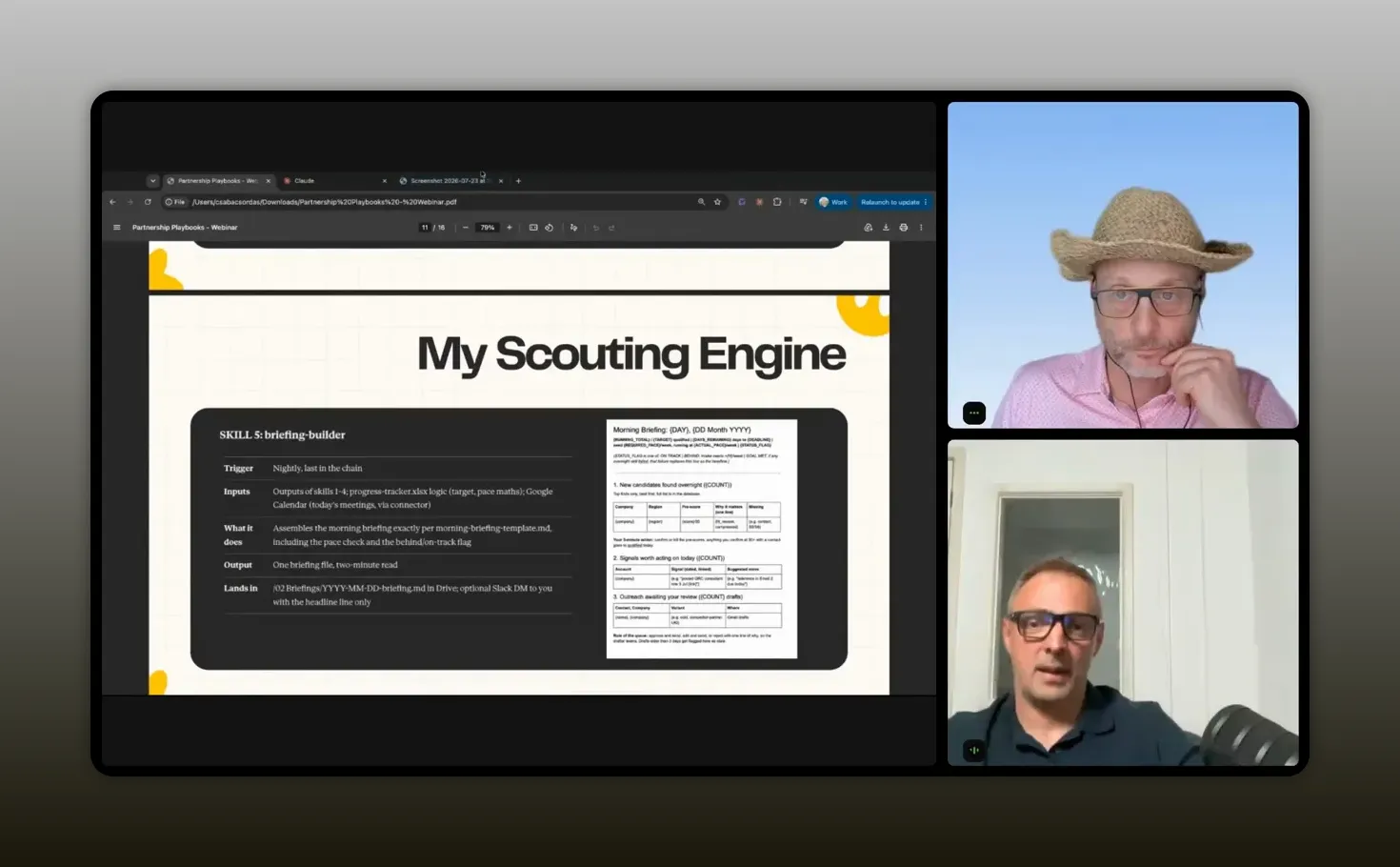
5. Read a two-minute morning briefing
The final skill produces a concise briefing. It answers only the questions you need in order to act:
- How many new partner candidates appeared overnight?
- Which market signals are worth acting on today?
- Which outreach drafts need review?
- How are you tracking against your key performance indicators?
A good briefing is not an encyclopedia. It is a decision tool. It should take roughly two minutes to read and leave you clear on what is new, what needs you, and what can wait.
“It is two minutes to read, and I know exactly what is new, what needs me, and how I am tracking.” – Csaba Csordas
Design AI skills as small specialized roles
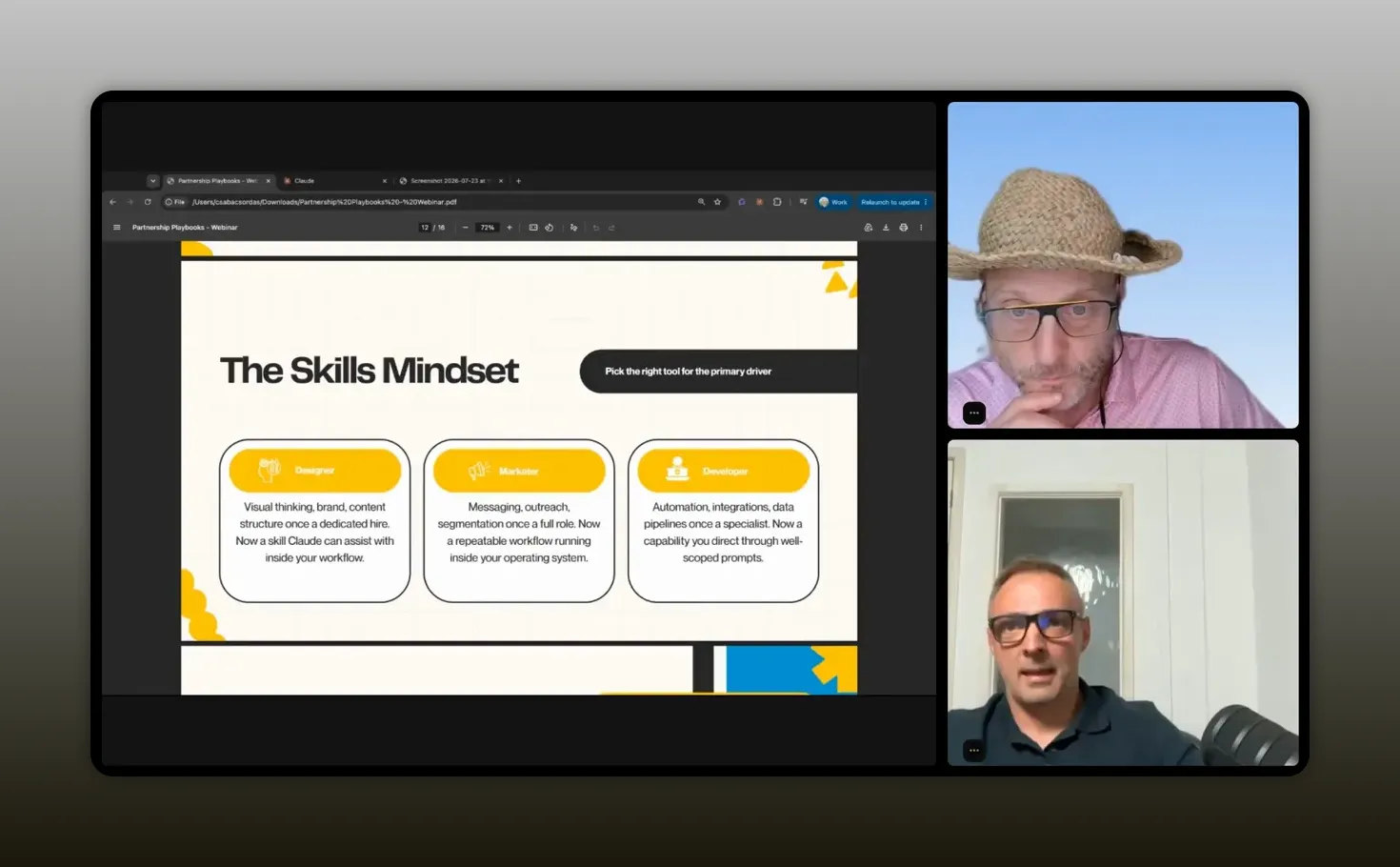
The strength of this workflow is not that it has five skills. The strength is that each skill has a narrow, understandable job. Rather than one massive prompt that starts with a question and produces a mountain of output, break the process into individual chunks and chain them together.
Small tasks give you several advantages:
- You can test and improve each step independently.
- You can see where poor inputs or noisy outputs originate.
- You can control what flows into the next stage.
- You can add human review at the moments where it matters most.
- You reduce the chance that one oversized instruction overrides everything else.
Csaba also recommends thinking about skills as professional profiles. If you wanted to build a partner-facing website years ago, you would have needed a designer, marketer, and developer. The same principle applies here. Tell the system what role it should play, what outcome it is responsible for, and what standards it must follow.
A research skill may need to behave like a market analyst. An outreach skill needs the discipline of a partnership manager who understands the importance of credibility. A presentation-content skill can help organize ideas, while a design tool may still be better suited for the visual production itself.
“Use skills that are running a really small and specific task.” – Csaba Csordas
This is also a useful reminder that you should not force one tool to do every job. Csaba used Claude to build the presentation content, then used Canva to assemble the finished deck. An attempted Claude to Canva design automation did not produce the required visual result, so the final step remained manual. That is not failure. It is sensible tool selection.
For a deeper look at building reusable partner workflows around Claude, see this live Claude CoWork workflow for partnerships.
Human oversight is part of the design, not a final check
“Human in the loop” is often treated as a final approval step. The AI produces an answer, then a person checks whether it looks right. That is necessary, but it is not sufficient.
Real human oversight starts much earlier. It means deciding which data enters the system, setting output limits, controlling workflow handoffs, choosing where drafts are saved, and determining when a person must make the next judgment call.
“Human oversight is not just validation of the outcome.” – Csaba Csordas
For partner work, that distinction matters because relationships are contextual. A model can identify signals and prepare a thoughtful starting point. It cannot replace your understanding of channel dynamics, your knowledge of a partner’s credibility, or your instinct about whether an opportunity deserves attention now.
Design your process so that the system handles repeatable volume and you retain responsibility for decisions that affect trust, reputation, commercial priorities, and customer relationships.
How to reduce AI drift
A question raised during the session addressed a very real issue: as you experiment with more skills and more context, AI behavior can drift. One skill can influence another. Old instructions can surface in unexpected places. Outputs can take odd tangents.
Csaba’s answer is containerization. Keep related work inside projects, use sandboxes or local intermediate files where appropriate, and restrict each workflow to smaller chunks that can be validated. Do not let every experiment live in one giant, permanent conversational context.
You can reduce drift by following a few practical rules:
- Use separate projects for distinct workstreams, such as partner recruitment, content, and operational reporting.
- Keep instructions specific to that project’s purpose.
- Use local or intermediate data stores before writing directly to core systems.
- Review small outputs frequently rather than reviewing giant outputs rarely.
- Retire outdated skills or instructions instead of endlessly layering new ones on top.
Make continuous improvement a calendar commitment
Your first system will not be perfect. It should not be. The aim is to make the next version better without getting distracted by every new model, platform, or promising idea.
Csaba relies on two habits: a weekly retrospective and protected experimentation time.
Run a short weekly retrospective
Block time on Thursday or Friday to review the week. Ask what created useful progress, where the system produced noise, what signals were missed, which drafts needed excessive rewriting, and where your guardrails were unclear.
Then make small changes. Improve one instruction. Adjust one output limit. Add one better data source. Remove one unnecessary step. Weekly refinement keeps the operating system alive and helps it improve steadily.
Protect a small experimentation slot
The AI landscape is noisy. There is always a new model, a new feature, a new integration, and a new skill someone says you need to try. If you chase every shiny object, you will spend your week evaluating tools instead of running partnerships.
Set aside a specific time for experimentation. Outside that window, use the system you have. This creates the right balance: you keep learning, but the operational work remains stable.
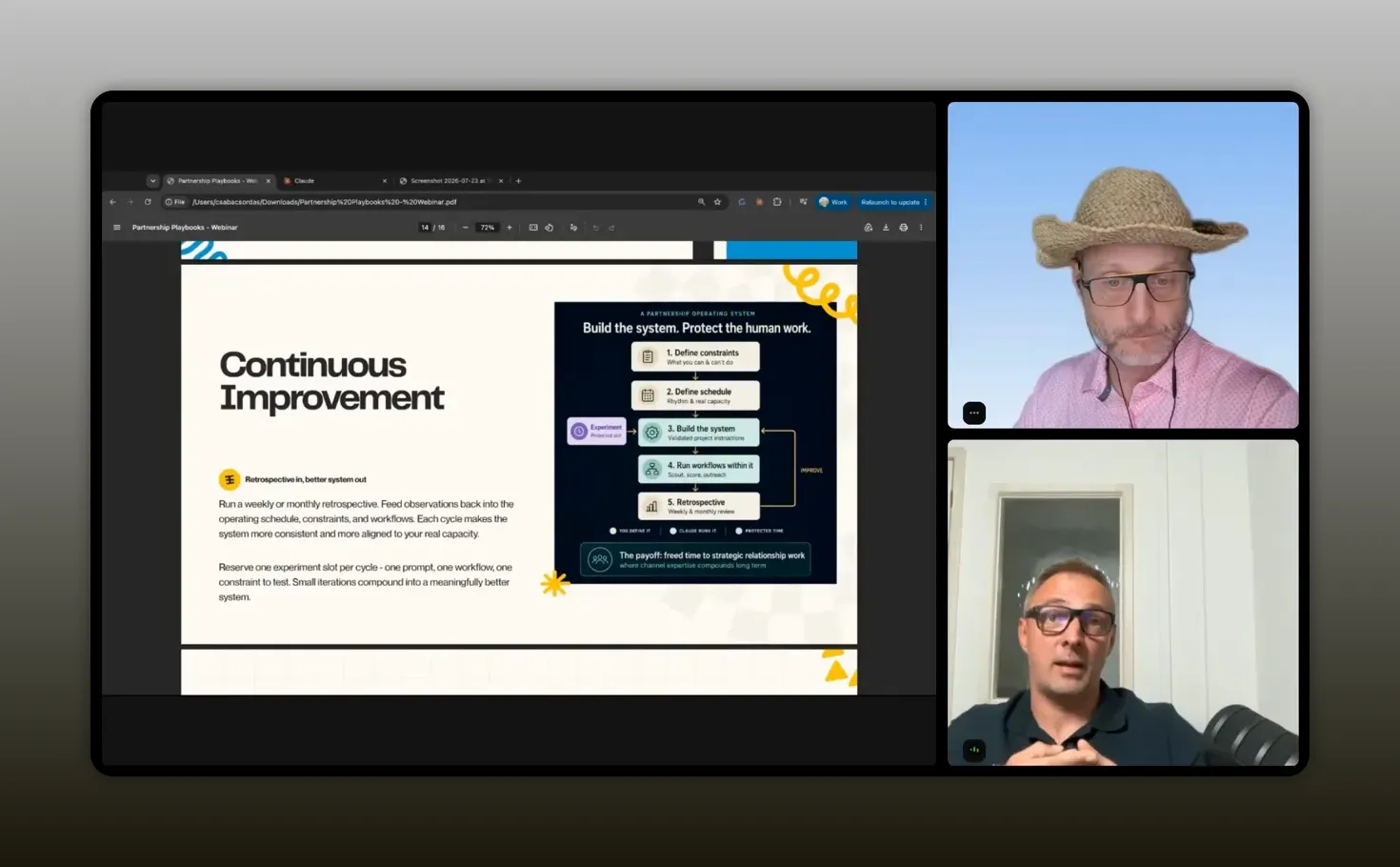
“Every week the system gets a bit better.” – Csaba Csordas
Recommended tools
You do not need every tool listed below to implement this approach. Use the approved stack available in your organization and keep the workflow simple enough to manage.
- Claude Projects: A structured home for recurring partner workflows, instructions, approved context, and focused workstreams.
- Claude CoWork and scheduling: Useful for running small chained skills and producing recurring outputs such as candidate lists or morning briefings.
- CSV partner database: A practical intermediate layer for experimentation, deduplication, and review before updates reach core systems.
- HubSpot: The operational CRM destination for approved partner information and ongoing relationship management.
- Gmail drafts: A controlled place for outreach drafts that still require your review and personalization.
- Canva: A visual production tool for turning AI-assisted content into polished presentation materials when automated design is not sufficient.
Technology should support a clear operating model, not become the operating model. Start with the minimum stack that lets you collect signals, prioritize work, draft thoughtfully, and preserve your control over the final decision.
FAQs
Can one person really run a multi-country partner program with AI?
Yes, provided you use AI to handle repeatable research, signal collection, prioritization, and draft preparation rather than trying to automate relationship judgment. A team of one still needs capacity limits, clear priorities, strong CRM discipline, and a workflow that keeps the most important decisions human-led.
What should you automate first in partner recruitment?
Start with signal collection and prioritization. Build a controlled list of potential partners, deduplicate it, monitor relevant country and industry developments, and generate a manageable daily priority list. Automating this early-stage research gives you more time for high-quality conversations without automatically sending outreach.
How many AI-generated outreach messages should you send?
Send only as many as you can genuinely review and personalize. Csaba caps his system at eight outreach drafts per night because partner relationships depend on trust. A lower number of well-considered messages is more valuable than a large volume of generic communication.
How do you prevent AI from producing too much information?
Set strict output requirements before the workflow runs. Specify the length, format, number of recommendations, and decision criteria. Build around your review capacity, ask for a short morning briefing rather than a long report, and divide large tasks into smaller skills that each have a clear job.
What is the best way to keep AI workflows from drifting?
Containerize work in separate projects, keep instructions relevant to each workflow, use small tasks that can be validated, and avoid allowing experimental outputs to write directly into major systems. Regular retrospectives also help you identify outdated instructions and conflicting skills before they create bigger problems.
Build a system that gives you more room for judgment
The point of using Claude in partnerships is not to become a faster producer of tasks. It is to create space for the work only you can do: assess partner fit, recognize market nuance, build trust, make tradeoffs, and move the right opportunities forward.
Start with your constraints. Build around your capacity. Choose a platform and create structure inside it. Then use small, specialized skills to collect signals, prioritize work, prepare drafts, and deliver a short briefing that tells you where your attention belongs.
When the system handles the overnight volume, you can spend the morning making better calls. That is how you do a lot with a little without sacrificing the quality that makes partnerships work.